5
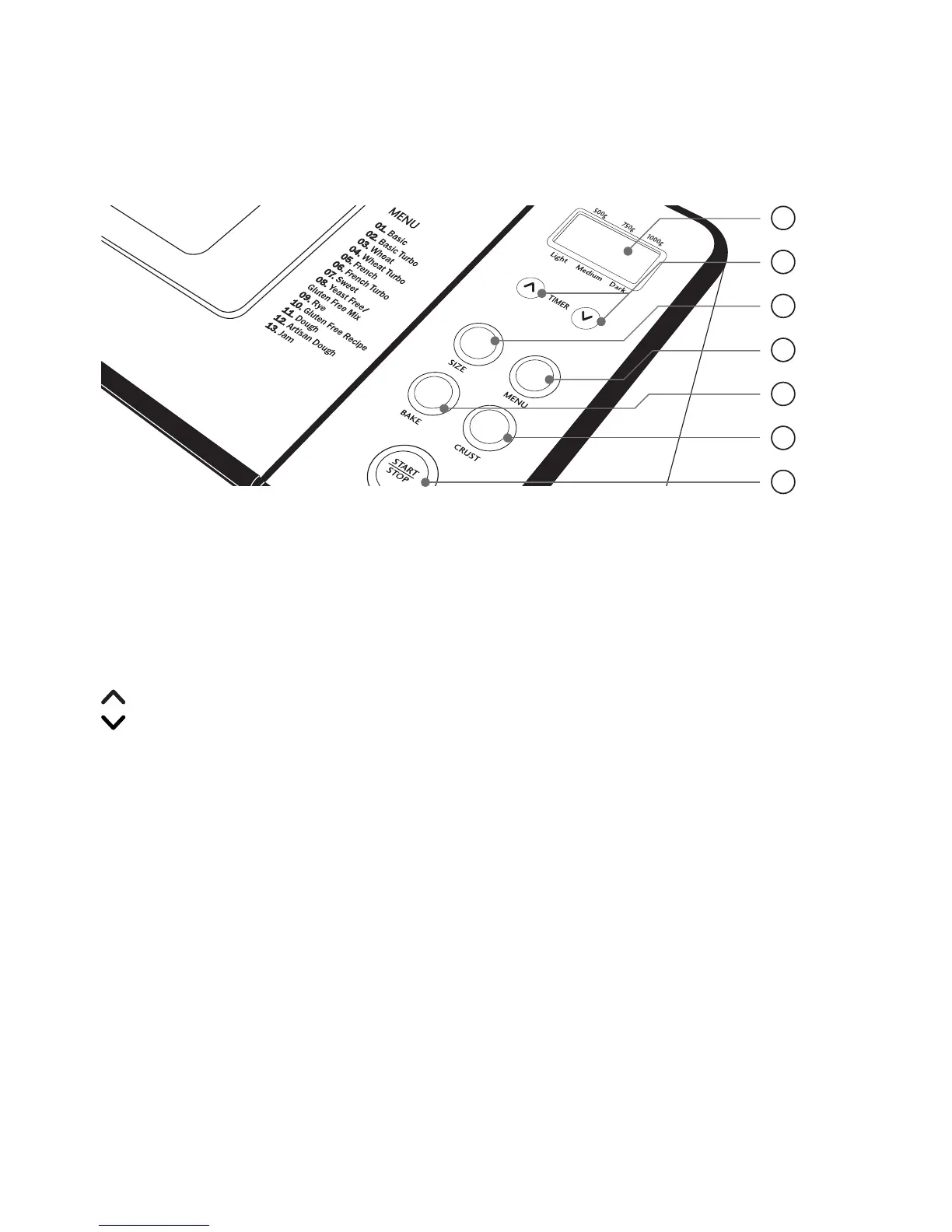
The Control Panel
1. LCD Window
Displays the Menu setting, Crust colour, Loaf
size and remaining time until the cycle is
complete - '0:00'.
2. Timer Buttons
Use to adjust the BAKE ONLY time and to
set the Delay Start timer.
Increases the time in 10 minute intervals
Decreases the time in 10 minute
intervals
3. Loaf Size Button
Press the SIZE button to select the loaf size
– 500g, 750g or 1.0kg. The default loaf size
is 1.0kg.
4. Menu Button
Press to select an automatic bread making
menu from (1) to (13).
5. Bake Button
Use this button to activate the BAKE ONLY
setting, then adjust the time needed by using
the timer buttons.
6. Crust Button
Press the CRUST button to select the desired
crust colour – Light, Medium or Dark. The
default crust colour setting is Medium.
7. Start / Stop Button
Press to commence selected setting or begin
timer countdown for delay timer. To stop the
operation or cancel a timer setting, press and
hold for 2-3 seconds to clear.
1
2
3
4
5
6
7




 To Next Page