SINGLE PHASE HI 8kW | User Manual43
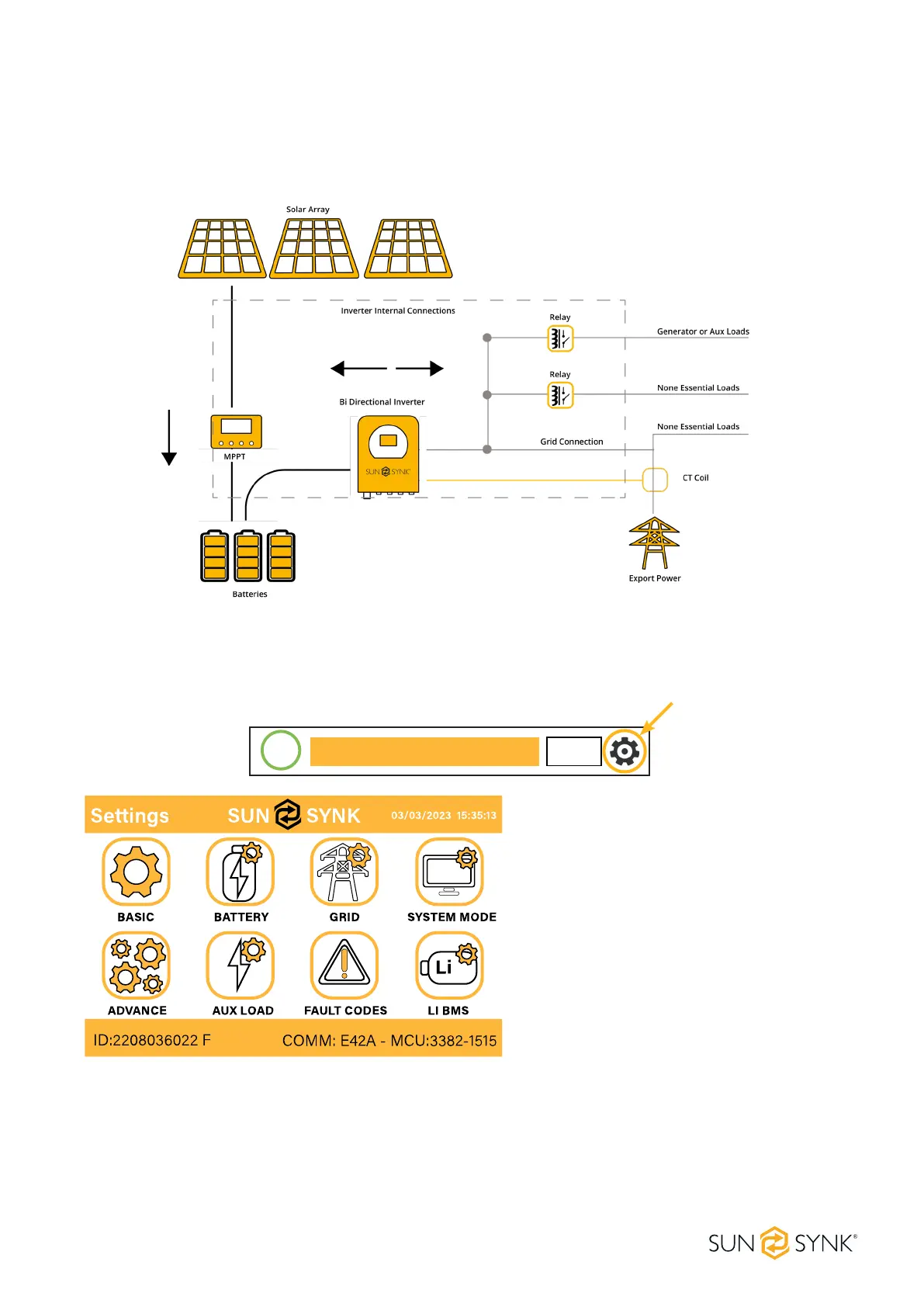
What this page displays:
The system ow.
MPPTs power.
Battery status.
Power distribution to load or grid.
5.7. Setup Page
To access Settings, click on the gear icon on the right top of the navigation menu.
Serial number.
Software version.
Time, Date, and MCU.
What this page displays:
What you can do from this page:
Access the Basic Setup Page (press the
BASIC icon).
Access the Battery Setup Page (press
the BATTERY icon).
Access the Grid Setup Page (press the
GRID icon).
0.0
kWh
0.0
kWh
0.0
kWh
0.0
kWh
0.0
kWh
0.0
kWh
85%
BATTERY IN/OUT MPPT. GRID.
SOLAR/TURBINE AC load
Battery Grid
Access the real-time programmable timer/system mode (press the SYSTEM MODE icon).
Access the advanced settings such as Paralleling and Wind Turbine (press the ADVANCE icon).
Access the auxiliary load/smart load settings (press the AUX LOAD icon)
Access the fault code register (press the FAULT CODES icon).
Set up Li BMS (press the LI BMS icon).






 To Next Page