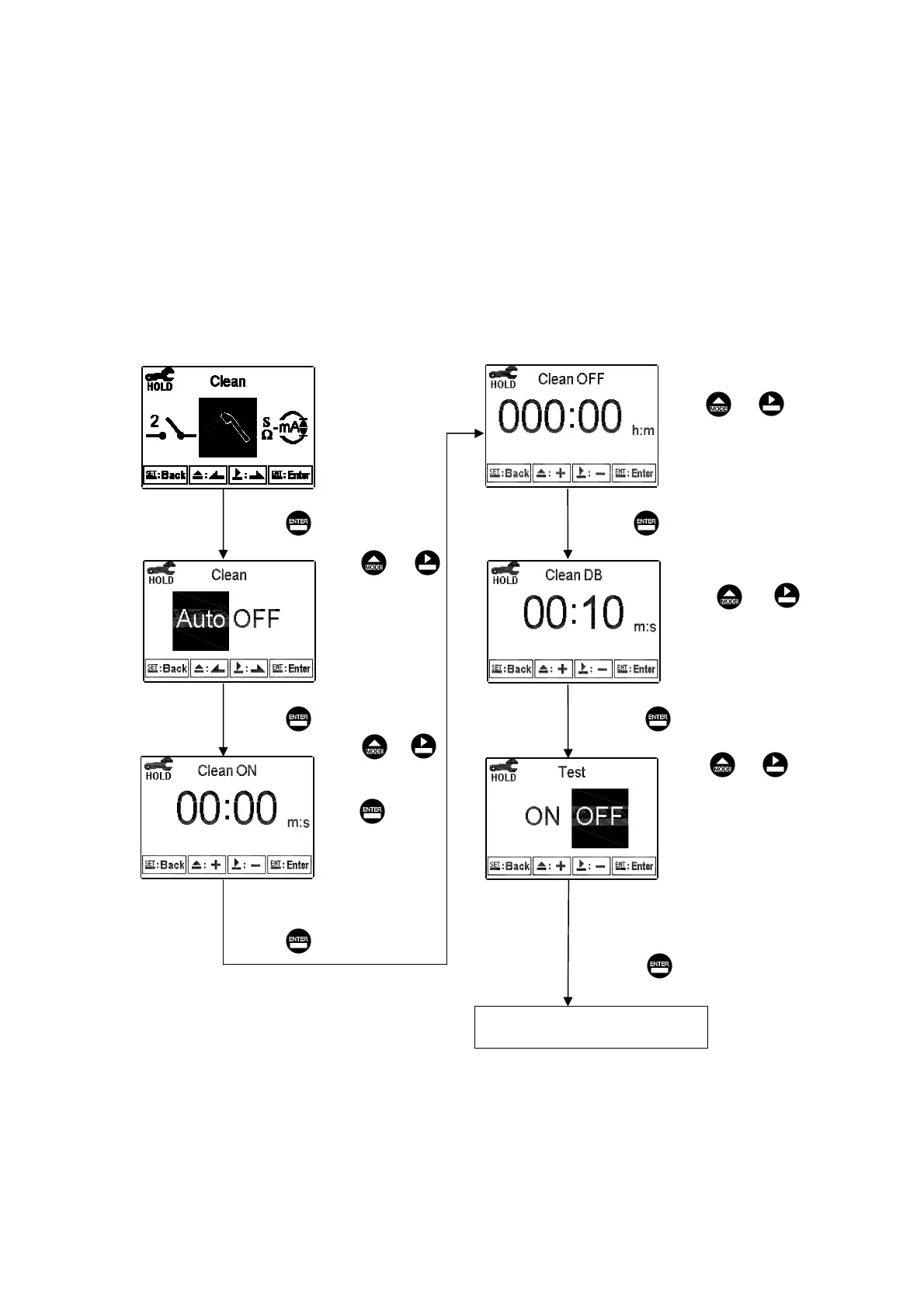
6.8 Clean
Enter setup of “Clean” function. Select the icon to turn on or turn off the clean function.
If you select “Auto” turning on, and set the timer of the clean function including
automatically turning on time and turning off time, and set the bead-band value(DB).
Note: When the clean function is turned on, if any value is set to be 0, the instrument
will automatically turn off this function.
Press ʳ or
to adjust the auto
turning on time.
Press to
confirm the
minute part, and
move to adjust
the second part.
Press or to adjust
set-point(SP) value
Enter “Analog 1” Setup
Press to confirm it. Press to confirm it.
Press to confirm it.
Press to confirm it.
Press to confirm it.
Press to confirm it.
Press or to adjust
dead-band(DB) value
Press ʳ or
to select to activate
a test of Clean or
not. If “ON”, the
Clean function is in
action, and the
“ACT” indication
light will light up.
Press ʳ or
to select to activate
Clean or not. If
not, the guide
menu goes to setup
of Analog 1.
лм



 To Next Page