6.13 Backlight settings
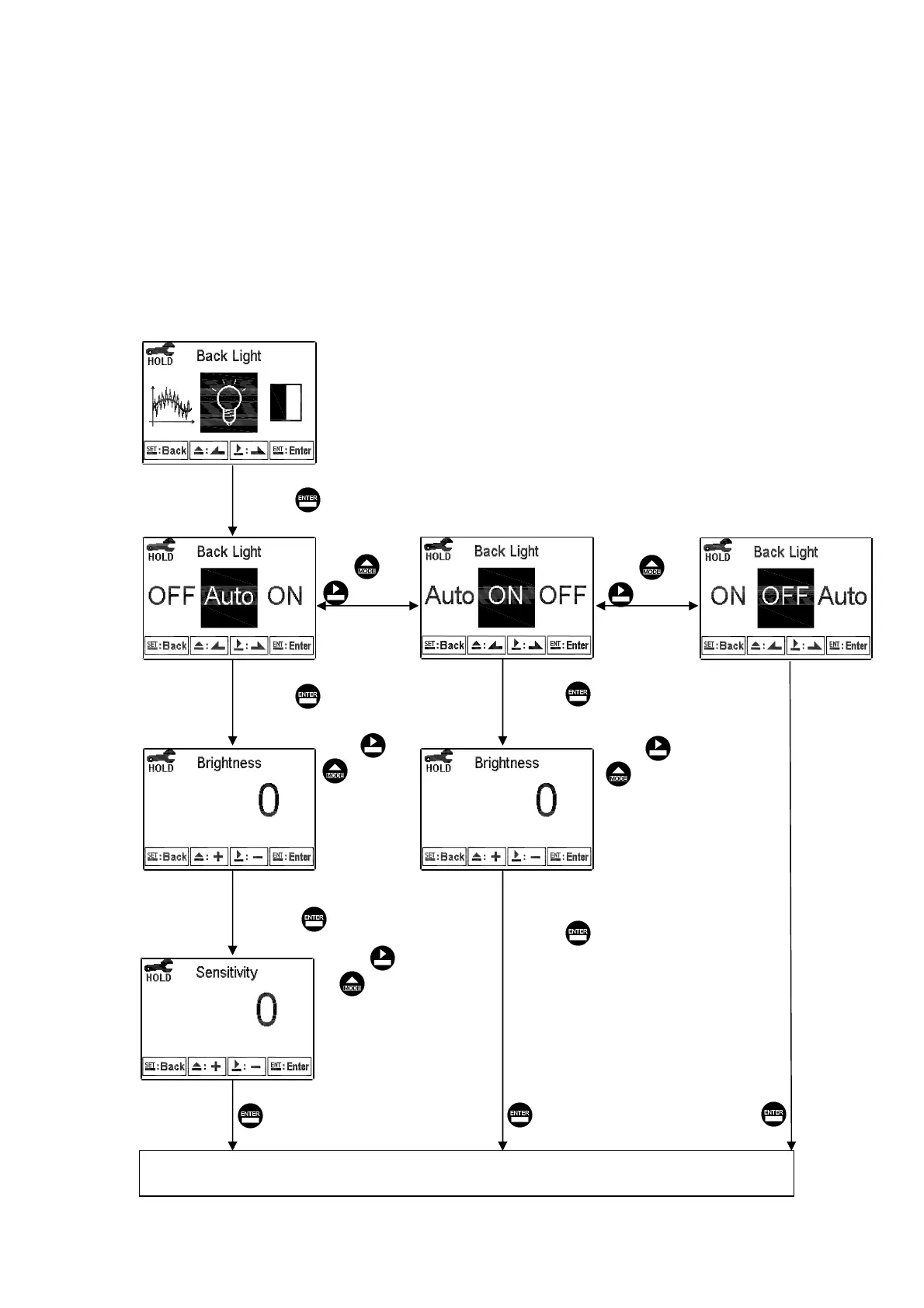
Enter setup of backlight display. According to your need, you can set the brightness of
display(-2~2, dark~ bright) and sensitivity of the sensitization sensor(-2~2, insensitive~
sensitive). Under AUTO or OFF mode, there is a touch-on function which means if
press any key the display backlight function acts, and then if there is no-pressing during
5 seconds it goes back to original setting status.
ON: Backlight light up OFF: Backlight turns off & Touch-on mode
AUTO: According to ambient condition turn on & off automatically & Touch-on mode
Pressʳ or ʳʳ
to
select -2, -1, 0,
1, 2, five
Backlit
Brightness
levels
Press or
to select
backlight mode.
Press or
to select
backlight mode.
Enter “Contrast” Setup
Press to confirm it.
Press to confirm it.
Press to confirm it.
Press to confirm it.
Press to confirm it.
Press to confirm it.
Press to confirm it.
Press to confirm it.
Pressʳ or ʳʳ
to
select -2, -1, 0,
1, 2, five
Backlit
Brightness
levels
Pressʳ or ʳʳ
to select
-2, -1, 0, 1, 2, five
Backlit sensitization
levels.
лс



 To Next Page