7.5 Standard solution calibration (Std. Sol.)
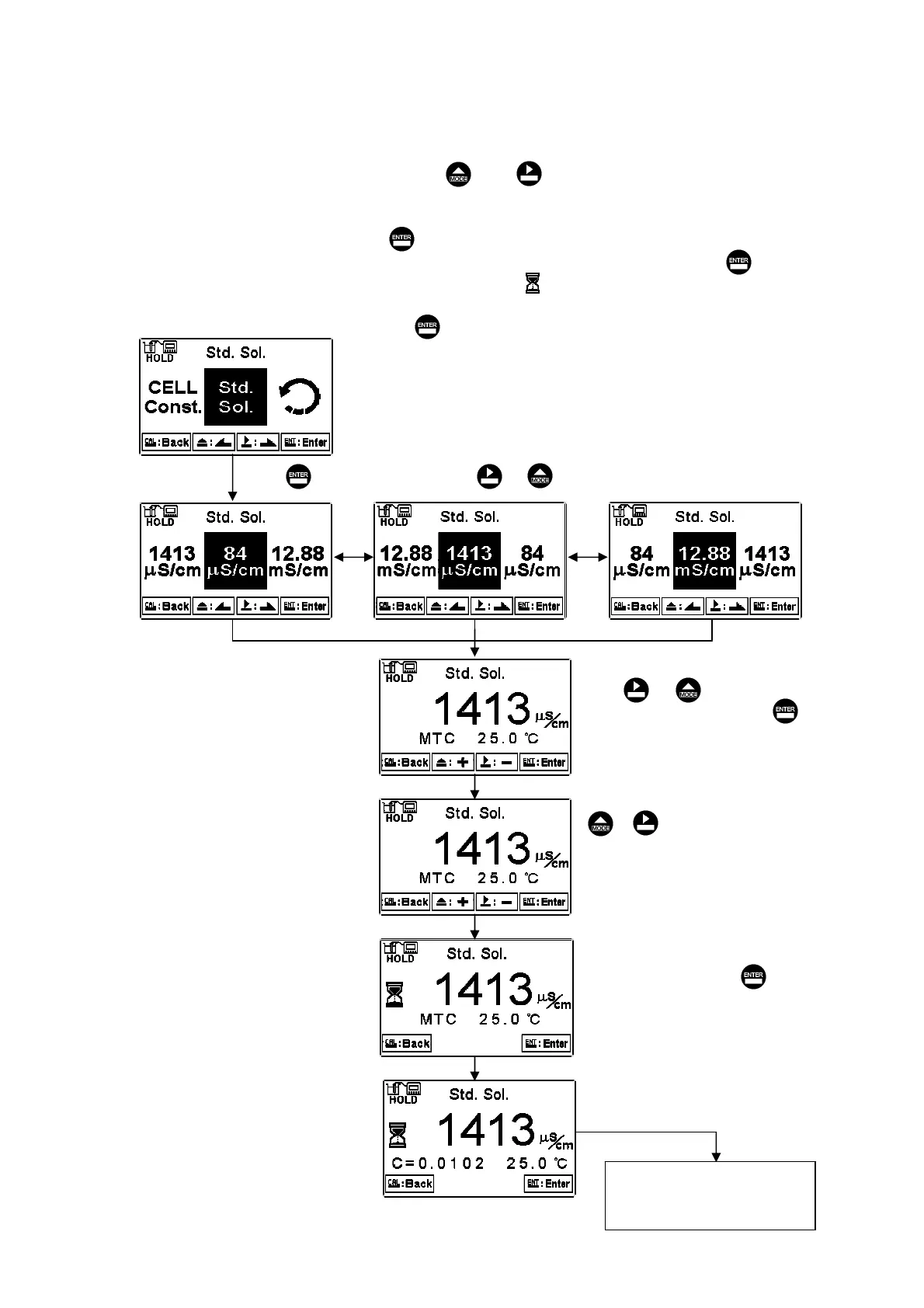
Applying known standard solution for calibration is only suitable for
conductivity measurement mode. Press or to select from preset standard
solution value. There are three preset value from 84.0S/cm, 1413S/cm, to
12.88mS/cm. After selecting proper preset value, put the cleaned conductivity sensor
into standard solution, and press to enter the calibration screen. At the time, the
conductivity value can be adjusted according to standard solution value. Press to
initiate the calibration. The display shows the sign , and it starts the auto
calibration procedure. After finishing calibration, the display automatically shows the
cell constant after calibration. Press to exit.
Press or to select it.
Enter ”Auto return
mode (Return)” Setup
Press to confirm it.
Press or to adjust the
standard solution value. Press
to confirm it.
Under MTC temperature mode, press
or to adjust temperature value.
If under ATC temperature mode(PTC or
NTC), the temperature value is read
automatically, and the instrument
directly goes to next screen.
The system measure the
standard solution. Press to
show the reading, or wait for
the reading which shows
automatically.
Display shows calculated
cell constant value
мс


 To Next Page