7.3 Security password of calibration (Code)
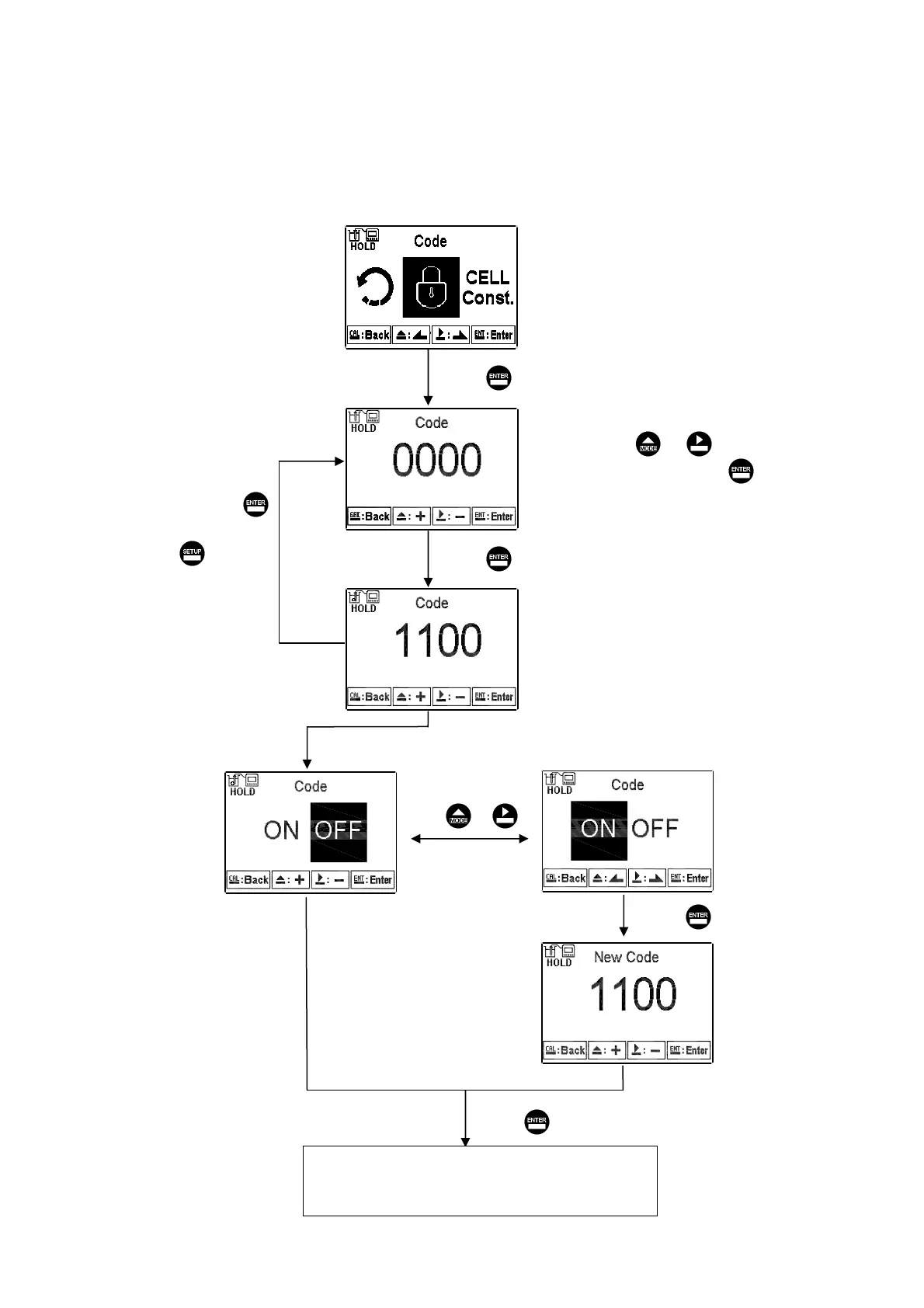
Select the Code (password) icon after entering calibration setup mode. Select to
activate code function or not. The default Calibration setting code is “1100”.
Press or
The first ‘0” of digits ‘0000” start
to twinkle. Press or to
adjust the value, and then press
to confirm it and continually key
in the next digit, and so on.
If you input a wrong code,
then the display shows a
“Error 5” message. Press
to restart inputting another
code, or press to
exit the calibration menu.
Input new code
Press to confirm it.
Press to confirm it.
Press to confirm it.
Press to confirm it.
If you input a wrong code,
then the display shows a
“Error 5” message. Press
to restart inputting another
code, or press to
exit the calibration menu.
(Select to turn on or turn off
code protection function. If
you select turn on, please
key in a new code. There
will be a code requirement
showing in display when you
re-enter to the setup mode.
Key in the correct password
to enter into calibration setup
menu.)
Enter “Cell Constant Calibration
(CELL Const.)”Setup
мо


 To Next Page