Description of calibration settings (see chapter 7 for details)ʳ ʳʳʳʳʳʳʳʳʳʳʳʳʳ
Press and simultaneously to see the last calibration information. Then press if you
would like to make a new calibration or modify setting of calibration. Press keypad according to
index of keypad on the screen.
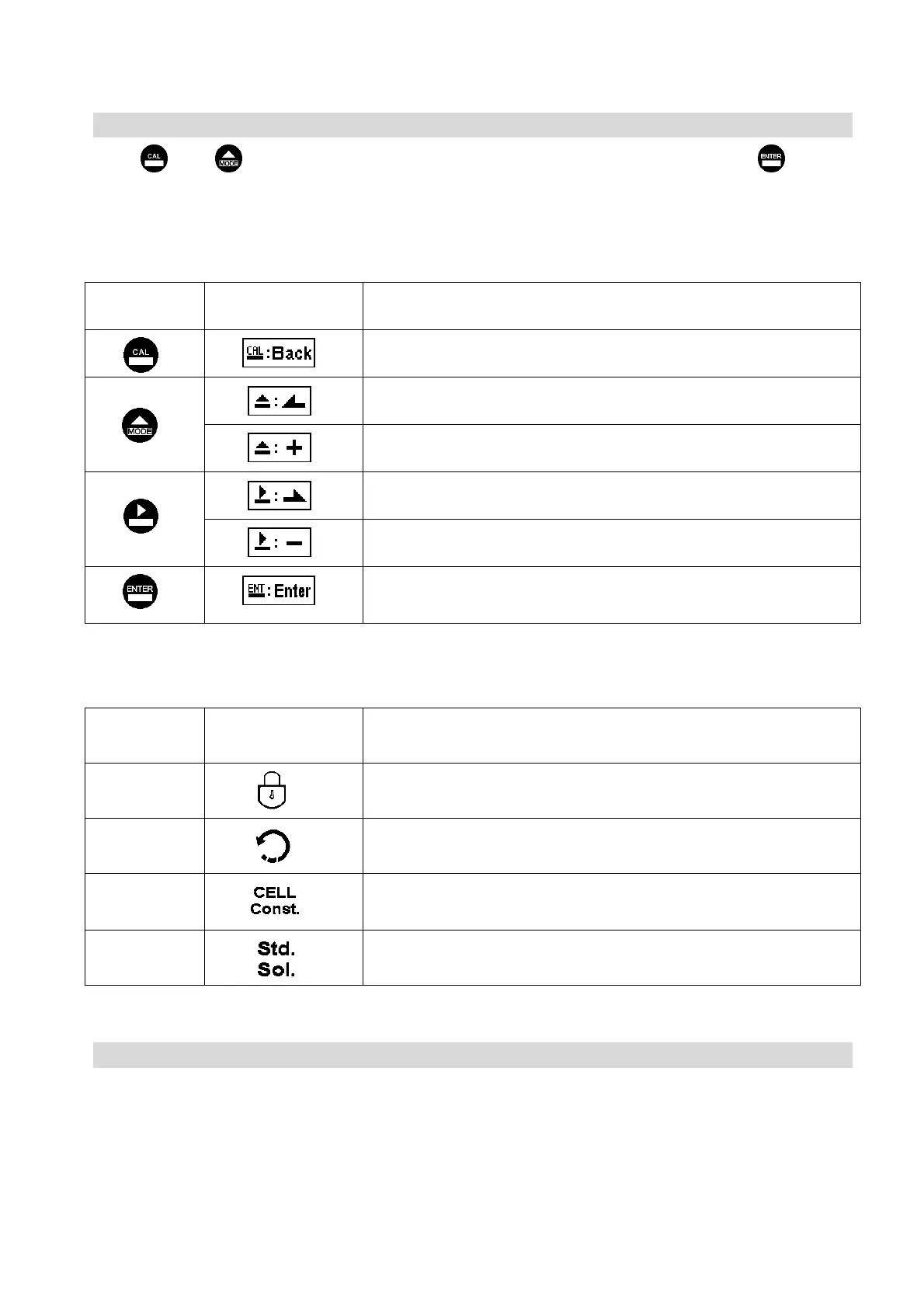
Index of keypad:
keypad Accordingly item Description
Back to upper layer
Choose leftward of change to left page
Increase digit
Choose rightward of change to right page
Decrease digit
Confirm settings after modifications and then go through next
step
Selection of calibration items (up to three-point calibration)
keypad Accordingly item Description
Code Security code of calibration mode. The factory default is 1100.
Return Time interval setting of returning to the measurement mode
Cell Constant To adjust the instrument cell constant setting until the value the
same with the given cell constant of the sensor
Solution Use the appropriate standard solution to calibrate the system
Note ʳ
SUNTEX reserves the right to change the figure of icons and contents. The actual icons and contents
please refer to the instruments.
м



 To Next Page