User manual [English]
7
3 Front panel
POWER: To switch the receiver power on/stand by
VOL^, v KEY: To adjust volume level, or to move cursor left or right in the menu
CH ^, v KEY : To change channels, or to move cursor up or down in the menu
Remote Sensor: Detects infrared signal from remote control unit
Display(4-Digit/7-Segment): Indicates operating status of receiver
Power Led: Lights up while the receiver is power on
Signal Led: When receiving signal is strong, the signal led is lighted.
MENU KEY: To enter into the main menu
OK KEY: To see TV/Radio channel list, or to confirm in the menu
Card Slot: Depending on version, one Smart Card Interface for CONAX card.
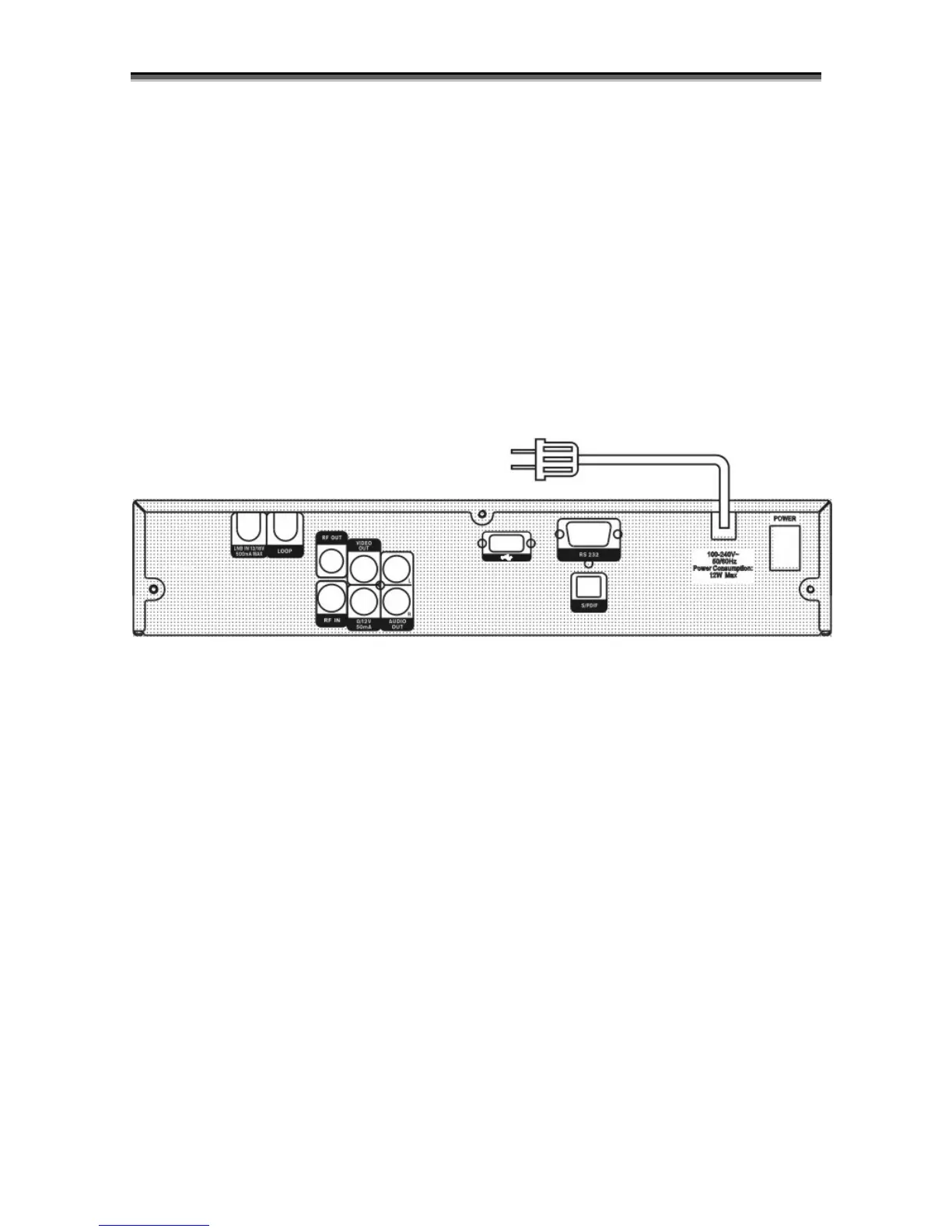
4 Rear Panel
Please refer to the diagram above for all possible connections of your receiver
Do not connect the unit to the mains socket until all other connections have been made and
checked.
LOOP: This enables the connection of another receiver.
13/18V 500mA MAX LNB IN: This port is to connect the coaxial cable from LNB of your Dish.
VIDEO OUT: This RCA connector is used to connect any external video.
0~12V: This is used to Connect 12V to an external 0V/12V switch.
S/PDIF: Digital Audio interface, connect to AV amplifier S/PDIF input terminal.
AUDIO R/L : These RCA connectors are used to connect any external audio amp or system.
USB: USB 2.0 Host, connect to USB hard disk, or flash disk
RS 232C SERIAL PORT: This is used to connect your receiver to a computer through a serial cable.
RF OUT: This enables the connection of another receiver.
RF IN : This port is to connect the coaxial cable from terrestrial antenna.
5 Connecting Your System
There are three ways to connect the receiver to your existing TV system. We recommend using one
of the following cases for the best result:
1. Connect one end of RCA cable to the RCA jack on the back of the receiver and the other end to a
RCA jack on your TV.
2. If your TV doesn't have a RCA jack, connect one end of RF cable to the TV on the back of the
receiver and the other end to a RF input jack on your TV.



 To Next Page