Sutron Corporation Satlink Operations & Maintenance Manual, Rev 8.04.2 11/3/2016 pg. 152
16. Connecting to Another Logger
Any model Satlink can be used to by another logger/device to transmit data via
GOES/Eumetsat/CGMS. This document provides the details for using Satlink in this manner in
the following sections:
Connect to Satlink
Configure Satlink
Transmit Data
16.1. Connection
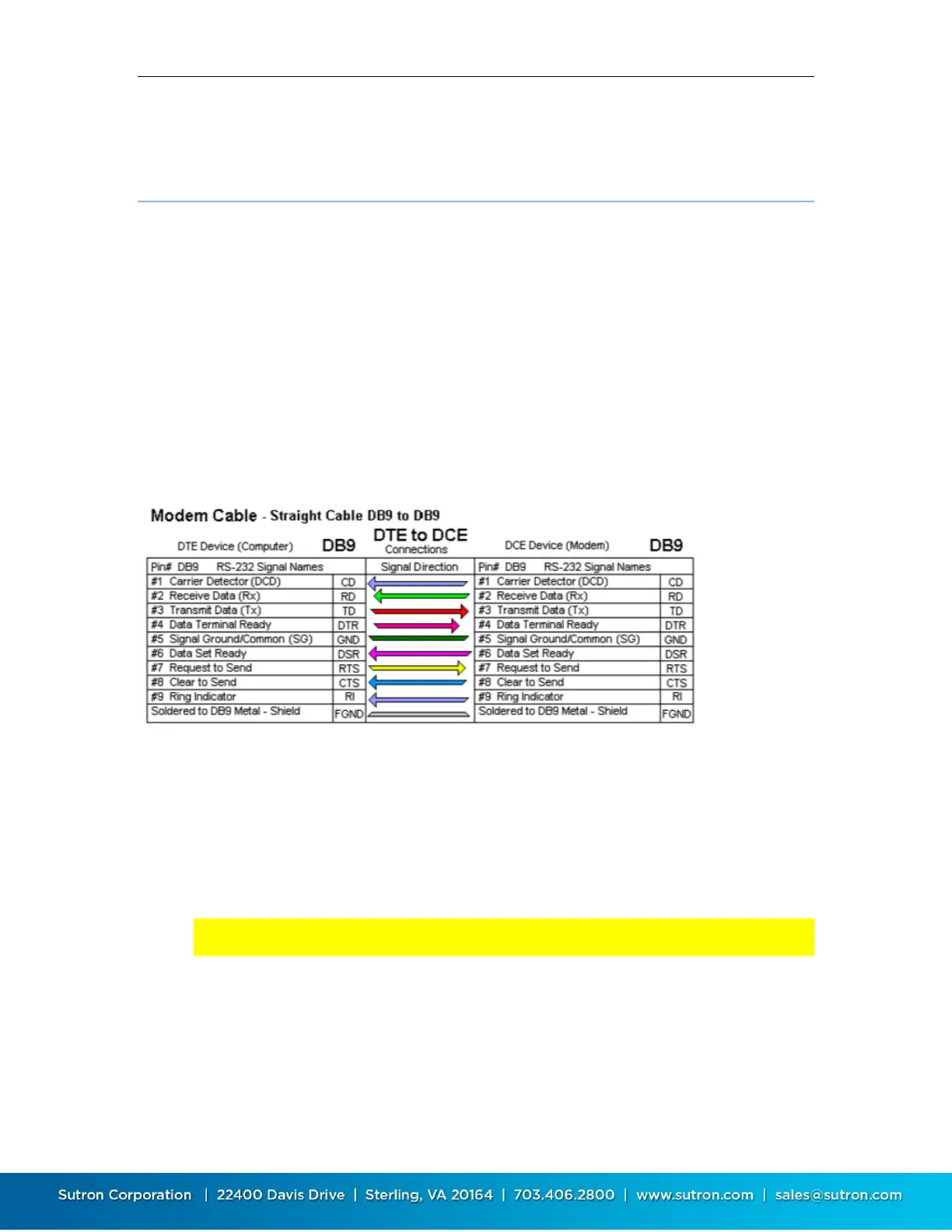
Satlink has an RS232 DB9 female connector, configured as DCE.
A straight M-F cable will connect Satlink to most DTE devices such as a PC.
Note that DTR, RTS and CTS are required. A device connected to Satlink must assert DTR prior to
talking to it. Satlink will ignore any data sent when DTR is not asserted. Similarly, Satlink uses
the RTS/CTS control lines Normally the device will turn DTR off when it is done talking with
Satlink. This allows Satlink to enter its low power modes.
Note: if you have a device that cannot assert DTR and/or does not support handshaking,
contact Sutron customer service
A null modem cable should be used when connecting to a DCE device. When using a null modem
cable, pay attention to the wiring so that the logger can assert the Satlink DTR as required (via
DSR in the example below).



 To Next Page