11
THE [SELECT] BUTTON
Is located on the top left of the Wristop Computer.
In the main mode level, pressing the [Select] button allows the user to enter into the sub modes of the
particular function or return to the main mode the user is in.
In the main mode or sub mode, pressing and holding the [Select] button for more than 2 seconds
allows the user to enter the setup process.
In the setup process, the [Select] button allows the user to move between settable units or values and
determine preferences.
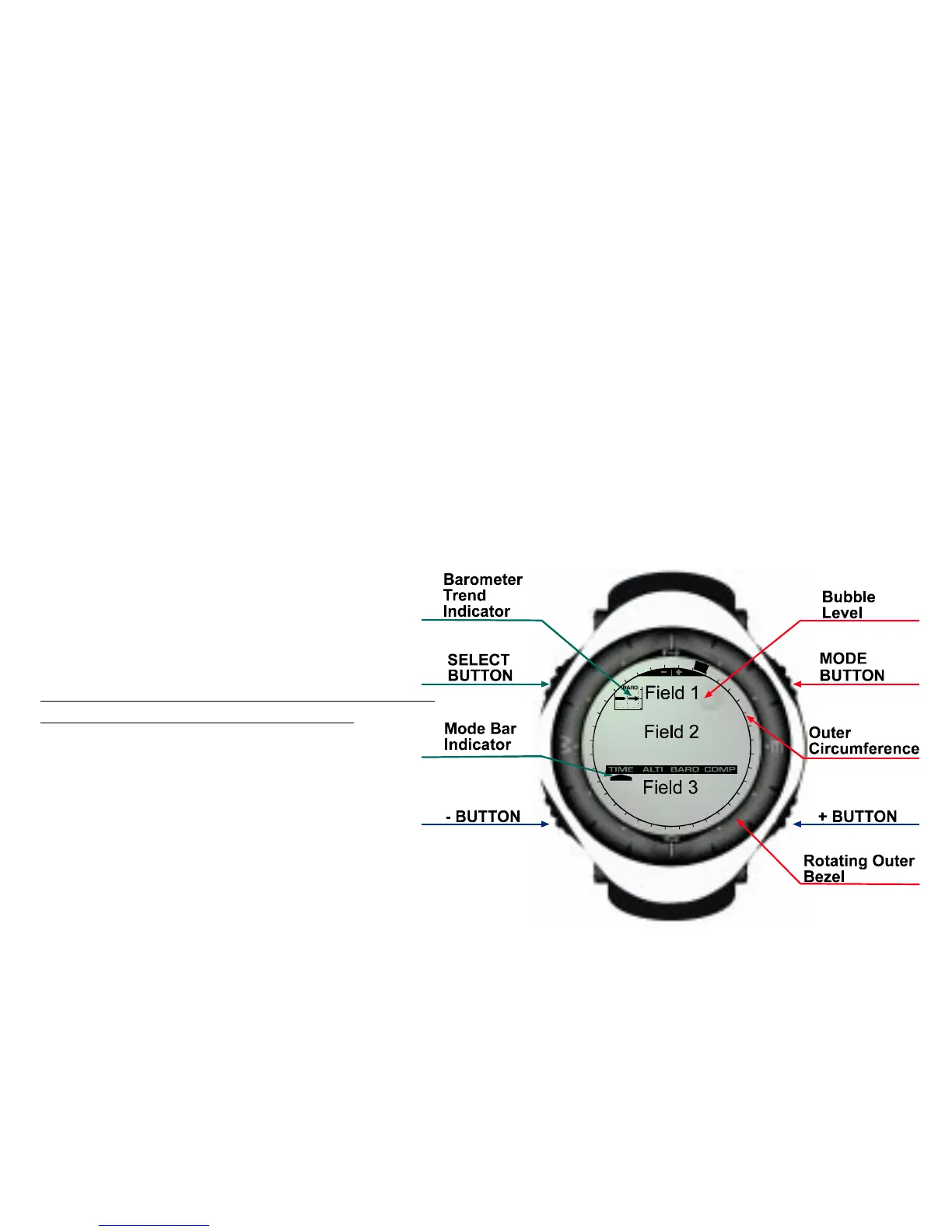
LCD DISPLAY
The display is designed to offer maximum clarity
and simplicity to the user.
The display is divided into several regions or
areas.
The Outer Circumference encompasses the
outer boundary of the LCD display.
A Barometric Trend Indicator provides a quick
reference for forecasting weather conditions.
Note: The Barometric Trend Indicator is provided
on the Altimax, Vector, and X-Lander.
Field 1 displays values either numbers or text
depending on the mode or sub mode the user
is in.
Field 2 displays large numbers and/or related
unit of measure of the function.
A Mode Indictor Bar displays the main modes
(functions) of the Wristop Computer (a
triangle arrow located just below the bar
indicates the mode the user is viewing).
Field 3 displaying either numbers and/or text.



 To Next Page