38
Note: Information on the current sea level pressure can be obtained through newspapers, local news
and radio weather reports, the local airport facility or through the Internet under local weather.
If the user does not press any button for 1 minute in the setup mode, the display will automatically exit
setup.
BAROMETRIC TREND INDICATOR
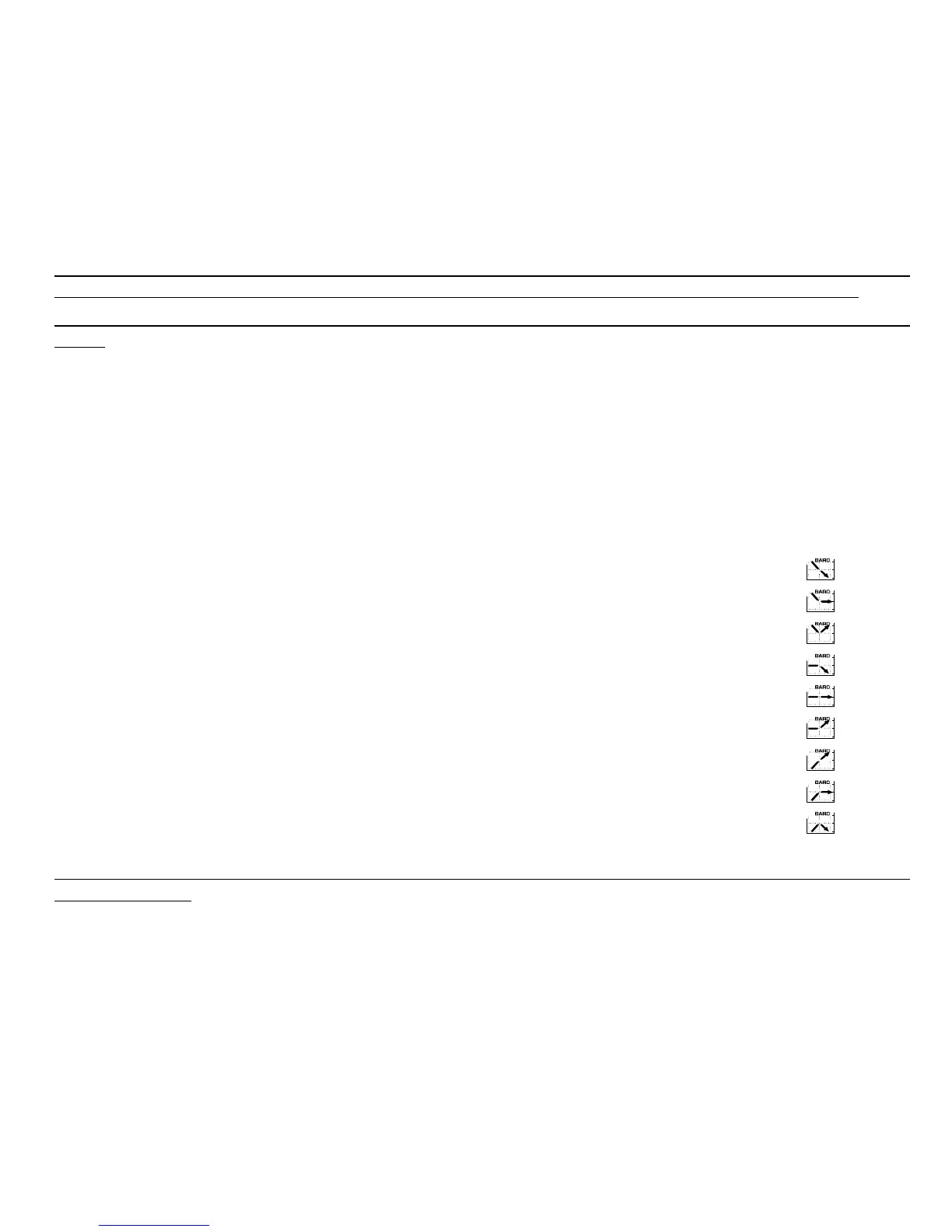
Located on the top left corner of the LCD display resides the Barometric Trend Indicator. This feature is
always displayed in all main modes providing the user a continual quick reference to analyze upcoming
weather conditions.
The Barometric trend is comprised of two lines forming an arrow. Each line represents a 3-hour period.
The right line represents the last 3 hours. The left line represents 3 hours prior to the last 3 hours. The
line can indicate 9 different patterns in the barometric trend.
Situation 6-3 hours ago Situation last 3 hours
Dropped heavy (>2 mbars/3hours) Dropping heavy (>2 mbars/3hours)
Dropped heavy (>2 mbars/3hours) Remaining stable
Dropped heavy (>2 mbars/3hours) Rising heavy (>2 mbars/3hours)
Remained stable Dropping heavy (>2 mbars/3hours)
Remained stable Remaining stable
Remained stable Rising heavy (>2 mbars/3hours)
Risen heavy (>2 mbars/3hours) Rising heavy (>2 mbars/3hours)
Risen heavy (>2 mbars/3hours) Remaining stable
Risen heavy (>2 mbars/3hours) Dropping heavy (>2 mbars/3hours)
Note: If the user remains at the same elevation, the barometric trend indicator can work as a weather
forecasting tool.



 To Next Page