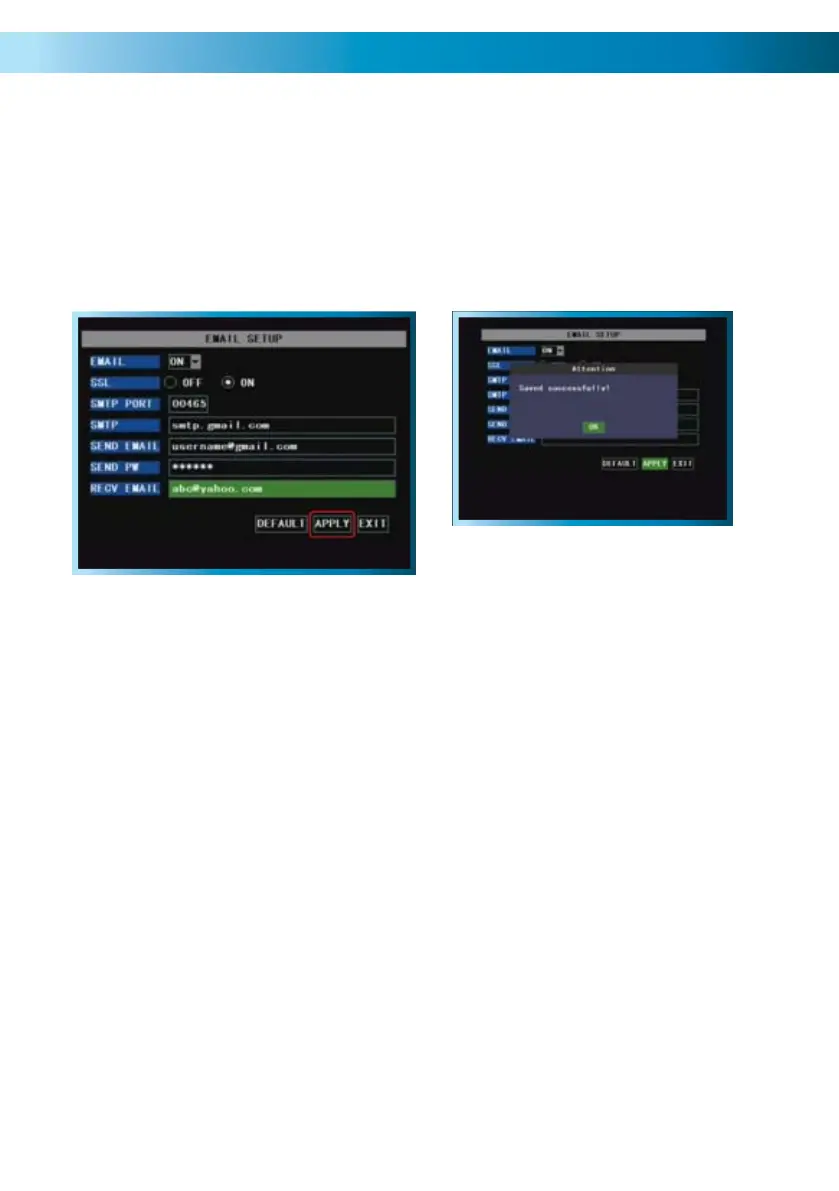
Step 4
Once you’ve entered all the required
information, the information in the
fields should look something like the
example shown (below). We stress that
this is an example only - the information
you’ll need to enter will vary depending
on your email provider.
In this example, the DVR has been
configured to send email via G-mail (a
free web-based email service which is,
at the time of writing, compatible with
the DVR’s auto-email system) to an
address at Yahoo mail.
Step 5
Once all your information has been
entered, choose APPLY to save your
settings. Once they are successfully
saved, you should see the message
“Saved Successfully!” as shown below.
Choose EXIT to return to the live-
viewing screen.
Tips and Tricks:
We strongly suggest testing the email setup once it is configured. This simply •
involves triggering an alarm event (via external alarm sensors or the motion
detection feature).
Many, if not the majority of, free online email servers will not work correctly. •
A standard SMTP email account (such as the ones most ISPs provide with their
high-speed Internet plans) will usually be a good option, if a web-based email
system does not work for you.
Remember: After making changes to the settings press/click the APPLY button.
35



 To Next Page