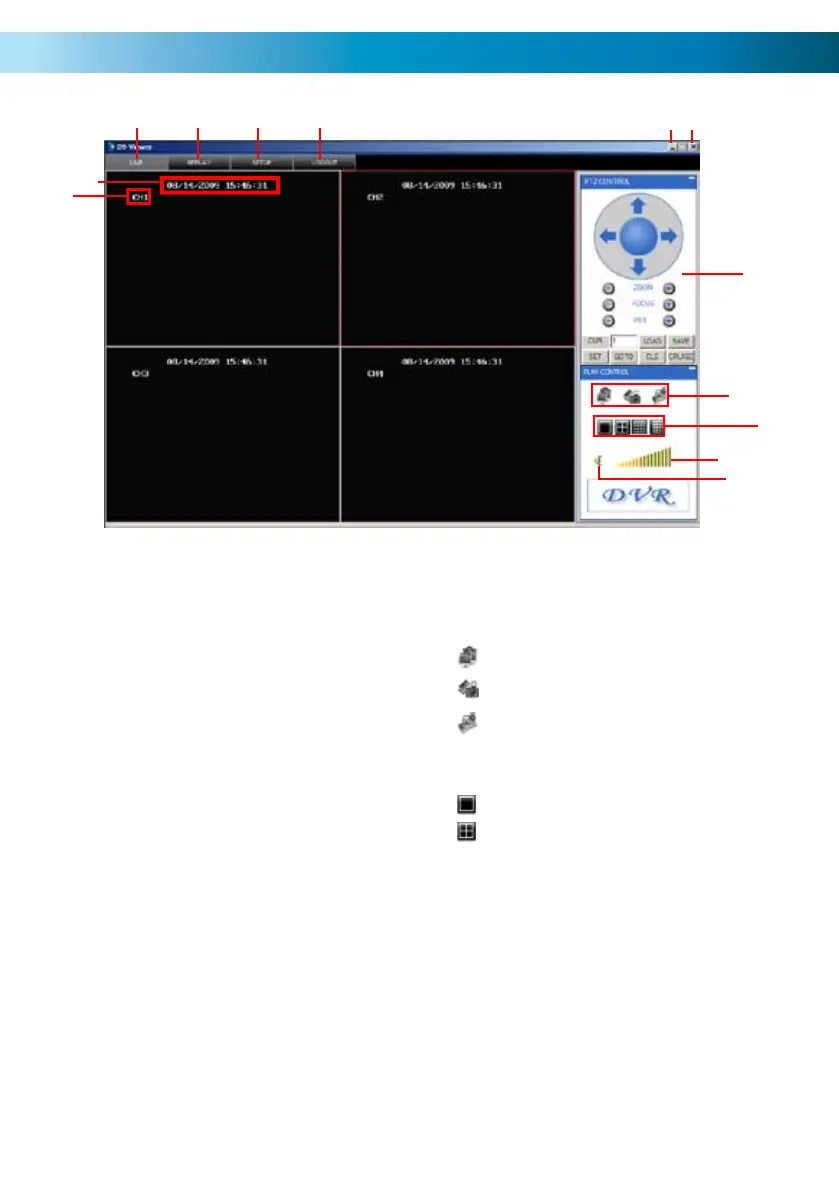
NetViewer - The Main Interface
59
2
1
3 4 5 6
7
9
8
10
11
12
13
27
Channel Name1.
Date & Time2.
Live - Click to view live view screen.3.
Replay - Click to view the replay screen.4.
Setup - Click to view the setup screen.5.
Logout - Click to logout.6.
Minimise - Press to minimise screen7.
Close - Press to close Net-Viewer.8.
PTZ Control - Pan, Tilt, Zoom 9.
controls.
Open Window, Capture & Record10.
Single, Quad View Buttons11.
Volume Bar - LEFT click and drag 12.
mouse from left to right to increase
the DVR volume.
Mute - Click to mute sound.13.
Click to view single camera view.
Click to to view quad view.
Click to OPEN and CLOSE live view .
Click to capture image.
Click to start recording.



 To Next Page