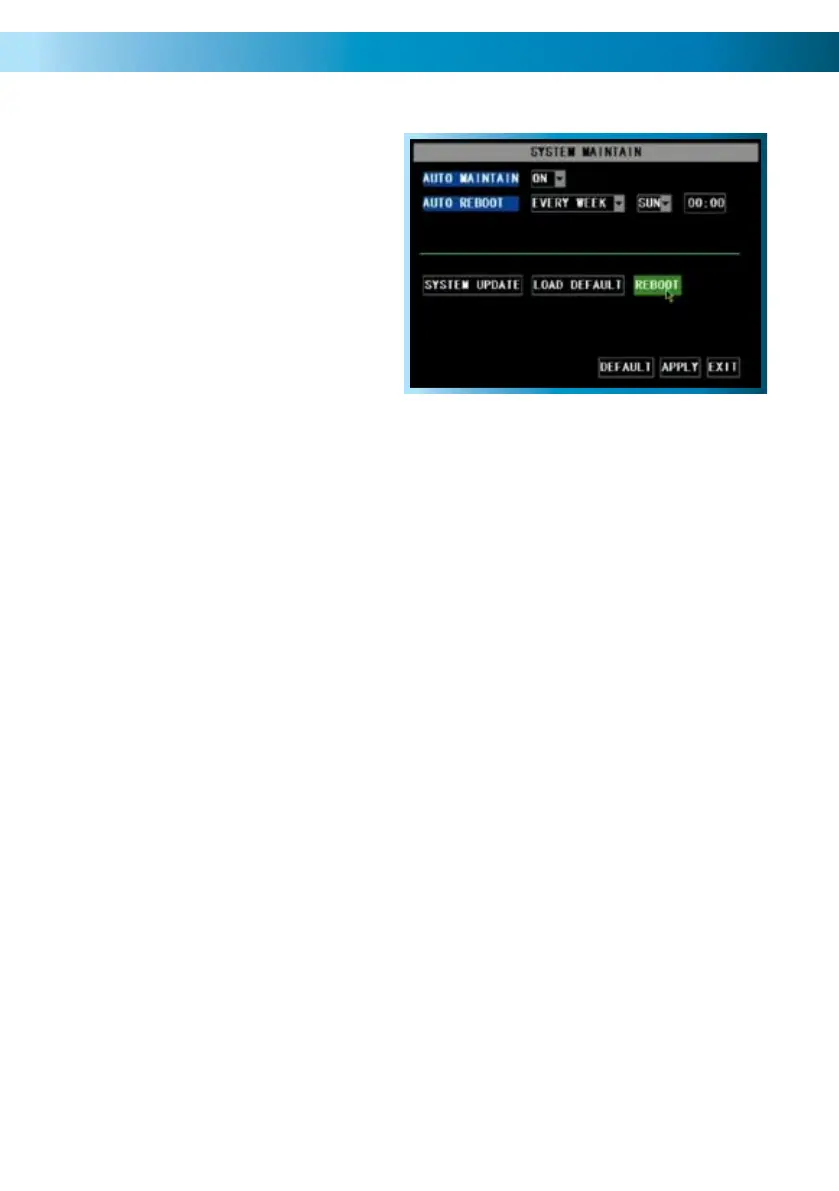
The System Maintenance Menu
Remember: After making changes to the settings press/click the APPLY button.
45
To maintain the operational integrity
of the DVR, it is suggested that it
be rebooted periodically. In much
the same way that a computer
can become unstable if left on for
an extremely long time, the DVR
can become unstable. It is strongly
suggested that the DVR be rebooted
at least once per month. However,
as this can be a hassle (particularly if
the DVR is stashed away somewhere
inconvenient) you can set the DVR up
to reboot itself.
AUTO MAINTAIN: Whilst OFF, there won’t be any other options available on this
screen. Turn this ON if you want to set the AUTO REBOOT function.
AUTO REBOOT: Will automatically shut the DVR down and restart it at a certain
time of the day, week or month.
SYSTEM UPDATE: For loading new soft/firmware onto the DVR via a USB flash
drive. Usually, you won’t need to use this setting unless directed to do so by Swann
Technical Support.
LOAD DEFAULT: Returns the DVR to it’s initial factory settings. Can be useful if,
for some unknown reason, the DVR is behaving erratically.
REBOOT: Turns off and restarts the DVR immediately.
About the AUTO REBOOT time:
If you choose weekly rebooting, you’ll need to select the day of the week •
(from MON through SUN) and the time that you’d like the DVR to reboot.
If you chose monthly rebooting, you can choose the date of the month that •
you’d like the DVR to reboot, and then the time on that date.
Note that, if you chose monthly rebooting and you enter the 31st as the date •
you’d like the DVR to reboot, there are several months of the year that don’t
have a 31st day. It is suggested that this date be avoided, for that reason.
When the DVR is rebooted, no settings will be lost, and it will automatically re-•
sume its recording mode and schedule without alteration. The reboot primarily
refreshes the software and gives the hardware a moment of ‘time out’, aiding
the ongoing smooth functionality of the DVR. It will not lose your settings.



 To Next Page