57
Click for contents
Channel 1
28/02/2024 09:27:07 AM
Play
Search: Basic
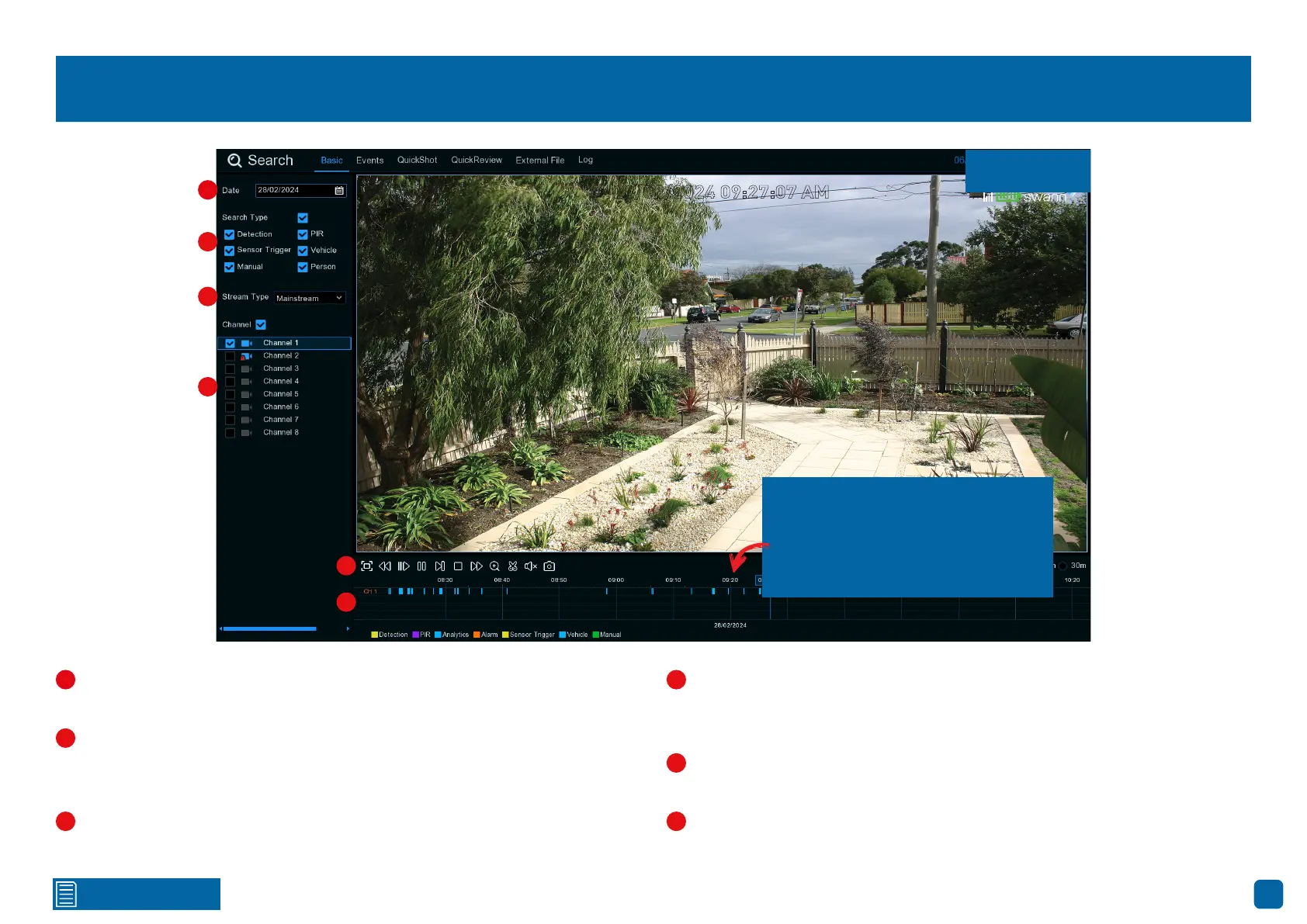
Click the calendar icon to select a date that you want to search on. A red
underline on a date indicates recordings on those particular dates.
This is the event type that you can search for. You can leave all event types
enabled if you want to search for all, or you can select specific event types.
Adjust accordingly.
For Mainstream, only one camera can be selected for playback. For Sub-
stream, a maximum of four cameras can be selected.
Select from one or more cameras to display for playback (a maximum
of four cameras can be selected for playback only). A blue camera indicates
which cameras match your search criteria.
Click this to hide the playback interface to maximize your viewing area
(watch full-screen). Right-click to restore.
Recordings that match your search criteria will be displayed here.
(continued on next page)
1
2
3
4
5
2
3
4
5
1
6
6
When zoomed into the timeline,
pause playback, click and hold the
time above the timeline, then drag
left or right to the desired time.
Mainstream


 To Next Page