64
Click for contents
Search: QuickReview
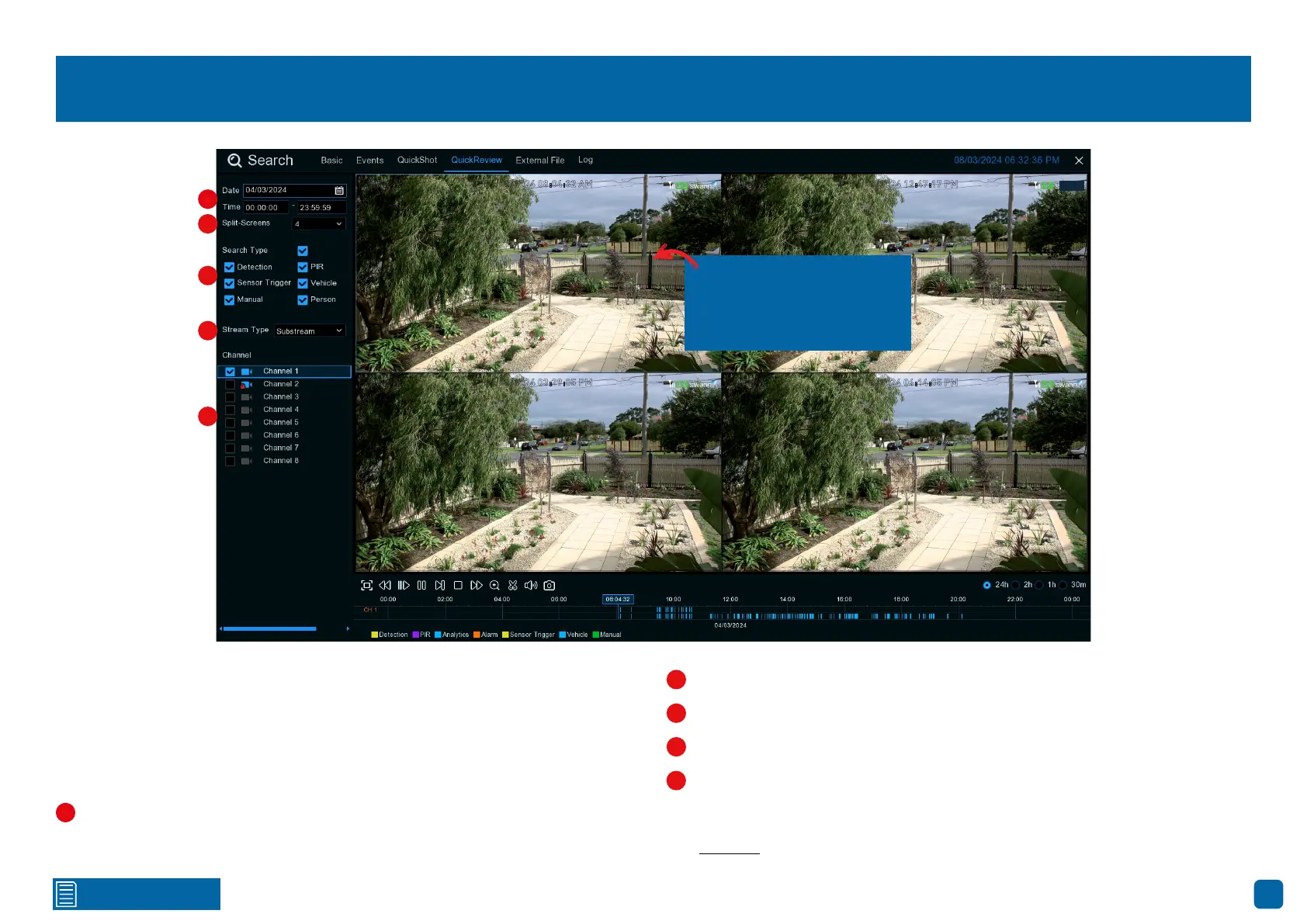
QuickReview lets you watch different actions happening at the same time on
one screen (but only if you’re using Substream). It’s like splitting your screen
into sections. So, if you have a whole day of motion events to watch and you’ve
chosen to split your screen into four parts, each part will show six hours of
action.
Click the calendar icon to select a date that you want to search on. A red
underline on a date indicates recordings on those particular dates. For time,
you can search over 24 hours or a specific start and end time.
Click the drop-down menu to select the preferred split-screen mode.
This is the event type that you can search. Adjust accordingly.
Change this to Substream.
Select the camera that you would like to search on.
Click the “Play” button to play the motion events.
See page 57 for an explanation of the controls on the timeline.
Channel 1
04/03/2024 08:04:32 AM
Channel 1
04/03/2024 12:47:17 PM
Play
Channel 1
04/03/2024 03:29:05 PM
Channel 1
04/03/2024 06:14:05 PM
1
2
3
4
5
2
3
4
5
1
Click on a split-screen to
select it (a surrounding
blue square is shown).



 To Next Page