4. Fuel Injection System
4-40
Air Cleaner
Remove
Remove left side body cover and luggage box.
Remove rear carrier and body cover.
Remove fuel gas recover tube.
Remove waste gas purification system pipes.
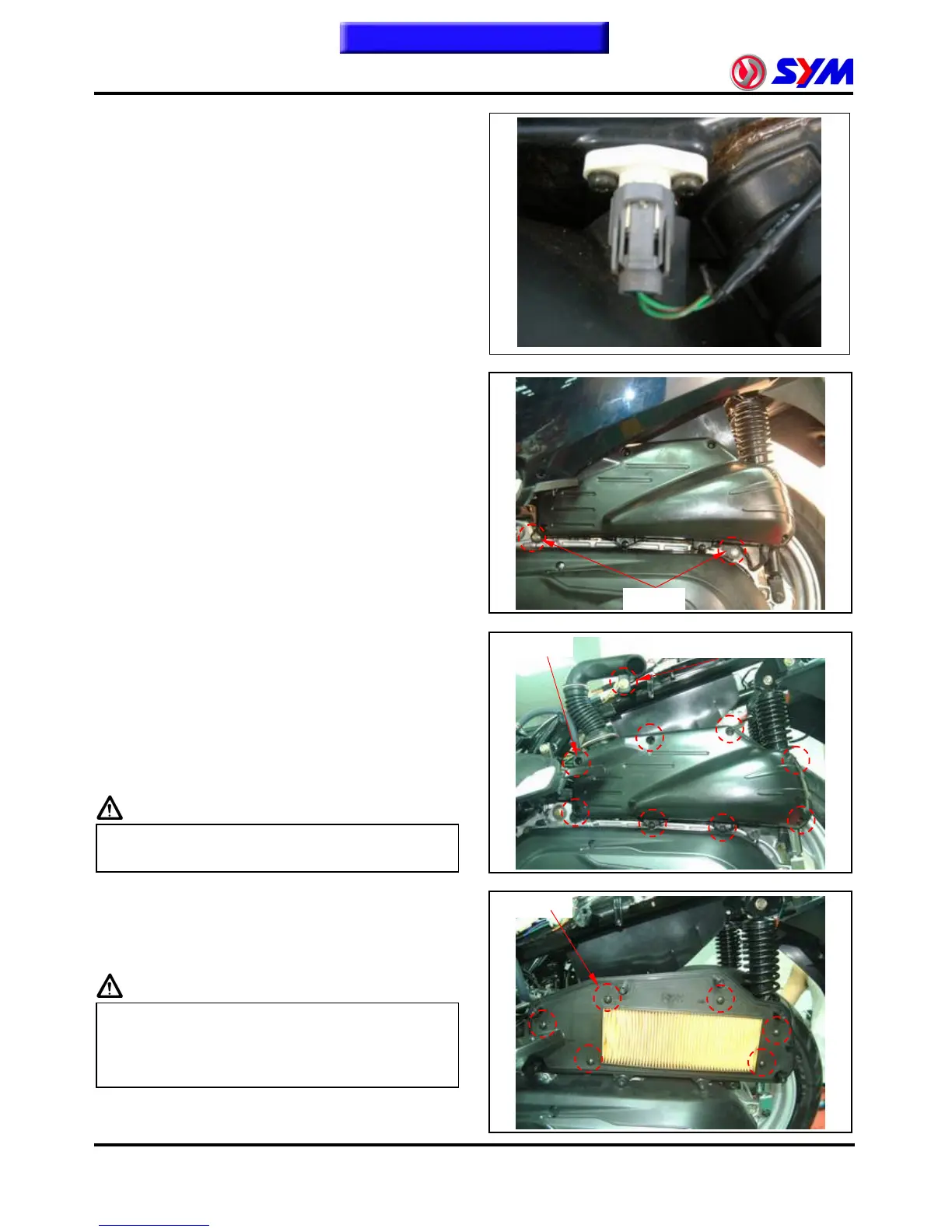
Remove TA Sensor coupler.
Remove intake tube fixed bolt (boltŽ1).
Remove air cleaner fixed bolts (boltŽ2).
Remove air cleaner.
Install
Install In the anti-demolition order.
Clean air cleaner
Remove air cleaner cover (boltŽ8).
Remove air cleaner filter (boltŽ6).
Use compressed air to remove the adhesion of dirt,
if not too much dirt cleared, please new
replacement.
Cautions
Š Air cleaner filter for paper products, must not
soak or cleaning by water.
Install air cleaner
Install In the anti-demolition order.
Cautions
Š Air cleaner filter and air filter cover should be
covered formation is the installation, not to
skew a seam, resulting dust, foreign body
aspiration in the engine.
Bolt Ž 6
Bolt Ž 8
Bolt Ž 2
Air catheter fixed bolts Ž 1
To this chapter contents



 To Next Page
 Loading...