Network Configuration
3-9
3.1.3.2 Configuring WEP Security Settings
WEP is an encryption security protocol specified in the IEEE Wireless Fidelity (Wi-Fi) standard, 802.11b, and
supported by the CB3000. WEP encryption is designed to provide a wireless device with a level of security and
privacy comparable to a wired LAN.
The level of protection provided by WEP encryption is determined by the encryption key length and algorithm.
An encryption key is a string of case-sensitive characters used to encrypt and decrypt data packets transmitted
between a mobile unit and the CB3000; the CB3000 and associated device must use the same encryption key
(typically 1 through 4) to interoperate. For further overview information on WEP, see About WEP Security.
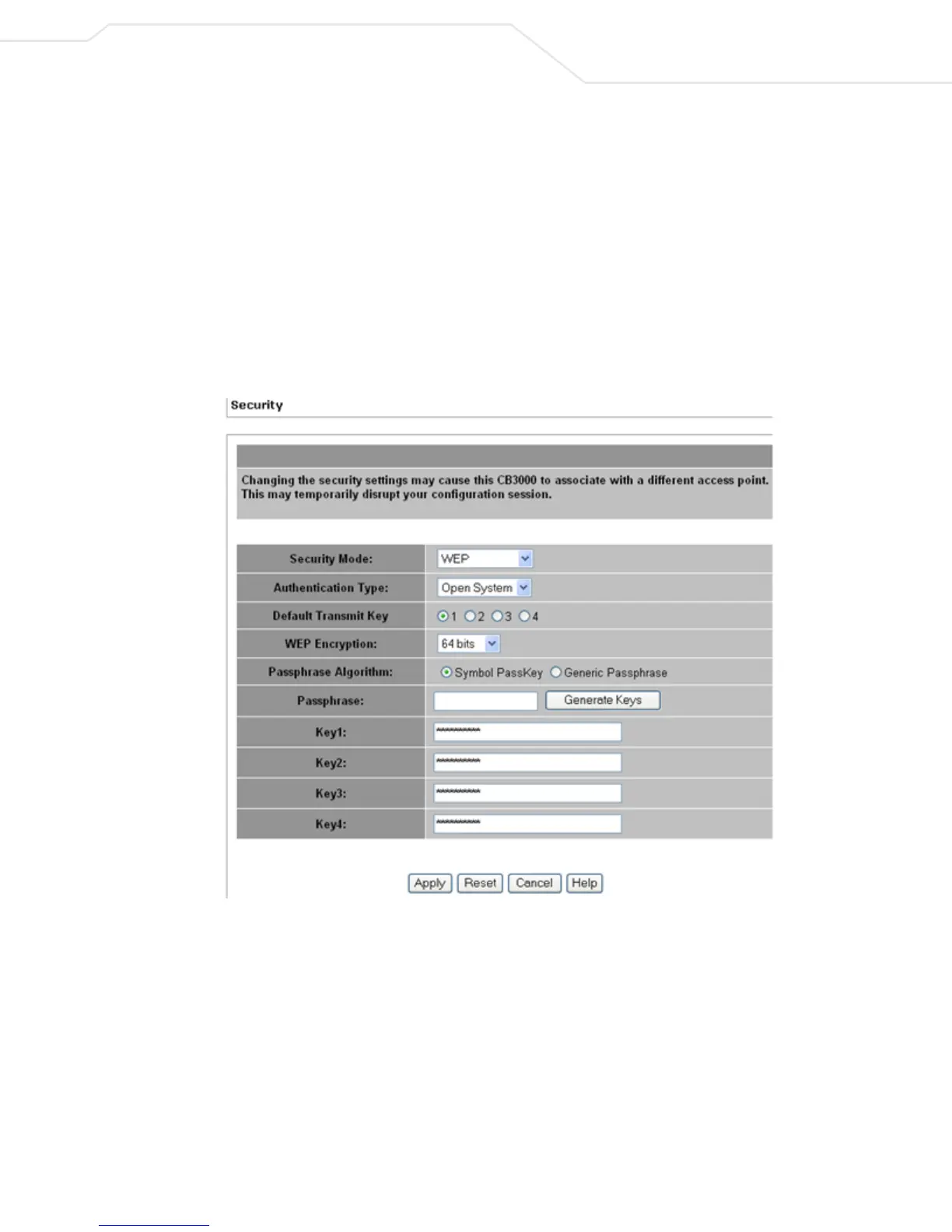
To configure WEP encryption security settings:
1. Select Settings > Wireless Settings > Security from the CB3000 menu tree.
2. Select WEP from the Security Mode drop-down field.
Figure 3.4 WEP Configuration
3. Configure the remainder of the fields, as appropriate, per the following descriptions.
• Authentication Type – Specify whether a shared key is implemented between the CB3000 and its
connected device or no key is used (Open System). If a shared key is used, both the CB3000 and its
connected device are required to use the same key (1 through 4) to interoperate. A shared key
increases the level of security within the network as opposed sending information without one.
• Default Transmit Key – Specify which one key is used to transmit WEP algorithm information
between the CB3000 and its connected device.



 To Next Page