Management Options
4-15
4.2.4 Time Settings
Time synchronization is recommended for the CB3000’s network operations. Therefore, setting the CB3000’s
internal time is required for network clock synchronization in a CB3000’s managed network environment.
The CB3000 (an NTP client) periodically synchronizes its time with a master clock (an NTP server). For example,
the CB3000 sets its clock to 07:04:59 upon reading a time of 07:04:59 from its designated NTP server. Support
for both of these options is available in the Time Settings screen.
Warning! The time setting will be lost on a reboot, and it will start with the
default time, i.e., January 1, 2000.
To configure clock synchronization on the CB3000:
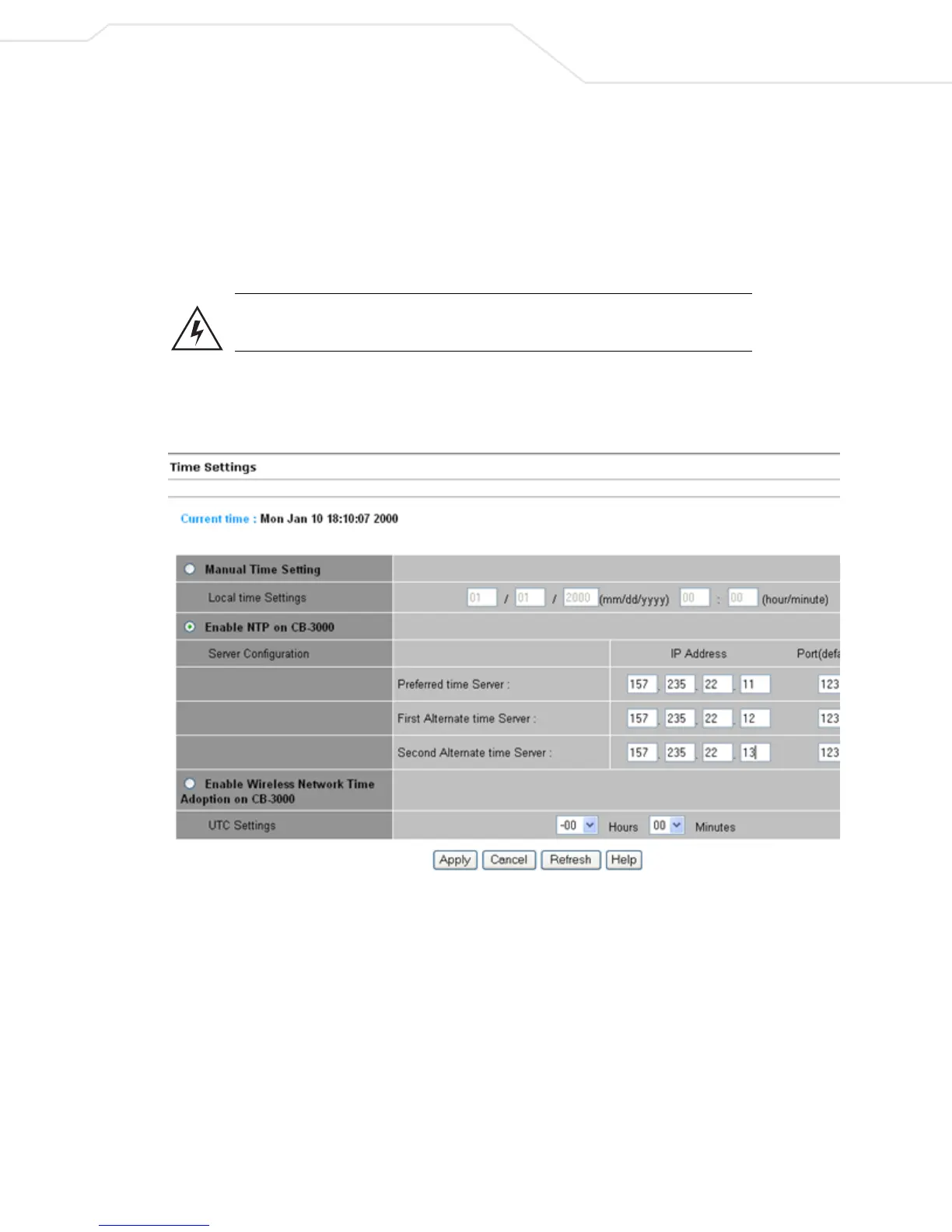
1. Select Management > Time Settings from the CB3000 menu tree. The Time Settings screen displays
.
Figure 4.10 Time Settings
2. Select either Manual Time Setting or Enable NTP on CB3000 to specify how CB3000 system time is
configured.
• Manual Time Setting – If selected, the CB3000 system time is based on the time entered within
the Local Time Settings fields.
• Local Time Settings – Current time based on the CB3000 system clock. If NTP is disabled or
if there are no servers available, the system time displays the CB3000 uptime. The time does
not automatically update. Click the Refresh button to update the date and time.
• Enable NTP on CB3000 – If selected, specifies the CB3000 time is based on the specified NTP
server entered within the Server Configuration fields.



 To Next Page