Management Options
4-11
• Wireless Time Adopt Failure - Trap generated when the adoption threshold (limit) has been exceeded for
a device adoption operation.
• Rf Threshold Throughput - Trap generated when the defined RF throughout for the CB3000 has been
exceeded.
• Rf Average Retries - Trap generated when the defined number of device retry attempts has been
exceeded.
• Process Failure - Trap generated when a system critical process (Linux process) fails and is re-started.
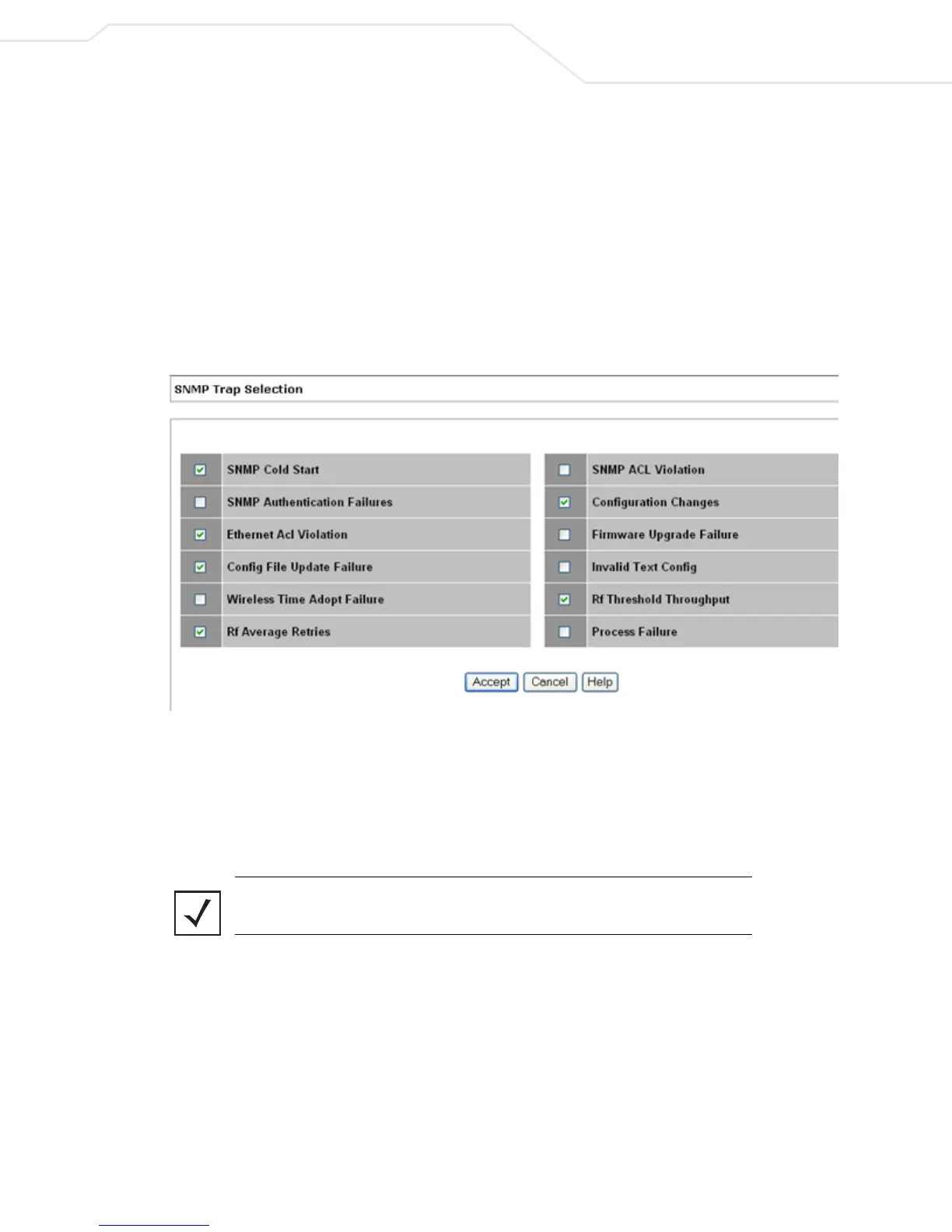
1. To modify these default SNMP trap definition settings, select Management > SNMP > SNMP Trap
Selection from the CB3000 menu tree. The SNMP Trap Selection screen displays.
2. Unselect a trap, if desired, then click Accept to save the setting.
Figure 4.6 SNMP Trap Selection
4.2.2.2 SNMP Access
Use the CB3000 SNMP interface to restrict access control using IP addresses. Those who are allowed to
access the CB3000 SNMP interface have access to read SNMP generated information and, if capable, modify
related settings from an SNMP-capable client.
Note The CB3000 implemented SNMP ACL applies to SNMP v1/v2c community
definitions.
To configure SNMP user access control for the CB3000:
1. Select
Management > SNMP > SNMP Access from the CB3000 menu tree. The SNMP Access Control
screen displays.



 To Next Page