42
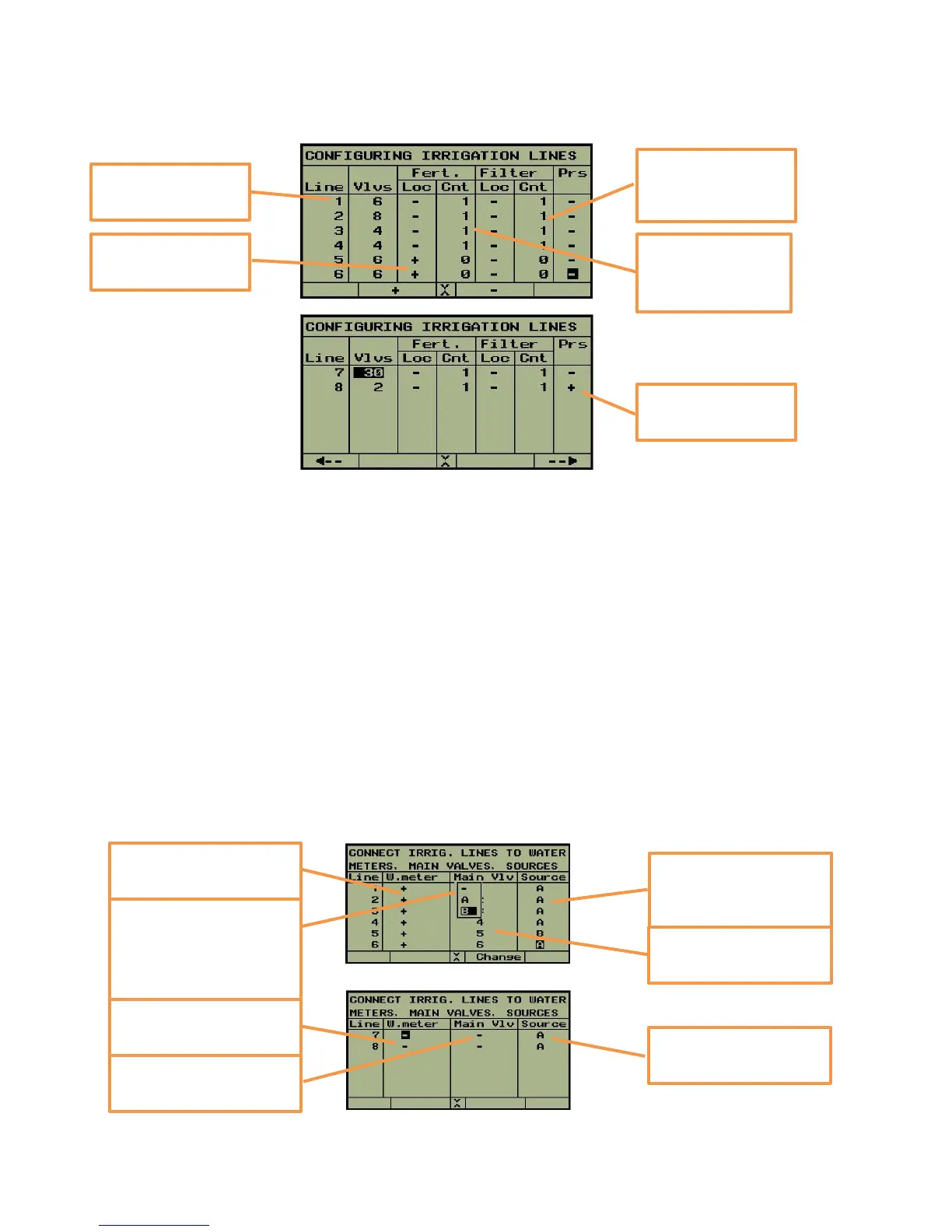
In the next step we define the connection between irrigation lines, water meters, main valves
and water sources.
Irrigation lines having a water meter will be indicated by “+” in the “W. meter” column.
Main valves are numerated 1,2,3 … etc. If several irrigation lines share the same main valve,
the number of the main valve in the “Main vlv” column will be the same. Notice that when
each irrigation line has a main valve of it's own, you can use the automatic numeration button,
otherwise you will have to do the numeration yourself.
The selected water source in the “Source” column will be used as default during definition of
irrigation programs.
Lines 1 to 4 are
using central
fertilizer site No. 1
Line 8 has got a
pressure sensors
Lines 1 to 4 are
using central filter
site No 1
Lines 5 and 6 have
local fertilizer sites
The number of
valves of line 1 is 6
The default source of
lines 1-4 ,6 is "A", and
of line 5 is "B"
The numeration of
the main valves
This window opens
when the "Change"
button is pushed
enabling selection of
water sources
All the lines from 1 to 6
have got a water meter
Lines 7 and 8 got no
water meter
Lines 7 and 8 got no
main valve
The default source of
lines 7 and 8 is "A",



 To Next Page