18
3 Software
The software serves as the processor's central control unit. With this you can set the procedures for product
processing. The software is operated via a touch screen.
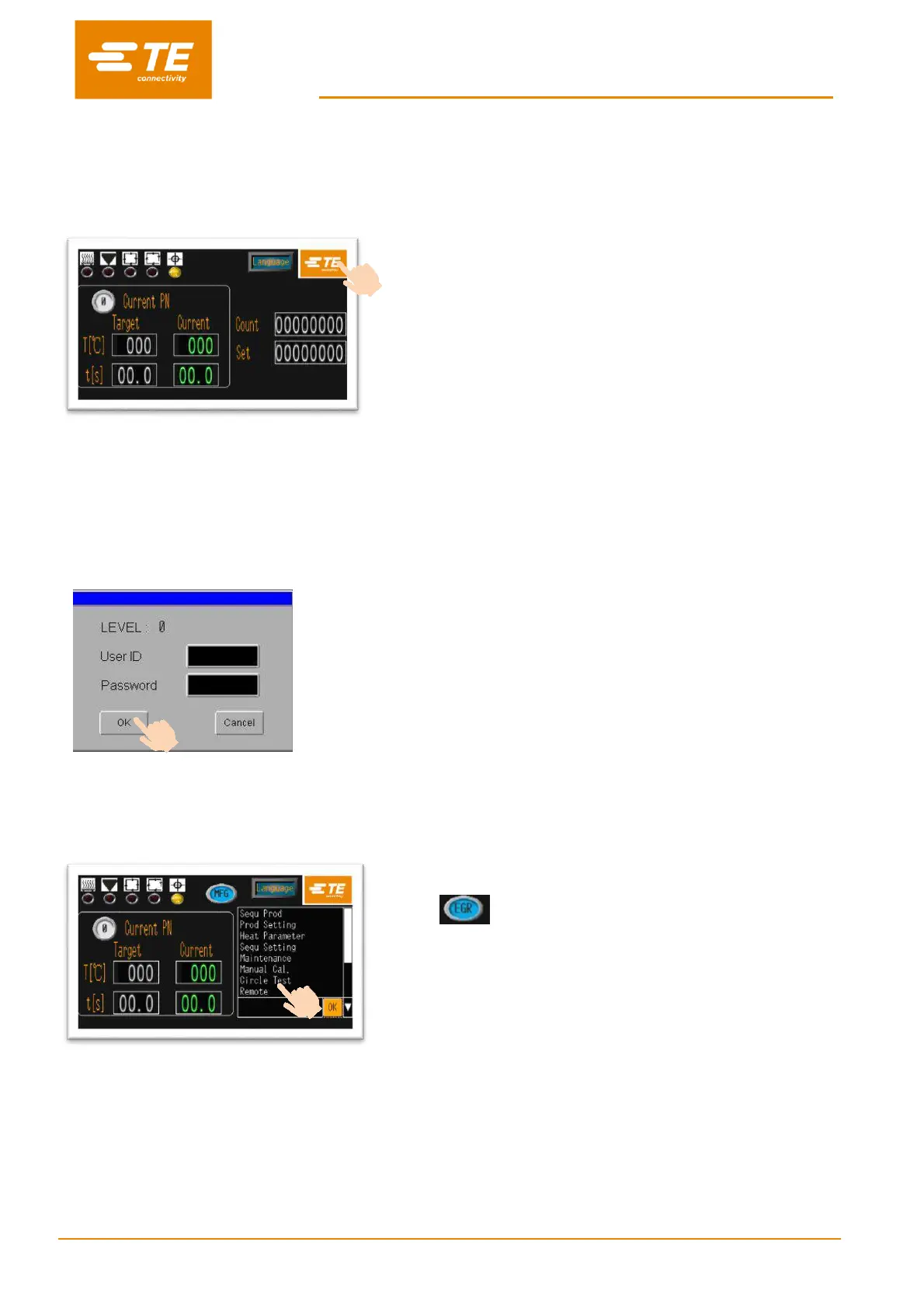
When power on to heater, you would see the main
interface like this picture.
Press on the TE logo from the main interface to log on.
3 level authority to log on:
•
“OPR” ---- user ID: “A”, password: “0000”
•
“EGR” ---- user ID: “B”, password: “12345”
•
“MFG” ---- user ID: “C”, (TE kept)
(password can be edit by higher authority.)
Input ID and password in this window.
For example, we are trying to log on as Engineer,
then we should input “B” in user ID column, and input
“12345” in Password column.
Then click on “OK” button.
You would find the main interface already have 2 changes:
•
ID icon is showing you access as engineer.
•
On the bottom right appear a column. Click on it, would
appear a drop-down list.
In this drop-down list, you can choose the setting item,
like show on below table.


 To Next Page