21
3.2 Sequence production
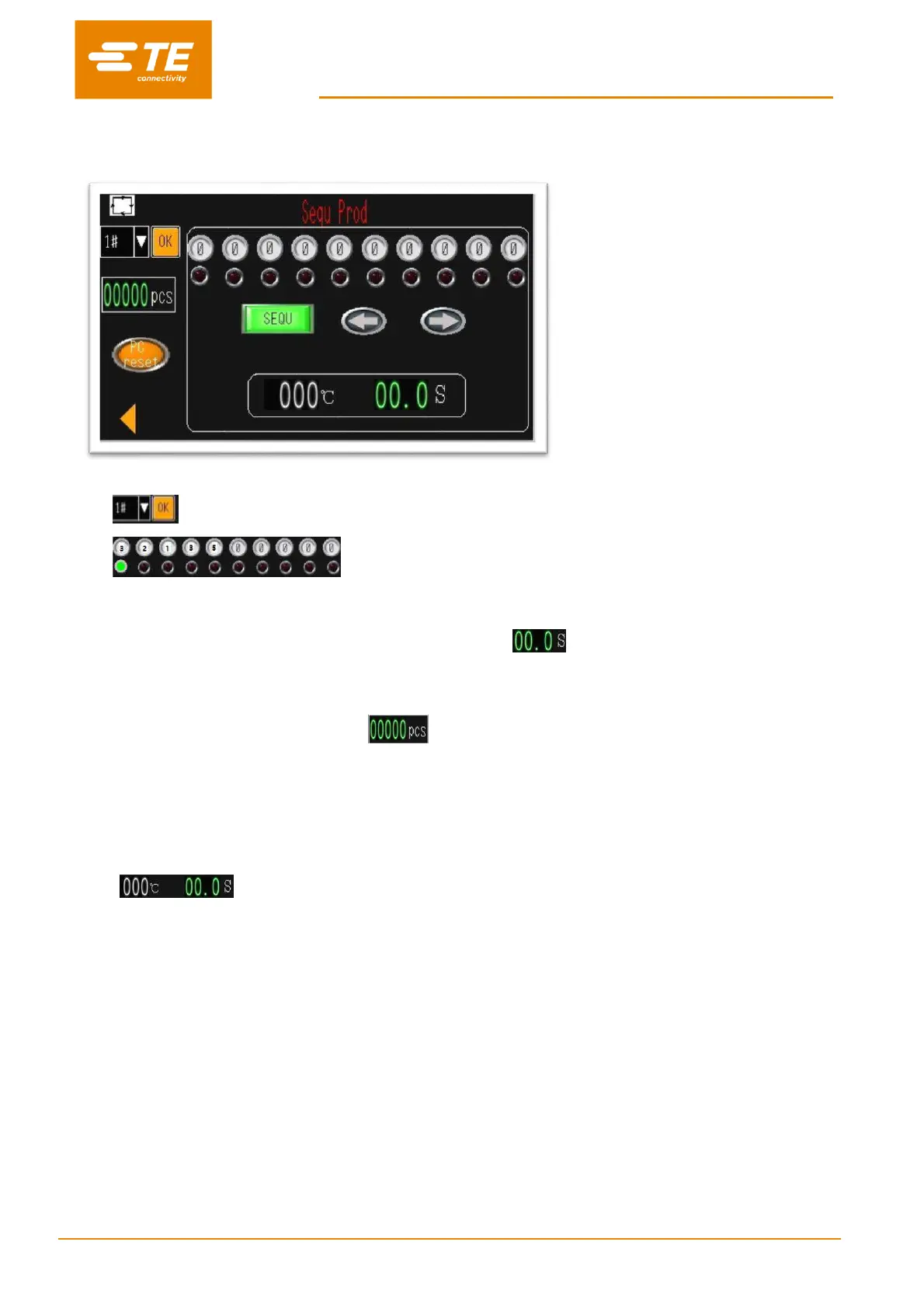
In this interface, processor entry the Sequence production mode.
To operate processor as sequence 1# (for example):
1. Click on this icon to have drop down list, to select the Sequence 1#.
2. It would show the selected button, which originally stored in sequence
1# (3
2
1
3
5). The green light will indicate the current process will run. From the beginning, the
green light will indicate the first process “3”.
3. Press and hold on both start button to start the sequence. start to count down to 0.
4. After finishing the current process 3, the green light will jump to the next process 2.
5. When we completed the last process 5, the green light will jump to the first process 3. We already
completed the first cycle, the counter will show number “1”. Processor is ready to continue the
next cycle for sequence 1#.
6. If necessary, press on the green SEQUENCE button to interrupt sequence. Then this button will show
red, no matter how many times you press on both start button, it will stay on current process. Currently
you also can press the left or right arrow to shift the current process. Unless you turn thic SEQUENCE
button back, it will continue the sequence.
Note: is showing the real temperature and time.
The orange PC RESET button, is designed to reset sequence production counter.


 To Next Page