26
3.6 Auto Calibration
Calibration of the RBK processor is carried out by using a UHI 250A probe.
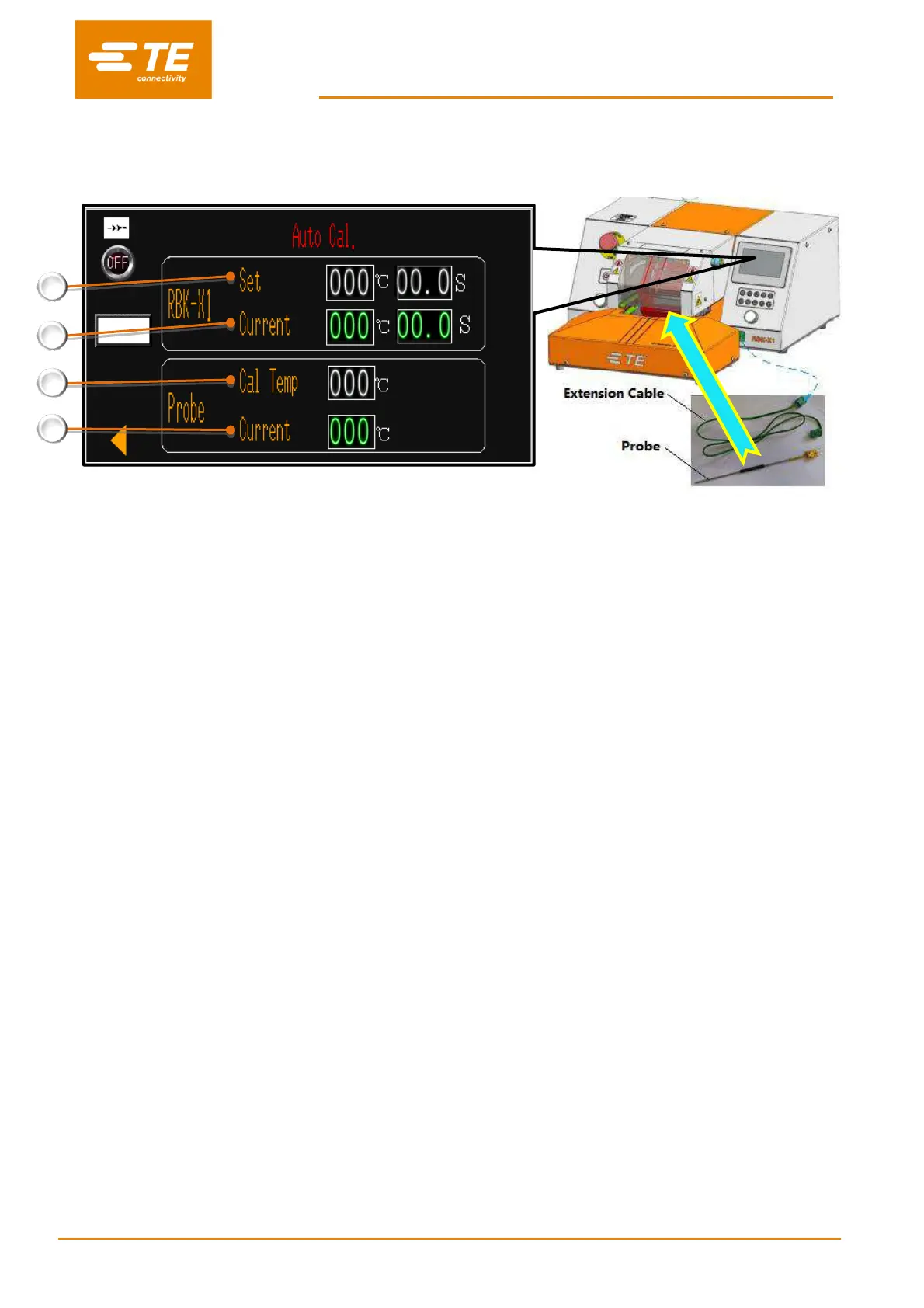
RBK-X1 “Set”
RBK processor calibration temperature and cycle time. Factory setting: 500°C @ 15S.
RBK-X1 “Current”
RBK processor real temperature and cycle time. (When calibration cycle start, cycle time will count down from 15S to 0S.)
Probe “Cal Temp”
Probe calibration value, which used to calculate RBK processor new offset value. It could be PROBE PEAK
TEMPERATURE after calibration cycle completed (MK3 calibration type), or PROBE INSTANTANEOUS
TEMPERATURE the moment when calibration cycle complete. (X1 calibration type). ----Factory setting: X1 calibration
type. Pls contact with TE if need to shift to MK3 calibration type.
Probe “Current”
Probe real temperature. It is required to cooling the probe to 23°C± 3°C before calibration cycle start. Otherwise
Automatic Calibration Procedure
1. Inactivate the “Centering” in HMI Maintenance page, connect the UHI probe to the front panel socket.
a. Touch screen entry Auto-Calibration interface automatically.
b. Processor will automatically adjust cycle heating parameter to 500ºC@15S. Allow a further 25 minutes
for processor to stabilize if the real temperature was higher or lower.
c. The UHI probe temperature must be cooled to 23+/-3 ºC.
2. Place the UHI probe centrally into the Processor jaws.
3. Initiate a process cycle by pressing both start button.
a. Timer display counts down from the (15s). UHI temperature will rise.
b. If after 5 seconds the Processor does not detect a 108C UHI. Increase of 5ºC the cycle will be
aborted. i.e. If probe is not inside heater during cycle.
4. Once the cycle is completed the UHI will be ejected.
5. DO NOT UNPLUG THE UHI PROBE WHEN IT WAS EJECTED. Before removing UHI from socket, allow
15 seconds for processor to calculate and adjust OFFSET automatically.
Note:
Calibration of the Processor can be performed at any time, however when the processor
indicated “Cal” in the Touch Screen, or replacement on heating element.
Do not repeat auto-calibration within 15 mins. Repeating this procedure within this time may
cause a large offset value to be obtained.


 To Next Page