22
3.3 Sequence Setting
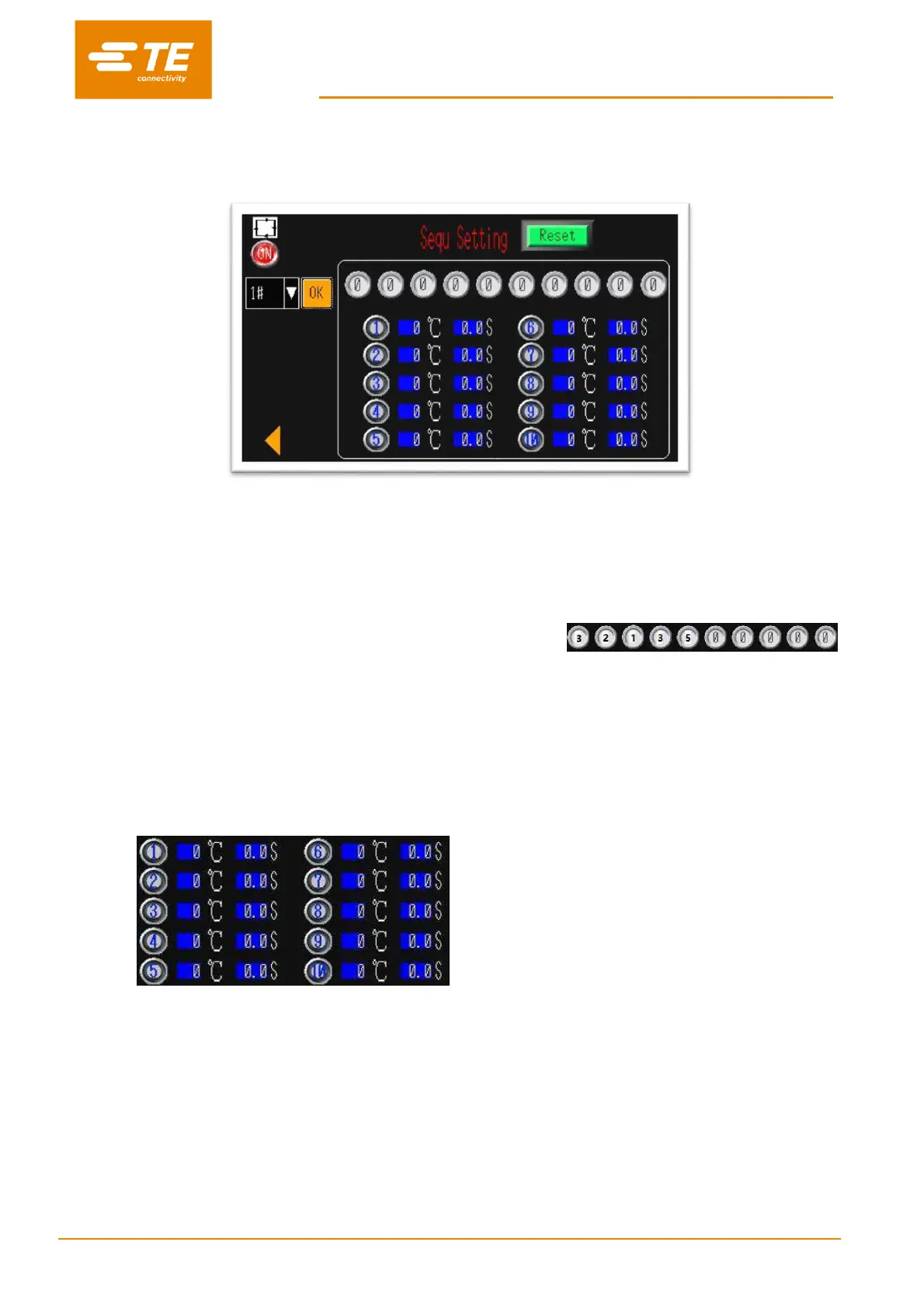
In this interface, operator can pre-set or edit Sequence stored in the 15X Sequence.
To edit the parameter stored in Sequence 1# (for example):
1. Switch OFF to ON, allow the operator to edit the parameter.
2. Click on the drop-down list to select the Sequence 1#.
3. Click on the green RESET button.
4. Press on the processor quick process buttons according to the sequence you would like to set.
(3
2
1
3
5, for example)
5. You would find the quick process button you selected will show on
Currently, touch screen can store 15X sequence. Each sequence contains 10X process.
6. Turn it back to button RESET, parameter will store in the sequence 1#
7. Switch ON to OFF, exist editing.
8. Click on LEFT ARROW button , to back to main interface.
Note: The parameter (Temperature & Time) stored in 10X quick process button can review from
below area.
It would help for editing Sequence.
Parameter editing for quick process button, refer to section 3.1 Heat Parameter


 To Next Page