31
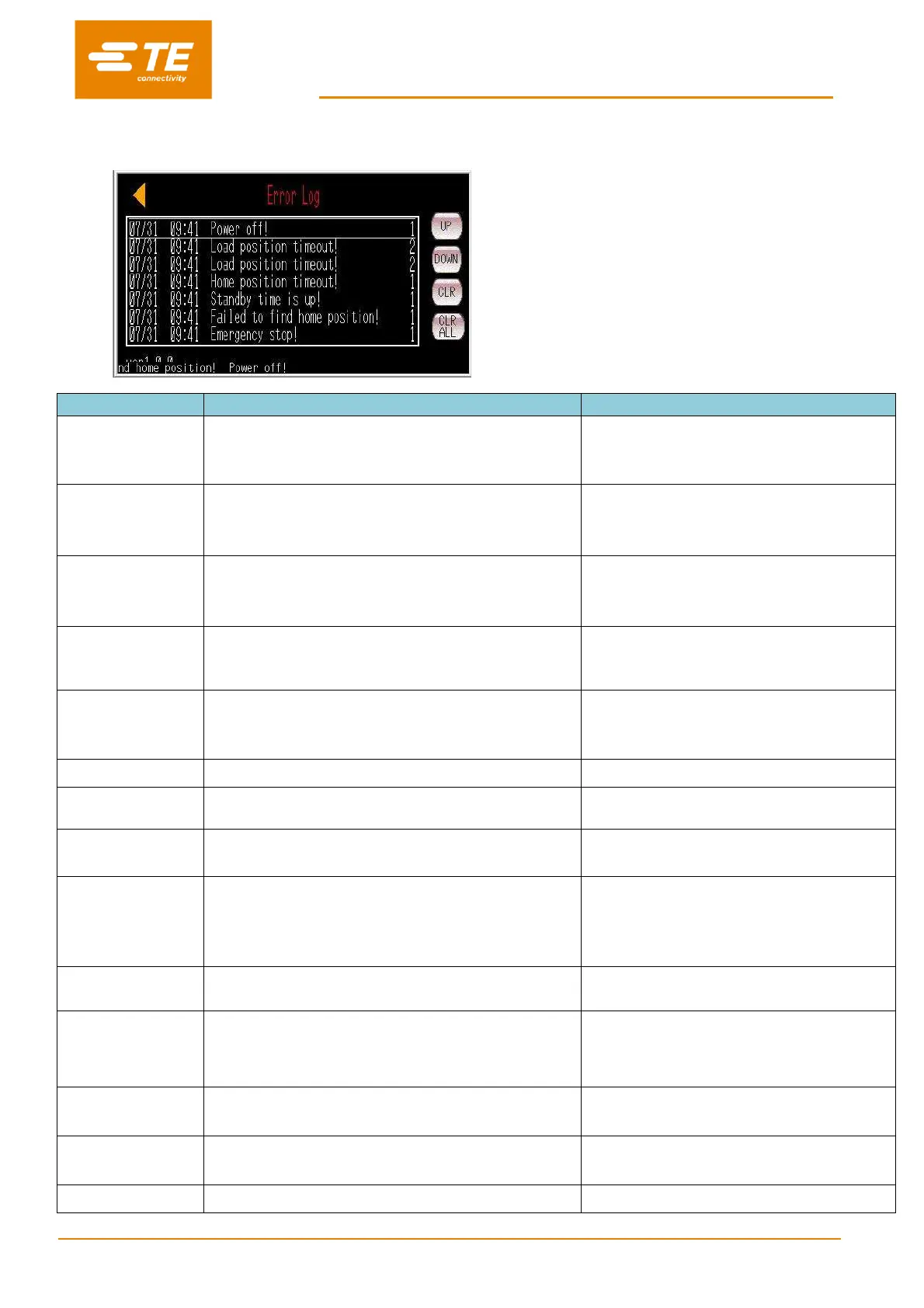
3.10 Error Log
This page will show error message on HMI. Other
processor issue please find from section 4.3
Troubleshooting
The processor isn't powered off in right process
1. Emergency stop button be pushed
2. The power supply is cut
1. Check the emergency stop button was pressed
or not
2. Check the power supply of processor
1. Load position sensor error
2. The heating chamber be jammed
3.The motor error
1. Check load position sensor
2. Check the heating chamber be jammed or not
3. Check the motor
1. Home position sensor error
2. The heating chamber be jammed
3.The motor error
1. Check home position sensor
2. Check the heating chamber be jammed or not
3. Check the motor
The time that operator doesn't operate the processor is
longer than the stan-by time, the processor is in standby
mode automatically
Press the IO button for 5s to power on the
processor
Failed to find home
position!
When power on the processor the heating chamber isn't
on home position, and push two hands buttons, the
heating chamber can't back to home position
1. Check home position sensor
2. Check the heating chamber be jammed or not
3. Check the motor
Emergency stop button be pushed
Release the emergency stop button
Setting temperature
too high!
Setting temperature value is higher than 675℃
Reset the temperature value lower than 675℃
Actual temperature is higher than 675℃
1. Check the temp sensor
2. Check the temp controller
Temp controller
comm error!
1. The communication cable between PLC and temp
controller is damaged
2. The PLC communication port is damaged
3. The temp controller error
1. Check the communication cable between PLC
and temp controller
2. Check the PLC communication port
3. Check the temp controller
Temperature error!
Check heating circuit!
Actual Temperature is higher than set temperature 10℃ or
lower than set temperature 10℃
Check the connect between temperature
controller and PLC
After 90s, actual temperature is lower than 180℃ when
set temperature is higher than 200℃
1. Check solid-state relay
2. Check Master control relay
3. Replace the master control relay.
1. Probe up/down sensor error
2. Inner connection of CD cable fail
1. Check the sensor
2. Reconnect the cable from top front cover
T/P to side/center
alarm!
1. T/P side/center sensor error.
2. Outer connection of CD cable fail
1. Check the sensor
2. Reconnect the outer CD cable
1. Push tube sensor error.


 To Next Page