32
3.11 Circle Test
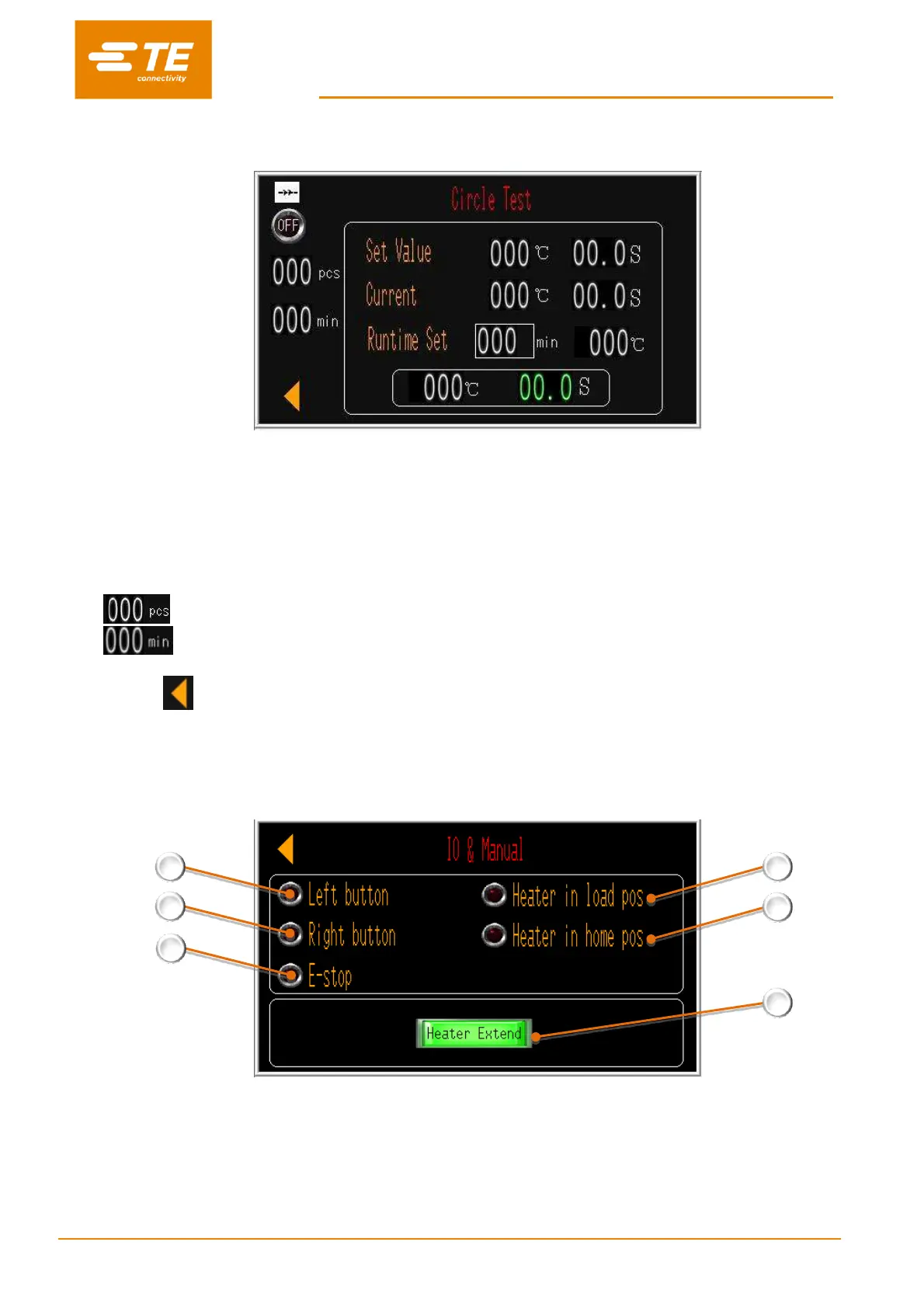
This is a testing interface, which was designed to test the RBK processor to run cycle in 500
o
C/0.2S for 60
min. So as to make sure processor work well before leaving factory.
To start the circle test:
1. Switch OFF to ON.
2. Edit the test time if need on RUNTIME SET, default value 60 min.
3. Press both start button to activate Circle test.
4. When time discount from 60 min to 0, test cycle will stop automatically.
5. will show the total cycle the CIRCLE TEST work.
6. will show the total time the CIRCLE TEST work.
7. Switch ON to OFF, exist editing.
8. Click on , to back to main interface.
3.12 I/O & Manual
This is an I/O page when input signal from those action.
1. When pressing on left start button, this icon will illuminate green.
2. When pressing on right start button, this icon will illuminate green.
3. When pressing on E-stop button, this icon will illuminate green.
4. When heater in load position, this icon will illuminate green.
5. When heater in home position, this icon will illuminate green.
6. Press on this button, heater will move to forward to load position. Press on this button again, heater will


 To Next Page