20
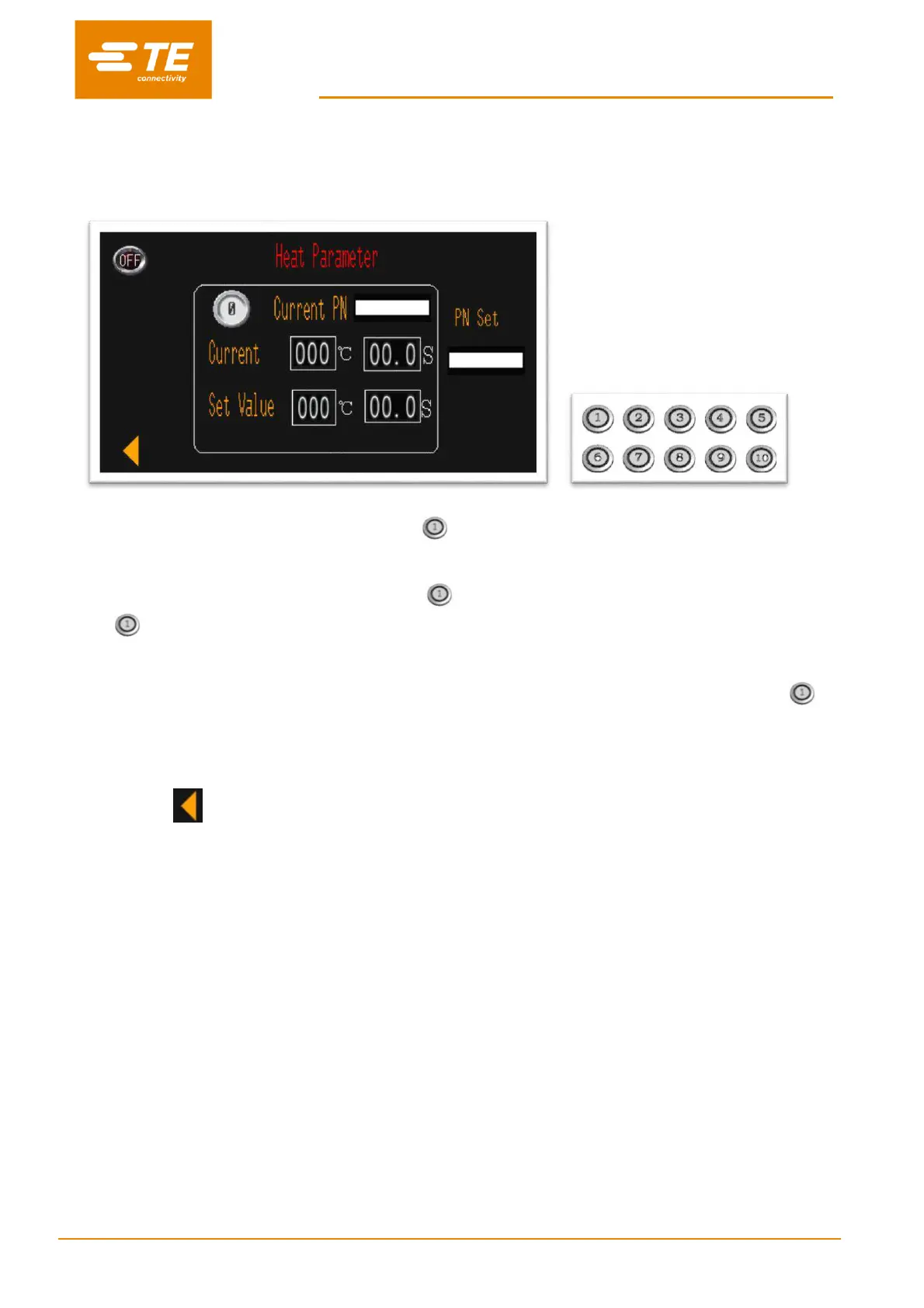
3.1 Heat parameter
In this interface, operator can pre-set or edit heat parameter (product size/heat temperature/heat time) stored
in the 10X quick process buttons.
To edit the parameter stored in quick process button (for example):
1. Switch button OFF to ON from top left, allow the operator to edit the parameter.
2. Press on the processor quick process button , then you would find the original parameter stored in
will show on CURRENT PN and SET VALUE
3. Click on the value of SET VALUE, to input the new value.
4. Press on the quick process button for 5 seconds, to upload new parameter to quick process button
. You would find the CURRENT parameter would change to SET VALUE. New parameter was
successfully modified.
5. Switch ON to OFF, to exit editing.
6. Click on , to back to main interface.
Note: Temperature and time showing in CURRENT area, is showing current cycle parameter which the
processor is carrying out.


 To Next Page