34
3.14 Barcode scanning
Barcode scanning can help processor to get the product’s heating parameter (Temperature/time…) by reading
the barcode attached on the product, then upload and change current heating parameter to processor
accordingly.
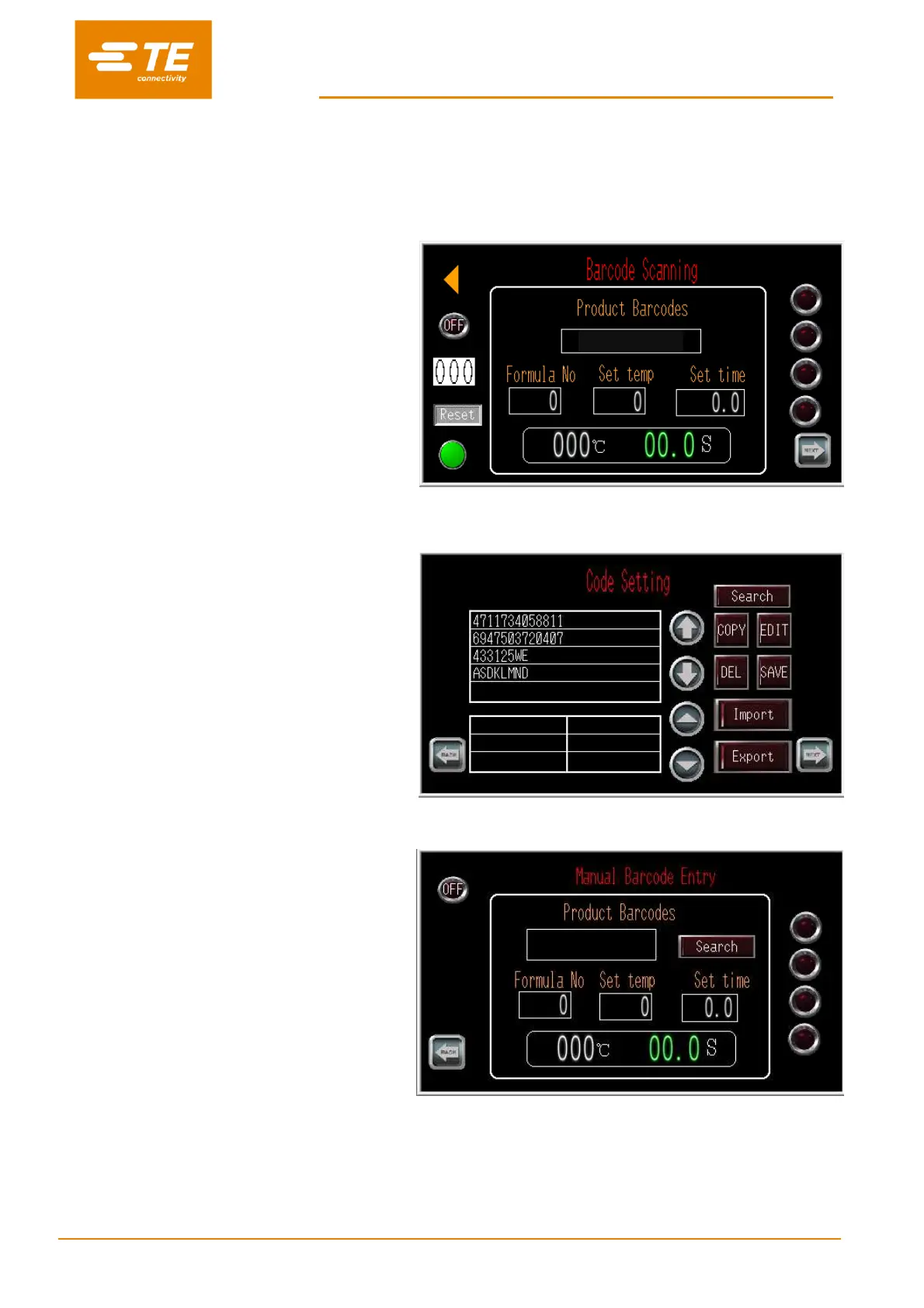
(1) Login on from main interface as User ID
“C”, select BARCODE SCANNING to
access to the interface in right picture
shown.
In this page, processor can work with
Barcode scanning function.
(2) Click next page button from Barcode
Scanning interface, to access to CODE
SETS interface.
In this page, operator can pre-set or edit
barcode parameter.
Note: Operator need to pre-set barcode
parameter in this page before using
barcode scanning function. Otherwise
processor pop up error message in touch
panel.
(3) Click next page button from CODE SETS
interface, to access to QR CODE
READING OPERATION interface.
In case of any reading fail on barcode
scanning, this page would allow operator to
input barcode parameter manually.
Note: More detail on barcode scanning, ask for instruction from TE.


 To Next Page