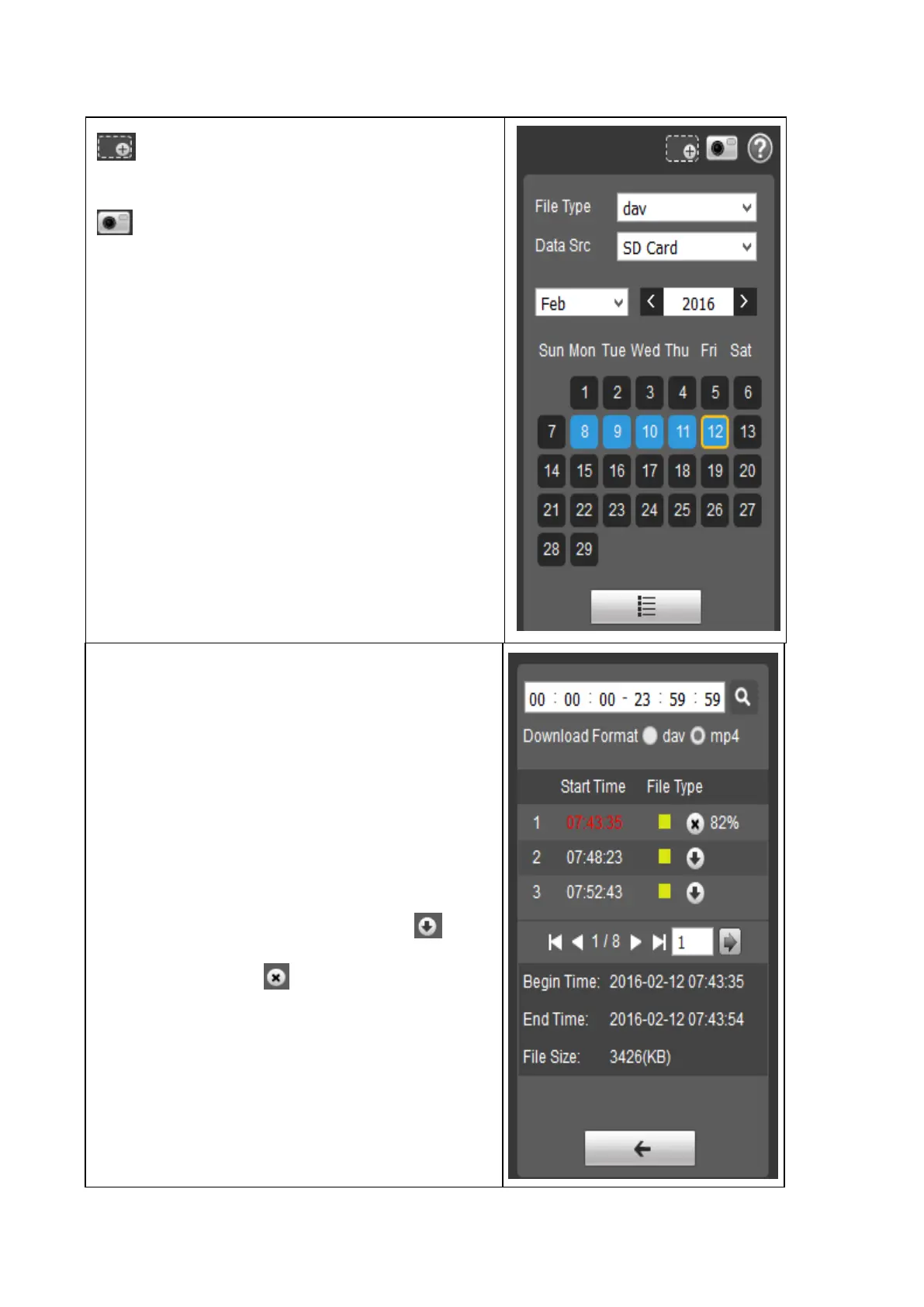
Digital zoom - Click it, to activate the
function (6.3 Live / Digital Zoom).
Snapshot - Click it, to take a picture of the
recorded video you are watching.
File Type: Switch between picture (jpg) and
video (dav) files.
Data Src: Pick SD- card, this is where the
recorded files are saved.
Calendar: Pick the date which you would like to
view the recorded files. The blue dates show
you when the camera has recorded
pictures/videos.
By clicking the button under the calendar you
are going to see the menu below.
Time: Choose the time of the day to see the
recorded videos.
Download Format: Choose mp4, it is possible
to view this video format with different common
players.
Start Time: Sows when the recording started
(time red = selected video and time blue =
video is played).
File Type: Shows how the video was started/
triggered (yellow = motion, red = alarm and blue
= manual). Start the download press . Stop
the download press .
File Size: shows the size of the video file.
By clicking the button with the arrow you are
going back to the calendar menu.


 To Next Page