EasyManua.ls Logo

Technics SC-S2350 - Page 11

Technics SC-S2350
60 pages
Print Icon
To Next Page IconTo Next Page
To Previous Page IconTo Previous Page
Loading...
|
Speaker
connections
|
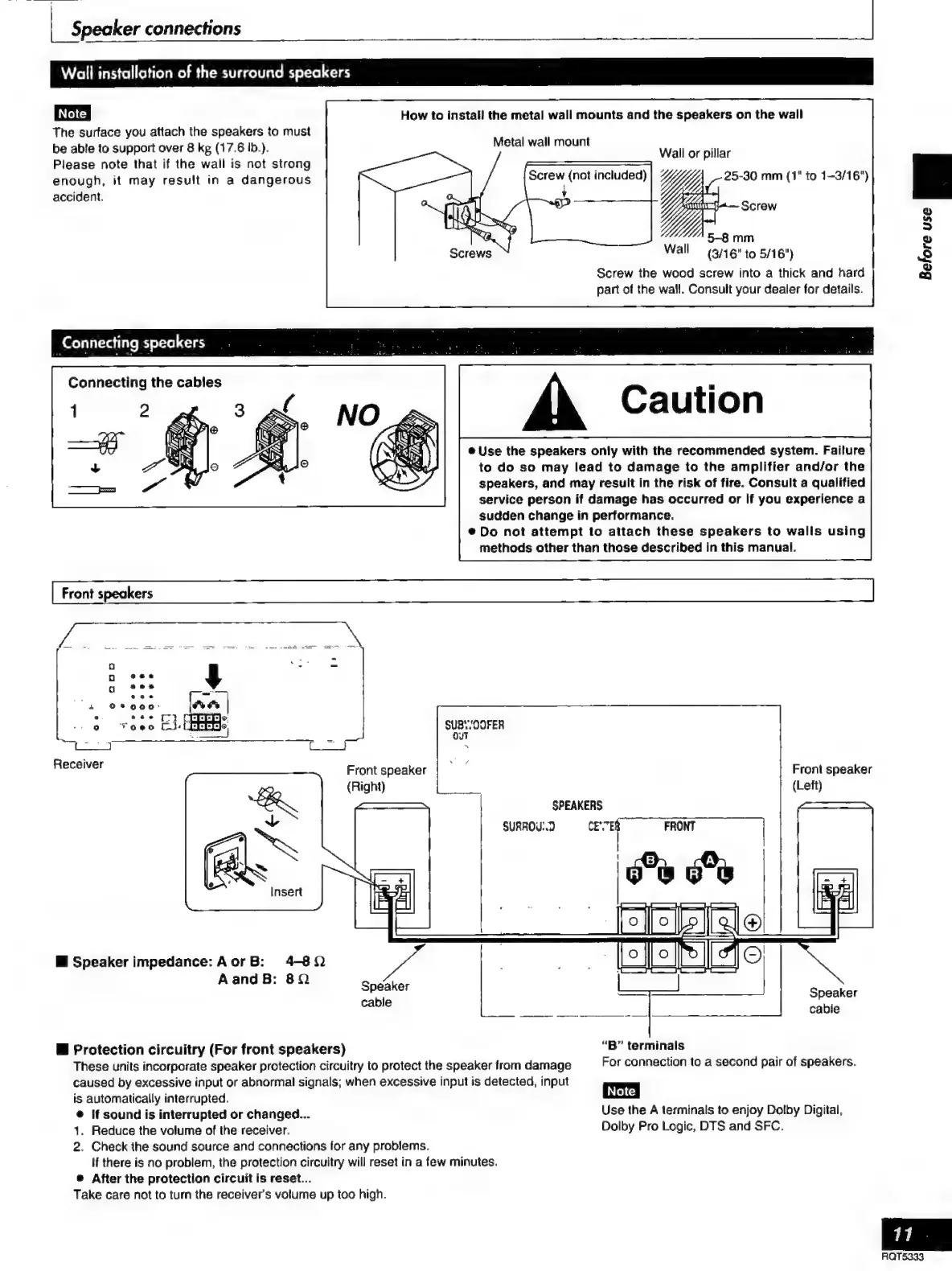
Wall
installation
of
the
surround
speakers
|
Note
|
How
to
install
the
metal
wall
mounts
and
the
speakers
on
the
wall
The
surface
you
attach
the
speakers
to
must
be
able
to
support
over
8
kg
(17.6
tb.).
Metal
wall
mount
,
;
;
Wall
or
pillar
Please
note
that
if
the
wall
is
not
strong
i
enough,
it
may
result
in
a
dangerous
i
a
included)
a
25-30
mm
(1"
to
1-3/16")
accident.
Screw
pr
5-8
mm
Wall
(3/16"to
5/16")
Screw
the
wood
screw
into
a
thick
and
hard
part
of
the
wall.
Consult
your
dealer
for
details.
:
Connecting
speakers
Connecting
the
cables
Caution
e
Use
the
speakers
only
with
the
recommended
system.
Failure
to
do
so
may
lead
to
damage
to
the
amplifier
and/or
the
speakers,
and
may
result
in
the
risk
of
fire.
Consult
a
qualified
service
person
if
damage
has
occurred
or
if
you
experience
a
sudden
change
in
performance.
e
Do
not
attempt
to
attach
these
speakers
to
walls
using
methods
other
than
those
described
in
this
manual.
=
Receiver
Front
speaker
(Right)
Front
speaker
(Left)
E
Speaker
impedance:
Aor
B:
4-82
AandB:
8Q
Speaker
cable
E
Protection
circuitry
(For
front
speakers)
“B”
terminals
These
units
incorporate
speaker
protection
circuitry
to
protect
the
speaker
from
damage
For
connection
to
a
second
pair
of
speakers.
caused
by
excessive
input
or
abnormal
signals;
when
excessive
input
is
detected,
input
is
automatically
interrupted.
ma
è
If
sound
is
interrupted
or
changed...
Use
the
A
terminals
to
enjoy
Dolby
Digital,
1.
Reduce
the
volume
of
the
receiver.
Dolby
Pro
Logic,
DTS
and
SFC.
2.
Check
the
sound
source
and
connections
for
any
problems.
If
there
is
no
problem,
the
protection
circuitry
will
reset
in
a
few
minutes.
e
After
the
protection
circuit
is
reset...
Take
care
not
to
turn
the
receiver's
volume
up
too
high.
Before
use
BE

Related product manuals