EasyManua.ls Logo

Technics SC-S2350 - To Fast-Forward or Rewind the Tape

Technics SC-S2350
60 pages
Print Icon
To Next Page IconTo Next Page
To Previous Page IconTo Previous Page
Loading...
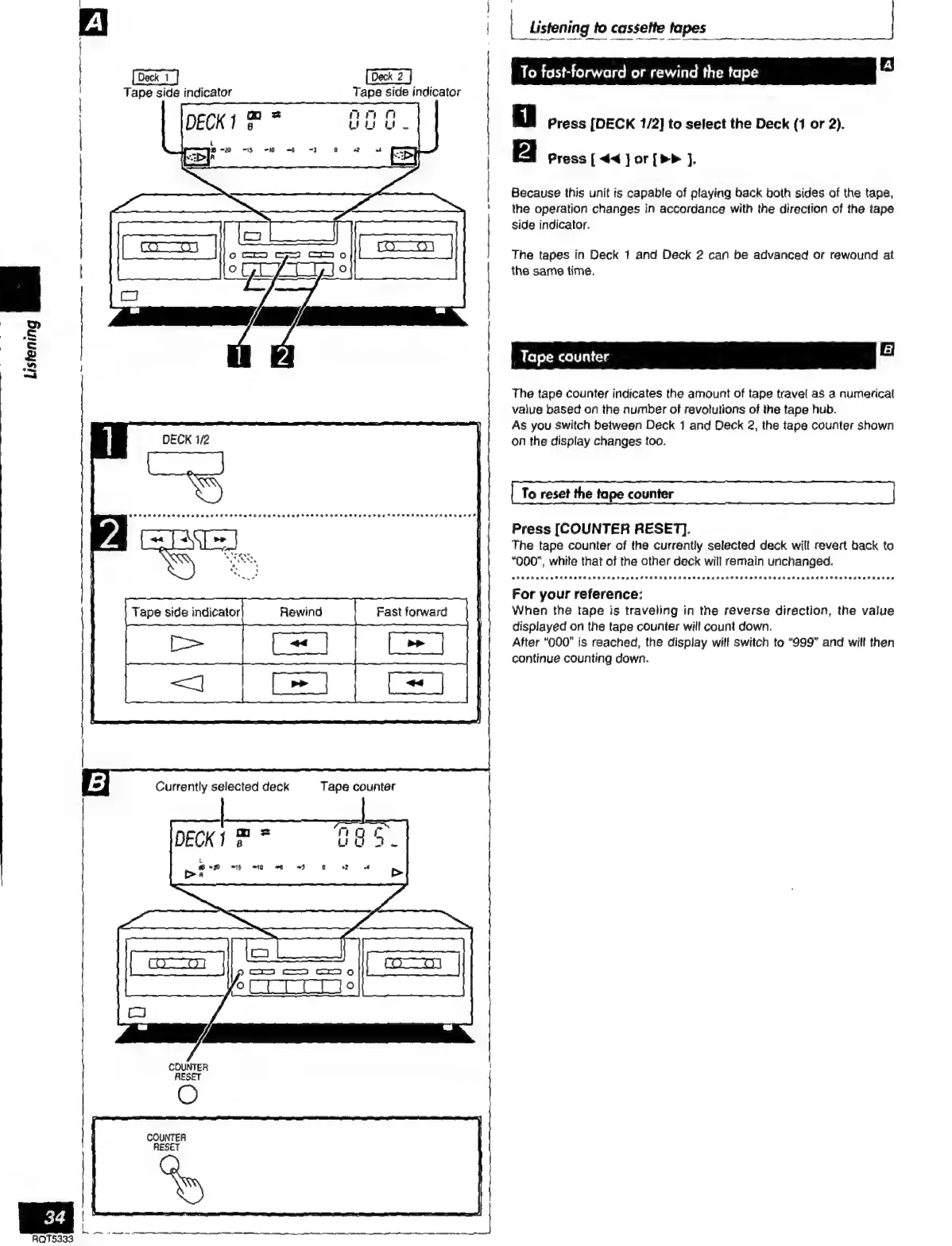
To
fast-forward
or
rewind
the
tape
Tape
side
indicator
Tape
side
indicator
Press
[DECK
1/2]
to
select
the
Deck
(1
or
2).
Press
[
««
j
or
[»»
].
Because
this
unit
is
capable
of
playing
back
both
sides
of
the
tape,
the
operation
changes
in
accordance
with
the
direction
of
the
tape
side
indicator.
The
tapes
in
Deck
1
and
Deck
2
can
be
advanced
or
rewound
at
the
same
time.
i
1
A
|
_
listening
to
cassette
tapes
|
|
|
|
|
ETT
E
The
tape
counter
indicates
the
amount
of
tape
travel
as
a
numerical
value
based
on
the
number
of
revolutions
of
the
tape
hub.
As
you
Switch
between
Deck
1
and
Deck
2,
the
tape
counter
shown
DECK
1/2
on
the
display
changes
too.
.
To
reset
the
tape
counter
PRADA
Hat
IRA
METH
P
APA
Aaa
UPA
RARA
AAA
sara
an
DOYS
Press
[COUNTER
RESET].
NES
:
The
tape
counter
of
the
currently
selected
deck
will
revert
back
ta
RS
|
“000”,
while
that
of
the
other
deck
will
remain
unchanged.
.
eS
POR
P
Aaa
RHEE
AA
ARA
AAA
AAA
rar
IEA
AA
A
rra
Ara
Ara
ra
1
,
For
your
reference:
When
the
tape
is
traveling
in
the
reverse
direction,
the
value
displayed
on
the
tape
counter
will
count
down.
After
“000”
is
reached,
the
display
will
switch
to
“999”
and
will
then
continue
counting
down.
Currently
selected
deck
Tape
counter
Do
2
DECK!
5
e
“ff
=t}
«10
~)
G
2
-+
>
COUNTER
l
RESET
COUNTER
RESET
RQT5333

Related product manuals