EasyManua.ls Logo

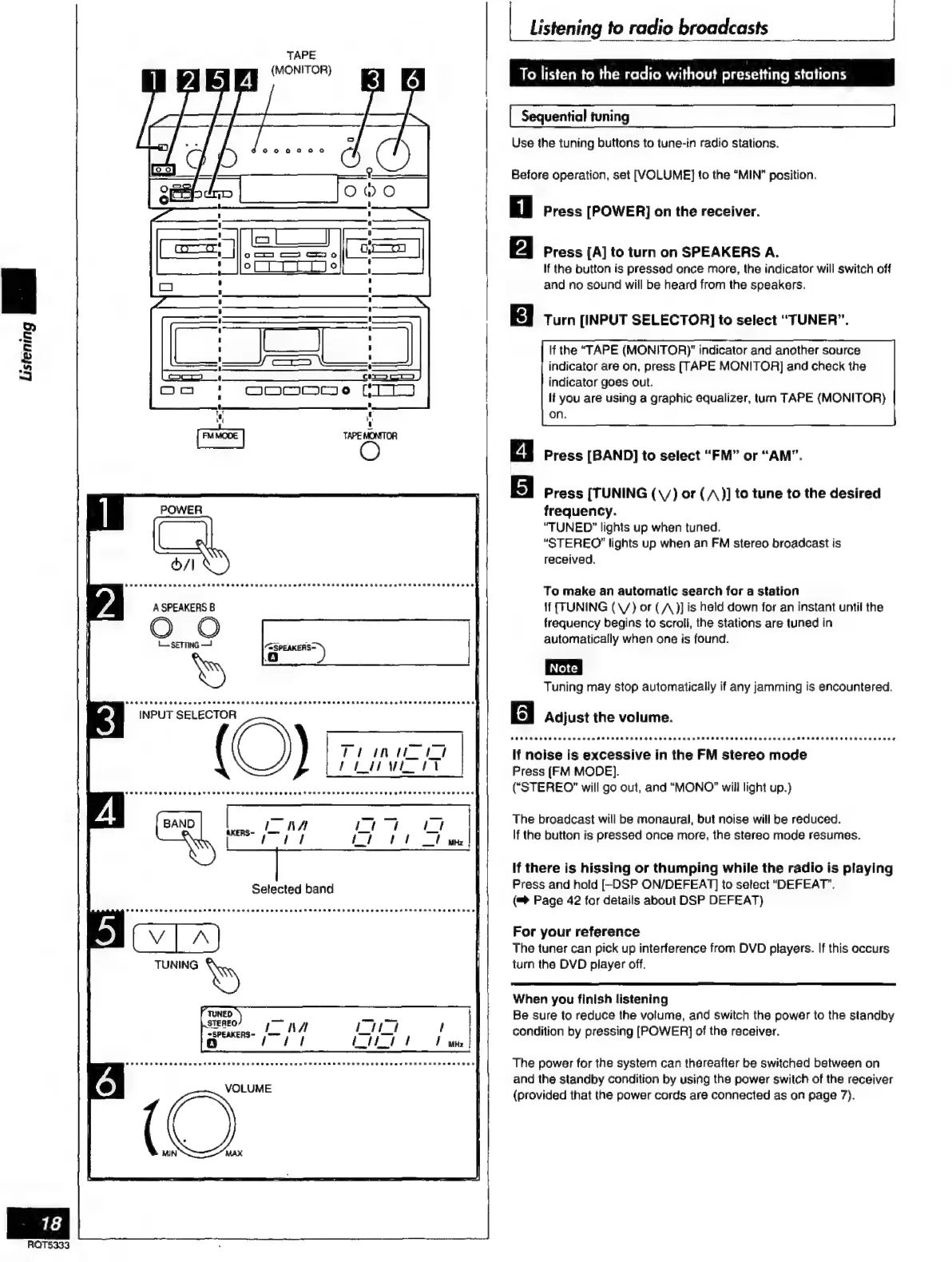
Technics SC-S2350 - Listening to Radio Broadcasts Oo; To Listen to the Radio Without Presetting Stations; Cceeeeeeeees

Technics SC-S2350
60 pages
Print Icon
To Next Page IconTo Next Page
To Previous Page IconTo Previous Page
Loading...
2
È
2
A
=i
18
ROT5333
TAPE
(MONITOR)
O
H
0 i
I
0
:
=
(a
u
of
INPUT
SELECTOR
(O)
un
A
|
tit
t
VOLUME
(Q
|
Listening
to
radio
broadcasts
|
To
listen
to
the
radio
without
presetting
stations
Sequential
tuning
Use
the
tuning
buttons
to
tune-in
radio
stations.
Before
operation,
set
[VOLUME]
to
the
“MIN”
position.
Press
[POWER]
on
the
receiver.
Press
[A]
to
turn
on
SPEAKERS
A.
If
the
button
is
pressed
once
more,
the
indicator
will
switch
off
and
no
sound
will
be
heard
from
the
speakers.
Turn
(INPUT
SELECTOR]
to
select
“TUNER”.
If
the
“TAPE
(MONITORY
indicator
and
another
source
indicator
are
on,
press
[TAPE
MONITOR]
and
check
the
indicator
goes
out.
lf
you
are
using
a
graphic
equalizer,
turn
TAPE
(MONITOR)
on.
Press
[BAND]
to
select
“FM”
or
“AM”.
Gl
E
Press
[TUNING
(y)
or
(/1)]
to
tune
to
the
desired
frequency.
“TUNED”
lights
up
when
tuned.
“STEREO”
lights
up
when
an
FM
stereo
broadcast
is
received.
To
make
an
automatic
search
for
a
station
If
(TUNING
(V)
or
(A
)]
is
held
down
for
an
instant
until
the
frequency
begins
to
scroll,
the
stations
are
tuned
in
automatically
when
one
is
found.
Tuning
may
stop
automatically
if
any
jamming
is
encountered.
g
Adjust
the
volume.
tetesovvvevasvovas
ASP
AHP
HOES
rra
rra
Peeeeeeaerevanaonane
EE
AAA
RATE]
.
If
noise
is
excessive
in
the
FM
stereo
mode
Press
[FM
MODE].
(“STEREO”
will
go
out,
and
“MONO”
will
light
up.)
The
broadcast
will
be
monaural,
but
noise
will
be
reduced.
If
the
button
is
pressed
once
more,
the
stereo
mode
resumes.
If
there
is
hissing
or
thumping
while
the
radio
is
playing
Press
and
hold
[-DSP
ON/DEFEAT]
to
select
“DEFEAT”.
(=>
Page
42
for
details
about
DSP
DEFEAT)
For
your
reference
The
tuner
can
pick
up
interference
from
DVD
players.
If
this
occurs
turn
the
DVD
player
off.
When
you
finish
listening
Be
sure
to
reduce
the
volume,
and
switch
the
power
to
the
standby
condition
by
pressing
[POWER]
of
the
receiver.
The
power
for
the
system
can
thereafter
be
switched
between
on
and
the
standby
condition
by
using
the
power
switch
of
the
receiver
(provided
that
the
power
cords
are
connected
as
on
page
7).

Related product manuals