EasyManua.ls Logo

Technics SC-S2350 - Listening to Cassette Tapes Oe

Technics SC-S2350
60 pages
Print Icon
To Next Page IconTo Next Page
To Previous Page IconTo Previous Page
Loading...
|
Listening
to
cassette
tapes
|
Types
of
tapes
which
can
be
played
on
this
unit:
Normal
postion
TVET
High
posiion/TYPETI
Metal
position/TYPE
IV
The
unit
automatically
identifies
the
type
of
tape.
The
procedures
described
below
are
an
example
of
playback
on
Deck
1.
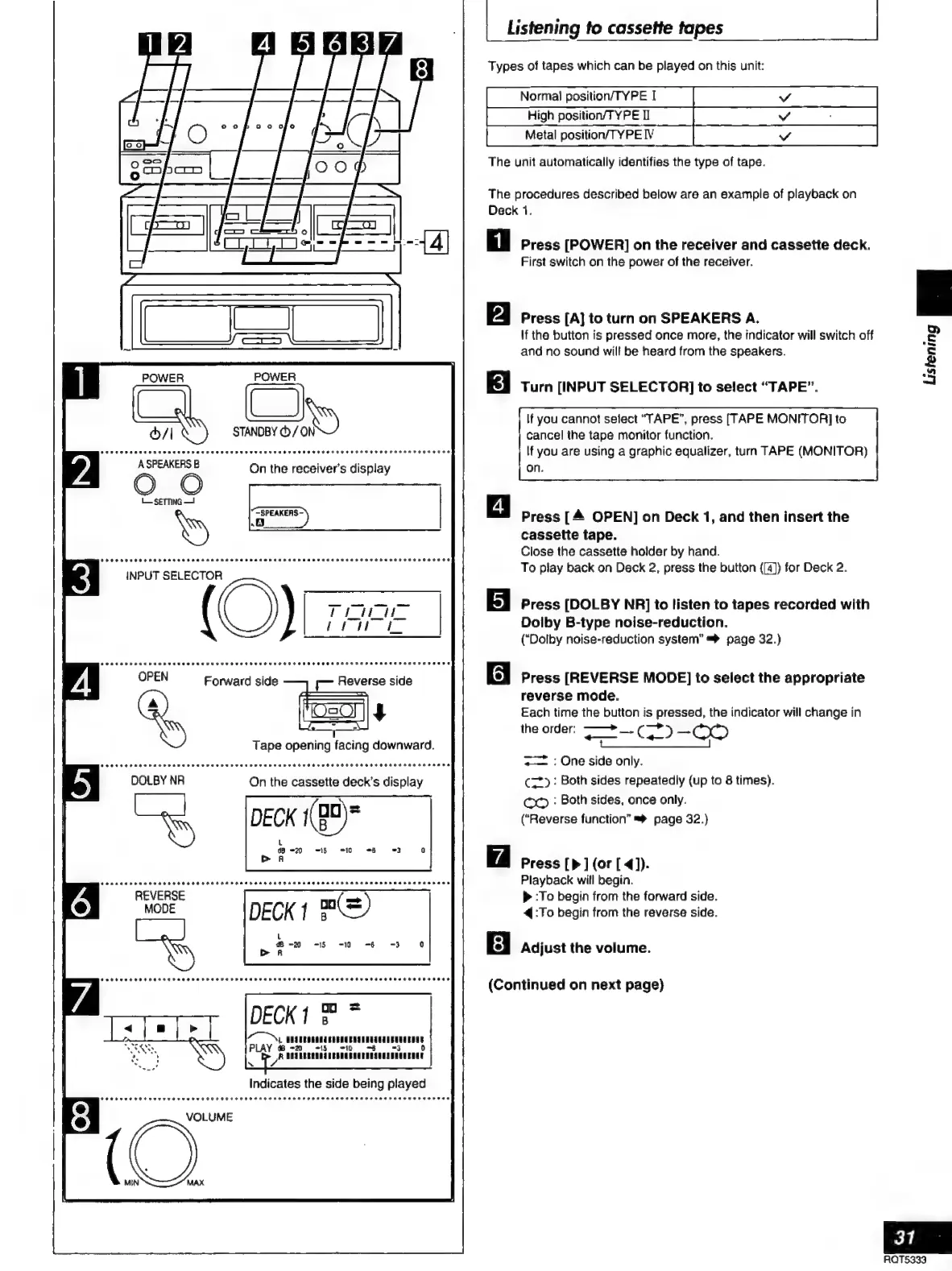
Press
[POWER]
on
the
receiver
and
cassette
deck.
First
switch
on
the
power
of
the
receiver.
a
Press
[A]
to
turn
on
SPEAKERS
A.
If
the
button
is
pressed
once
more,
the
indicator
will
switch
off
2
E
$
pl
and
no
sound
will
be
heard
from
the
speakers.
Turn
[INPUT
SELECTOR]
to
select
“TAPE”.
If
you
cannot
select
“TAPE”,
press
[TAPE
MONITOR]
to
cancel
the
tape
monitor
function.
If
you
are
using
a
graphic
equalizer,
turn
TAPE
(MONITOR)
on.
On
the
receiver's
display
=
|
Press
[A
OPEN]
on
Deck
1,
and
then
insert
the
cassette
tape.
Close
the
cassette
holder
by
hand.
INPUT
SELECTOR
To
play
back
on
Deck
2,
press
the
button
([4))
for
Deck
2.
~
Press
[DOLBY
NR]
to
listen
to
tapes
recorded
with
Dolby
B-type
noise-reduction.
(‘Dolby
noise-reduction
system”
=>
page
32.)
OPEN
Forward
side
Reverse
side
6
|
Press
[REVERSE
MODE]
to
select
the
appropriate
reverse
mode.
Each
time
the
button
is
pressed,
the
indicator
will
change
in
.
the
order:
——+__
Caco
-0O
Z
:
One
side
only.
C=”):
Both
sides
repeatedly
(up
to
8
times).
CO
:
Both
sides,
once
only.
(“Reverse
function”
=%
page
32.)
Press
[p
]
(or
[
4]).
Playback
will
begin.
REVERSE
»
:To
begin
from
the
forward
side.
MODE
4
:To
begin
from
the
reverse
side.
El
Adjust
the
volume.
(Continued
on
next
page)
DECK
1
*
CN
AROMA
EBRO
ERA
RANA
EUA
PLAY
Ye
~
-5
710
=$
-3
0
A
DOTEERQDATUEERG
BACK
INIA
NNUU
ENOE
Indicates
the
side
being
played
31
AQTS333

Related product manuals