EasyManua.ls Logo

Technics SC-S2350 - Disc Grouping Play on O

Technics SC-S2350
60 pages
Print Icon
To Next Page IconTo Next Page
To Previous Page IconTo Previous Page
Loading...
Í
|
|
Listening
to
compact
discs
|
“Disc
grouping
play
With
disc
grouping
play,
you
can
register
discs
into
any
of
the
five
available
groups
(A-E)
and
then
play only
the
discs
in
a
specific
group.
e
The
same
disc
can
be
registered
in
as
many
groups
as
you
like.
e
Each
group
can
hold
up
to
60
discs.
e
You
can
name
each
group.
To
make
groups
DISC
GROUPING
PLAY
{In
the
stop
mode)
MOM
Press
[DISC
SKIP
(-)
or
(+)]
to
select
the
disc.
7
e
You
cannot
select
slot
No.
0.
DISC
SKIP
e
The
changer
skips
over
empty
slots.
Listening
UN
For
your
reference
NS
You
can
also
select
a
disc
number
by
using
the
remote
control.
(=>
page
24.)
Press
[GROUP
ENTER].
EN
GROUP
ENTER
[Within
7
seconds]
Press
the
[DISC
GROUPING
PLAY]
button
you
want.
(This
inputs
the
disc
in
the
group.)
For
example:
To
input
disc
in
group
A.
Press
[A]
.
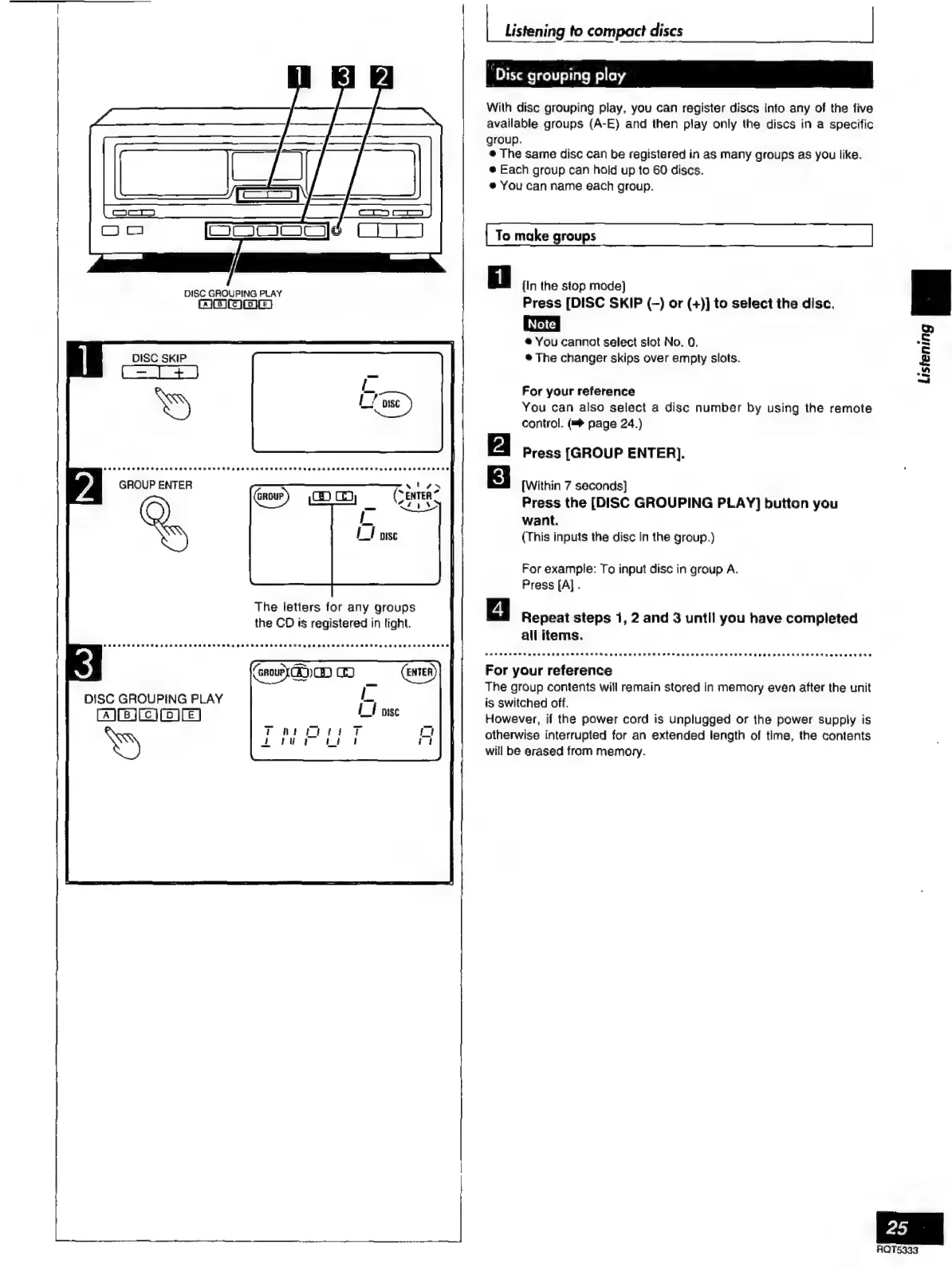
The
letters
for
any
groups
the
CD
is
registered
in
tight.
Repeat
steps
1,
2
and
3
until
you
have
completed
all
items.
For
your
reference
The
group
contents
will
remain
stored
in
memory
even
after
the
unit
DISC
GROUPING
PLAY
is
switched
off.
AERE]
However,
if
the
power
cord
is
unplugged
or
the
power
supply
is
otherwise
interrupted
for
an
extended
length
of
time,
the
contents
will
be
erased
from
memory.

Related product manuals