EasyManua.ls Logo

Technics SC-S2350 - Troubleshooting Guide

Technics SC-S2350
60 pages
Print Icon
To Next Page IconTo Next Page
To Previous Page IconTo Previous Page
Loading...
Reference
a
56
RQT§333
|
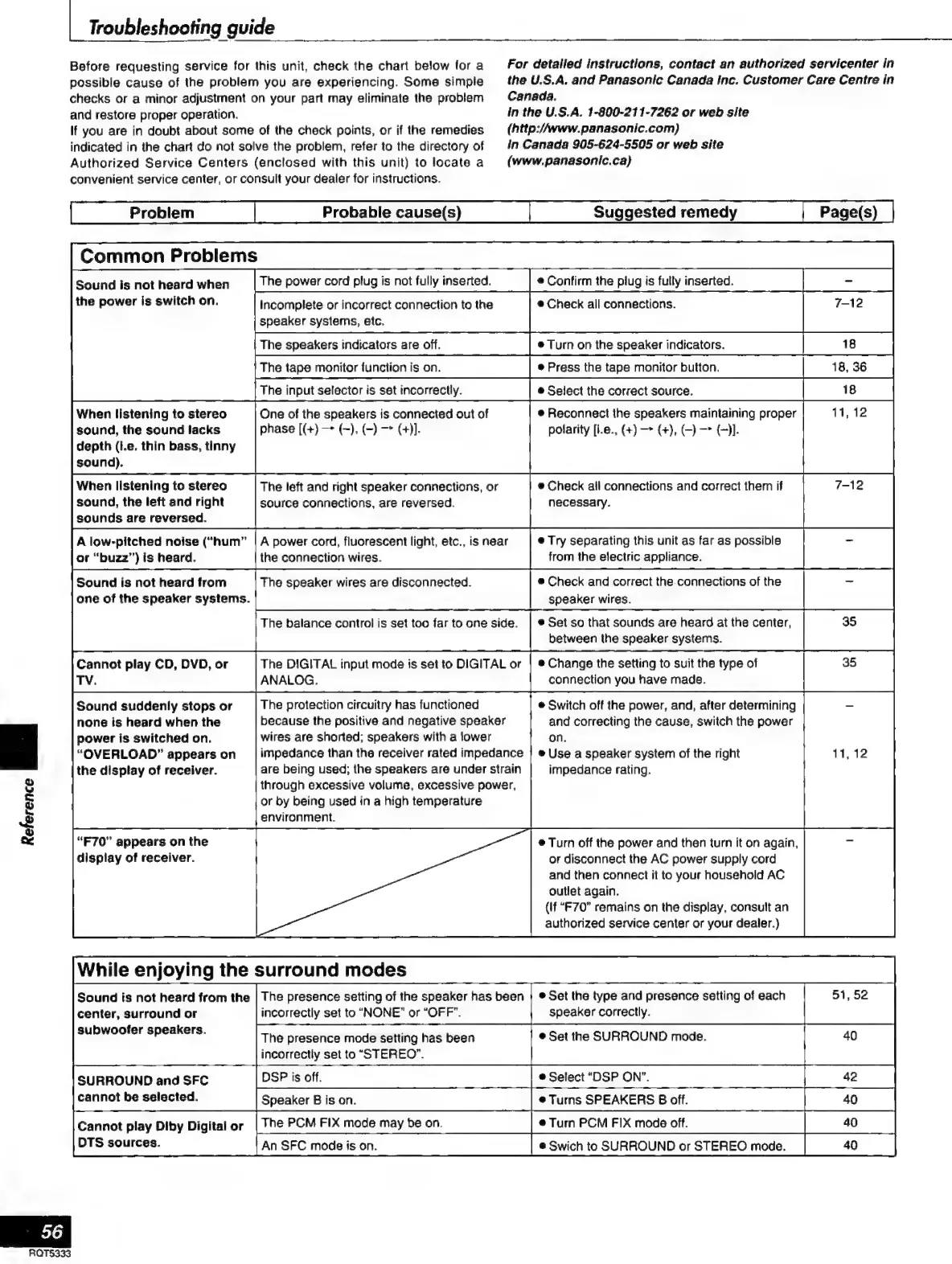
Troubleshooting
guide
Before
requesting
service
for
this
unit,
check
the
chart
below
for
a
possible
cause
of
the
problem
you
are
experiencing.
Some
simple
checks
or
a
minor
adjustment
on
your
part
may
eliminate
the
problem
and
restore
proper
operation.
If
you
are
in
doubt
about
some
of
the
check
points,
or
if
the
remedies
indicated
in
the
chart
do
not
solve
the
problem,
refer
to
the
directory
of
Authorized
Service
Centers
(enclosed
with
this
unit)
to
locate
a
For
detalled
instructions,
contact
an
authorized
servicenter
in
the
U.S.A.
and
Panasonic
Canada
Inc.
Customer
Care
Centre
in
Canada.
in
the
U.S.A.
1-800-211-7262
or
web
site
convenient
service
center,
or
consult
your
dealer
for
instructions.
Probable
cause(s)
Suggested
remedy
Page(s)
Common
Problems
Sound
is
not
heard
when
the
power
is
switch
on.
When
listening
to
stereo
sound,
the
sound
lacks
depth
(i.e.
thin
bass,
tinny
sound).
When
listening
to
stereo
sound,
the
left
and
right
sounds
are
reversed.
A
low-pitched
noise
(“hum”
or
“buzz”)
is
heard.
Sound
is
not
heard
from
one
of
the
speaker
systems.
Cannot
play
CD,
DVD,
or
TV.
Sound
suddenly
stops
or
none
is
heard
when
the
power
is
switched
on.
“OVERLOAD”
appears
on
the
display
of
receiver.
“F70"
appears
on
the
display
of
receiver.
(http://www.
panasonic.com)
in
Canada
905-624-5505
or
web
site
(www.panasonic.ca}
The
power
cord
plug
is
not
fully
inserted.
e
Confirm
the
plug
is
fully
inserted.
Incomplete
or
incorrect
connection
to
the
e
Check
all
connections.
7-12
speaker
systems,
etc.
The
speakers
indicators
are
off.
e
Turn
on
the
speaker
indicators.
oas
|
The
tape
monitor
function
is
on.
e
Press
the
tape
monitor
button.
18,
36
The
input
selector
is
set
incorrectly.
e
Select
the
correct
source.
¡MBA
One
of
the
speakers
is
connected
out
of
phase
[(+)
(~),
(-)
(+)].
The
left
and
right
speaker
connections,
or
source
connections,
are
reversed.
e
Reconnect
the
speakers
maintaining
proper
11,
12
polarity
[i.e.,
(+)
(+),
-)—>
(1.
|
e
Check
all
connections
and
correct
them
if
necessary.
A
power
cord,
fluorescent
light,
etc.,
is
near
e
Try
separating
this
unit
as
far
as
possible
the
connection
wires.
from
the
electric
appliance.
The
speaker
wires
are
disconnected.
e
Check
and
correct
the.connections
of
the
speaker
wires.
The
balance
control
is
set
too
far
to
one
side.
|
®
Set
so
that
sounds
are
heard
at
the
center,
between
the
speaker
systems.
The
DIGITAL
input
mode
is
set
to
DIGITAL
or
ANALOG.
The
protection
circuitry
has
functioned
because
the
positive
and
negative
speaker
wires
are
shorted;
speakers
with
a
lower
impedance
than
the
receiver
rated
impedance
|
e
Use
a
speaker
system
of
the
right
are
being
used;
the
speakers
are
under
strain
through
excessive
volume,
excessive
power,
or
by
being
used
in
a
high
temperature
environment.
While
enjoying
the
surround
modes
center,
surround
or
subwoofer
speakers.
e
Change
the
setting
to
suit
the
type
of
connection
you
have
made.
e
Switch
off
the
power,
and,
after
determining
and
correcting
the
cause,
switch
the
power
|
on.
impedance
rating.
e
Turn
off
the
power
and
then
turn
it
on
again,
or
disconnect
the
AC
power
supply
cord
and
then
connect
it
to
your
household
AC
outlet
again.
{If
“F70”
remains
on
the
display,
consult
an
authorized
service
center
or
your
dealer.)
The
presence
mode
setting
has
been
incorrectly
set
to
“STEREO”.
SURROUND
and
SFC
cannot
be
selected.
Cannot
play
Diby
Digital
or
DTS
sources.
An
SFC
mode
is
on.
e
Set
the
SURROUND
mode.
e
Select
“DSP
ON”.

Related product manuals