EasyManua.ls Logo

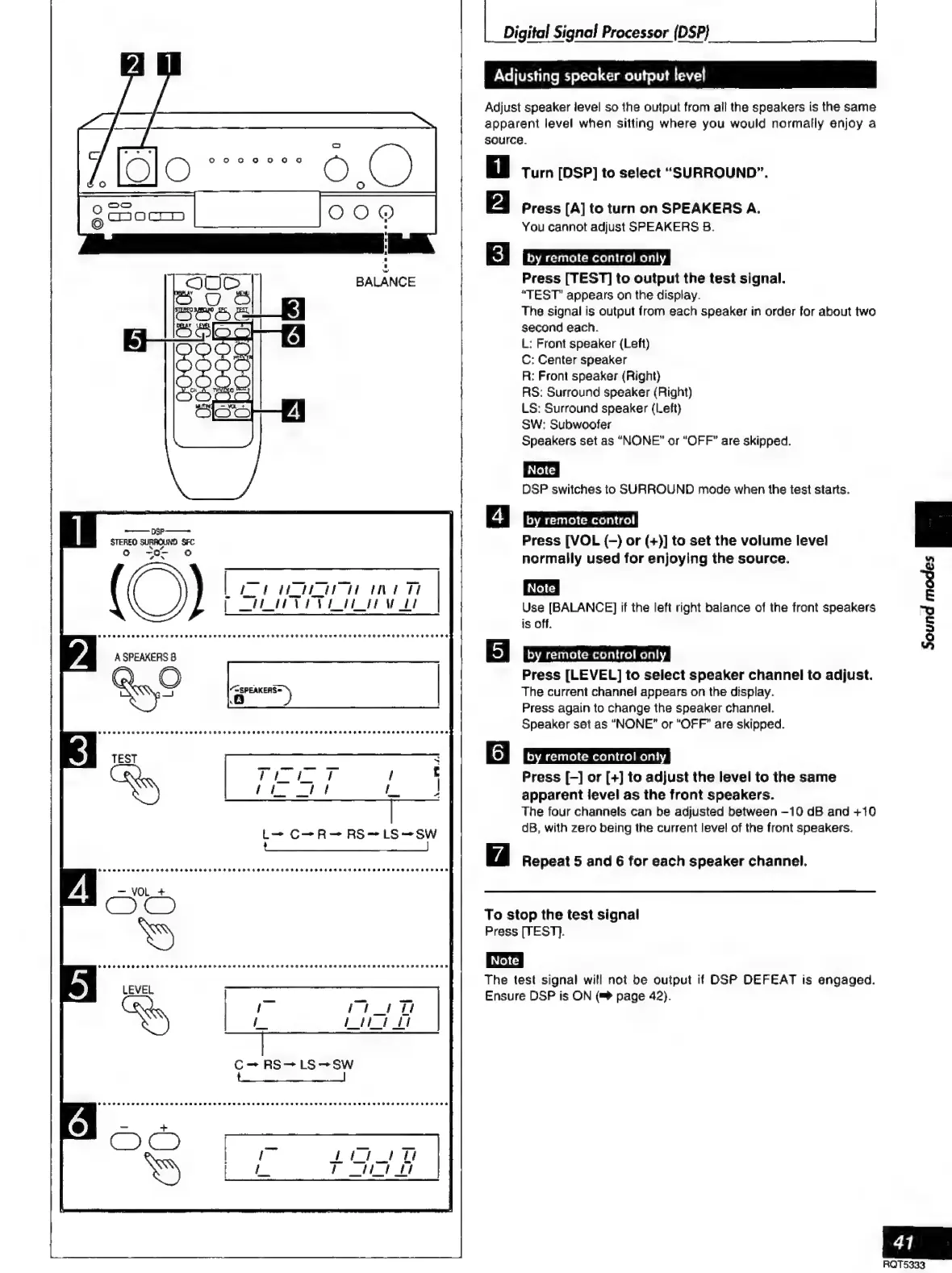
Technics SC-S2350 - Adjusting Speaker Output Level

Technics SC-S2350
60 pages
Print Icon
To Next Page IconTo Next Page
To Previous Page IconTo Previous Page
Loading...
(a
OOO
BALANCE
O
——
ns
STEREO
SURROUND
SFC
NY
o
o:
“ez
|
IZA
MEA
ANA
TI
PO
ther
vt
I
APU
R
PAO
PPAR
TEETER
EI
EII
HEED
COROT
HOT
EH
HEHEHE
EHH
AEE
ERE
OH
ERED
A
SPEAKERS
8
“<SPEAKERS=
l
=)
|
Digital
Signal
Processor
{DSP}
Adjusting
speaker
output
level
Adjust
speaker
level
so
the
output
from
all
the
speakers
is
the
same
apparent
level
when
sitting
where
you
would
normally
enjoy
a
source.
Turn
[DSP]
to
select
“SURROUND”.
Press
[A]
to
turn
on
SPEAKERS
A.
You
cannot
adjust
SPEAKERS
B.
by
remote
control
onl
Press
[TEST]
to
output
the
test
signal.
“TEST”
appears
on
the
display.
The
signal
is
output
from
each
speaker
in
order
for
about
two
second
each.
L:
Front
speaker
(Left)
C:
Center
speaker
R:
Front
speaker
(Right)
AS:
Surround
speaker
(Right)
LS:
Surround
speaker
(Left)
SW:
Subwoofer
Speakers
set
as
“NONE”
or
“OFF”
are
skipped.
DSP
switches
to
SURROUND
mode
when
the
test
starts.
by
remote
control
Press
[VOL
(-)
or
(+)]
to
set
the
volume
level
normally
used
for
enjoying
the
source.
Use
[BALANCE]
if
the
left
right
balance
of
the
front
speakers
is
off.
by
remote
control
onl
Press
[LEVEL]
to
select
speaker
channel
to
adjust.
The
current
channel
appears
on
the
display.
Press
again
to
change
the
speaker
channel.
Speaker
set
as
“NONE”
or
“OFF”
are
skipped.
6|
by
remote
control
oni
Press
[-]
or
[+]
to
adjust
the
level
to
the
same
apparent
level
as
the
front
speakers.
The
four
channels
can
be
adjusted
between
-10
dB
and
+10
dB,
with
zero
being
the
current
level
of
the
front
speakers.
Repeat
5
and
6
for
each
speaker
channel,
To
stop
the
test
signal
Press
[TESTI].
The
test
signal
will
not
be
output
if
DSP
DEFEAT
is
engaged.
Ensure
DSP
is
ON
(m
page
42).
A
q
3
E
“o
Š
A
41
RQT5333

Related product manuals