EasyManua.ls Logo

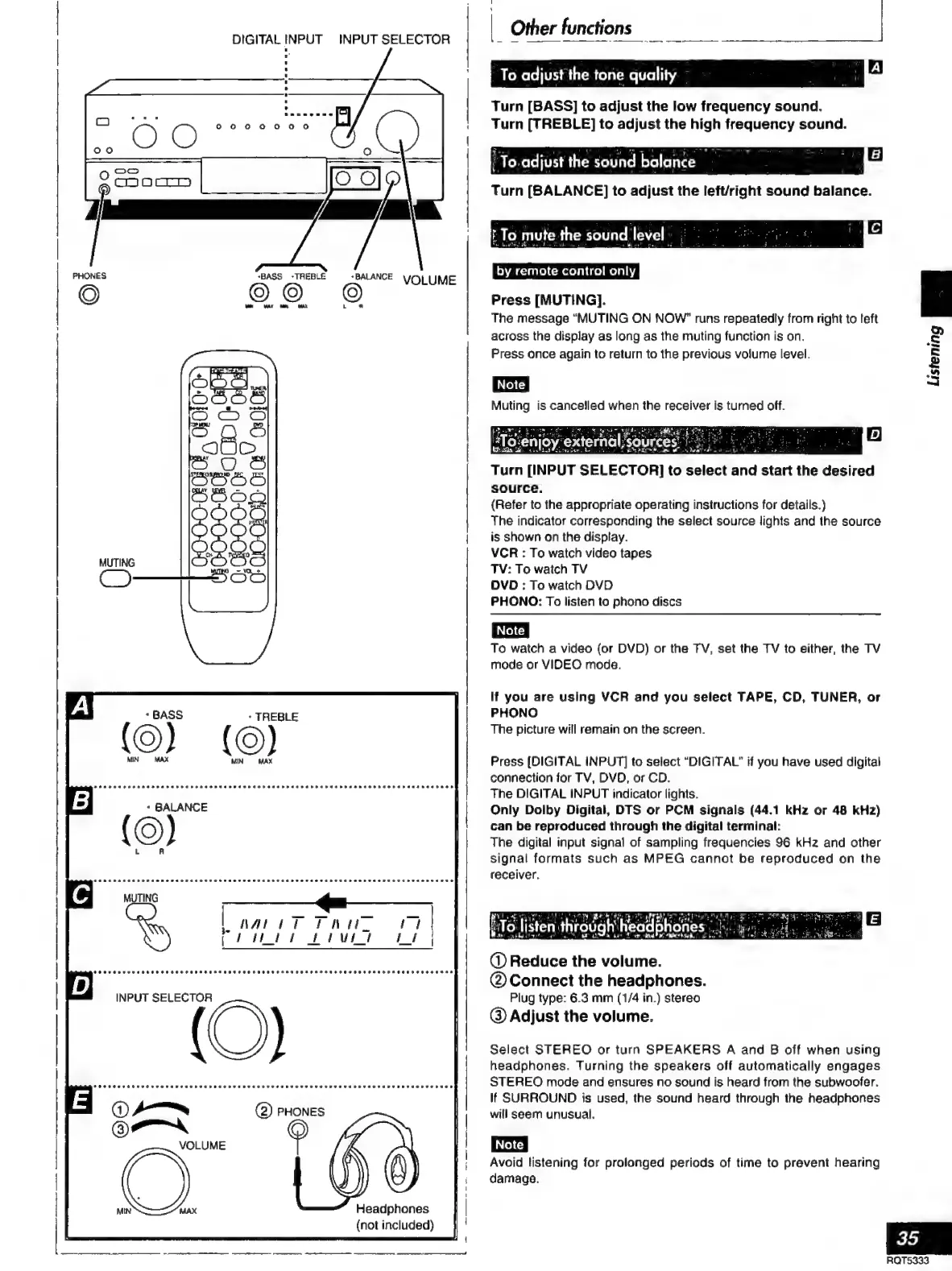
Technics SC-S2350 - Other Functions; To Adjust the Tone Quality; To Listen through Headphones

Technics SC-S2350
60 pages
Print Icon
To Next Page IconTo Next Page
To Previous Page IconTo Previous Page
Loading...
—_—
INPUT
SELECTOR
DIGITAL
INPUT
PHONES
«BASS
‘TREBLE
+
BALANCE
VOLUME
©
MN
MAR
Sy
MAL
La
*
TREBLE
ee
eetneree
TOOK
COREE
REE
ET
HEE
EEE
THEE
tonpararo
SOF
Oe
FARE
B
EOE
rro
INPUT
SELECTOR
O)
Headphones
(not
included)
|
Other
functions
A
To
adjust
the
tone
quality:
`
ga
Turn
[BASS]
to
adjust
the
low
frequency
sound.
Turn
[TREBLE]
to
adjust
the
high
frequency
sound.
“To.adjust
the
sound
balance
ga
Turn
[BALANCE]
to
adjust
the
left/right
sound
balance.
y
la
E
To
mute
the
sound
level
:
-
by
remote
control
only
Press
[MUTING].
The
message
“MUTING
ON
NOW”
runs
repeatedly
from
right
to
teft
across
the
display
as
long
as
the
muting
function
is
on.
Press
once
again
to
return
to
the
previous
volume
level.
Muting
is
cancelled
when
the
receiver
is
turned
off.
A
oe
ahead
y=
Le"
Turn
[INPUT
SELECTOR]
to
select
and
start
the
desired
source.
(Refer
to
the
appropriate
operating
instructions
for
details.)
The
indicator
corresponding
the
select
source
lights
and
the
source
is
shown
on
the
display.
VCR
:
To
watch
video
tapes
TV:
To
waich
TV
DVD
:
To
watch
DVD
PHONO:
To
listen
to
phono
discs
To
watch
a
video
(or
DVD)
or
the
TV,
set
the
TV
to
either,
the
TV
mode
or
VIDEO
mode.
If
you
are
using
VCR
and
you
select
TAPE,
CD,
TUNER,
or
PHONO
The
picture
will
remain
on
the
screen.
Press
[DIGITAL
INPUT]
to
select
“DIGITAL”
if
you
have
used
digital
connection
for
TV,
DVD,
or
CD.
The
DIGITAL
INPUT
indicator
lights.
Only
Dolby
Digital,
DTS
or
PCM
signals
(44.1
kHz
or
48
kHz)
can
be
reproduced
through
the
digital
terminal:
The
digital
input
signal
of
sampling
frequencies
96
kHz
and
other
signal
formats
such
as
MPEG
cannot
be
reproduced
on
the
receiver,
4
¿To
listen
through
headphones
:.;::.
ss.
road
ii
a
a
E
AA
a
7
kta
@
Reduce
the
volume.
®©
Connect
the
headphones.
Plug
type:
6.3
mm
(1/4
in.)
stereo
@
Adjust
the
volume.
Select
STEREO
or
turn
SPEAKERS
A
and
B
off
when
using
headphones.
Turning
the
speakers
off
automatically
engages
STEREO
mode
and
ensures
no
sound
is
heard
from
the
subwoofer.
If
SURROUND
is
used,
the
sound
heard
through
the
headphones
will
seem
unusual.
Avoid
listening
for
prolonged
periods
of
time
to
prevent
hearing
damage.
2
&
$
3
35
RQTS333

Related product manuals