EasyManua.ls Logo

Technics SC-S2350 - The TAPE (MONITOR) Indicator 0.0.0.2; Dynamic Range Compression 0; Using a Subwoofer Oido

Technics SC-S2350
60 pages
Print Icon
To Next Page IconTo Next Page
To Previous Page IconTo Previous Page
Loading...
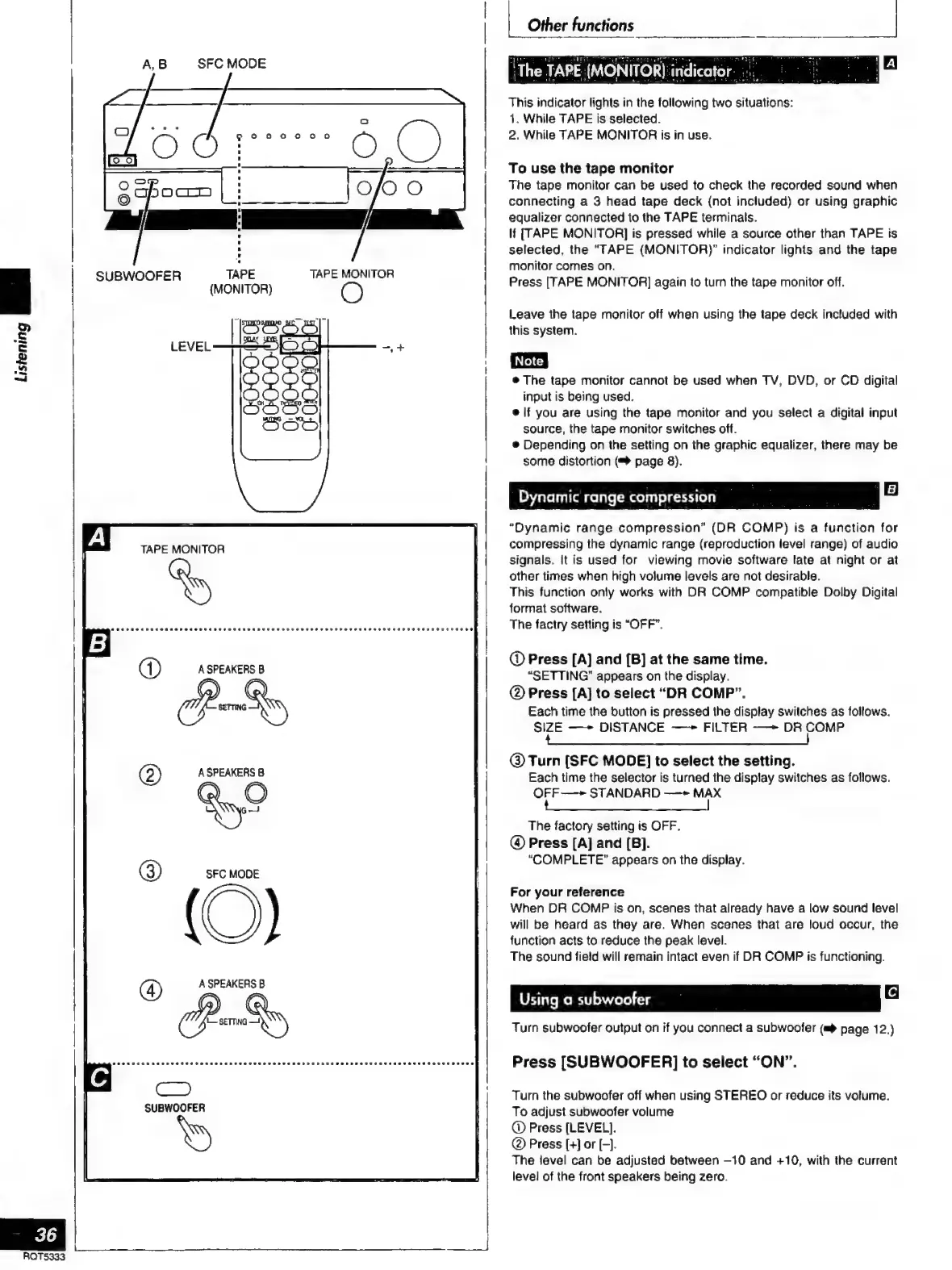
A,B
SFC
MODE
+
SUBWOOFER
TAPE
TAPE
MONITOR
(MONITOR)
This
indicator
lights
in
the
following
two
situations:
1.
While
TAPE
is
selected.
2.
While
TAPE
MONITOR
is
in
use.
To
use
the
tape
monitor
The
tape
monitor
can
be
used
to
check
the
recorded
sound
when
connecting
a
3
head
tape
deck
(not
included)
or
using
graphic
equalizer
connected
to
the
TAPE
terminals.
lf
[TAPE
MONITOR]
is
pressed
while
a
source
other
than
TAPE
is
selected,
the
“TAPE
(MONITOR)”
indicator
lights
and
the
tape
monitor
comes
on.
Press
[TAPE
MONITOR]
again
to
turn
the
tape
monitor
off.
Leave
the
tape
monitor
off
when
using
the
tape
deck
included
with
this
system.
e
The
tape
monitor
cannot
be
used
when
TV,
DVD,
or
CD
digital
input
is
being
used.
e
|f
you
are
using
the
tape
monitor
and
you
select
a
digital
input
source,
the
tape
monitor
switches
off.
e
Depending
on
the
setting
on
the
graphic
equalizer,
there
may
be
some
distortion
(™
page
8).
Listening
reel
Dynamic
range
compression
compressing
the
dynamic
range
(reproduction
level
range)
of
audio
signals.
It
is
used
for
viewing
movie
software
late
at
night
or
at
other
times
when
high
volume
levels
are
not
desirable.
This
function
only
works
with
DR
COMP
compatible
Dolby
Digital
format
software.
The
factry
setting
is
“OFF”.
@
Press
[A]
and
[B]
at
the
same
time.
“SETTING”
appears
on
the
display.
O
Press
[A]
to
select
“DR
COMP”.
Each
time
the
button
is
pressed
the
display
switches
as
follows.
SIZE
—+
DISTANCE
—~+
FILTER
——
DR
COMP
CARA
A
O
A
SPEAKERS
B
PR,
O
A
SPEAKERS
B
O
G-
@
Turn
[SFC
MODE]
to
select
the
setting.
Each
time
the
selector
is
turned
the
display
switches
as
follows.
OFF
—-»
STANDARD
—-»
MAX
¡ASS
ees
|
The
factory
setting
is
OFF.
(4)
Press
[A]
and
[B].
“COMPLETE”
appears
on
the
display.
O)
SFC
MODE
For
your
reference
When
DR
COMP
is
on,
scenes
that
already
have
a
low
sound
level
will
be
heard
as
they
are.
When
scenes
that
are
loud
occur,
the
function
acts
to
reduce
the
peak
level.
The
sound
field
will
remain
intact
even
if
DR
COMP
is
functioning.
(4)
A
SPEAKERS
B
PD
Using
a
subwoofer
Turn
subwoofer
output
on
if
you
connect
a
subwoofer
(@
page
12.)
Press
[SUBWOOFER]
to
select
“ON”.
Turn
the
subwoofer
off
when
using
STEREO
or
reduce
its
volume.
To
adjust
subwoofer
volume
O
Press
[LEVEL].
©
Press
[+]
or
[-].
The
level
can
be
adjusted
between
—10
and
+10,
with
the
current
level
of
the
front
speakers
being
zero.
|
í
“Dynamic
range
compression”
(DR
COMP)
is
a
function
for
RQTS333

Related product manuals