EasyManua.ls Logo

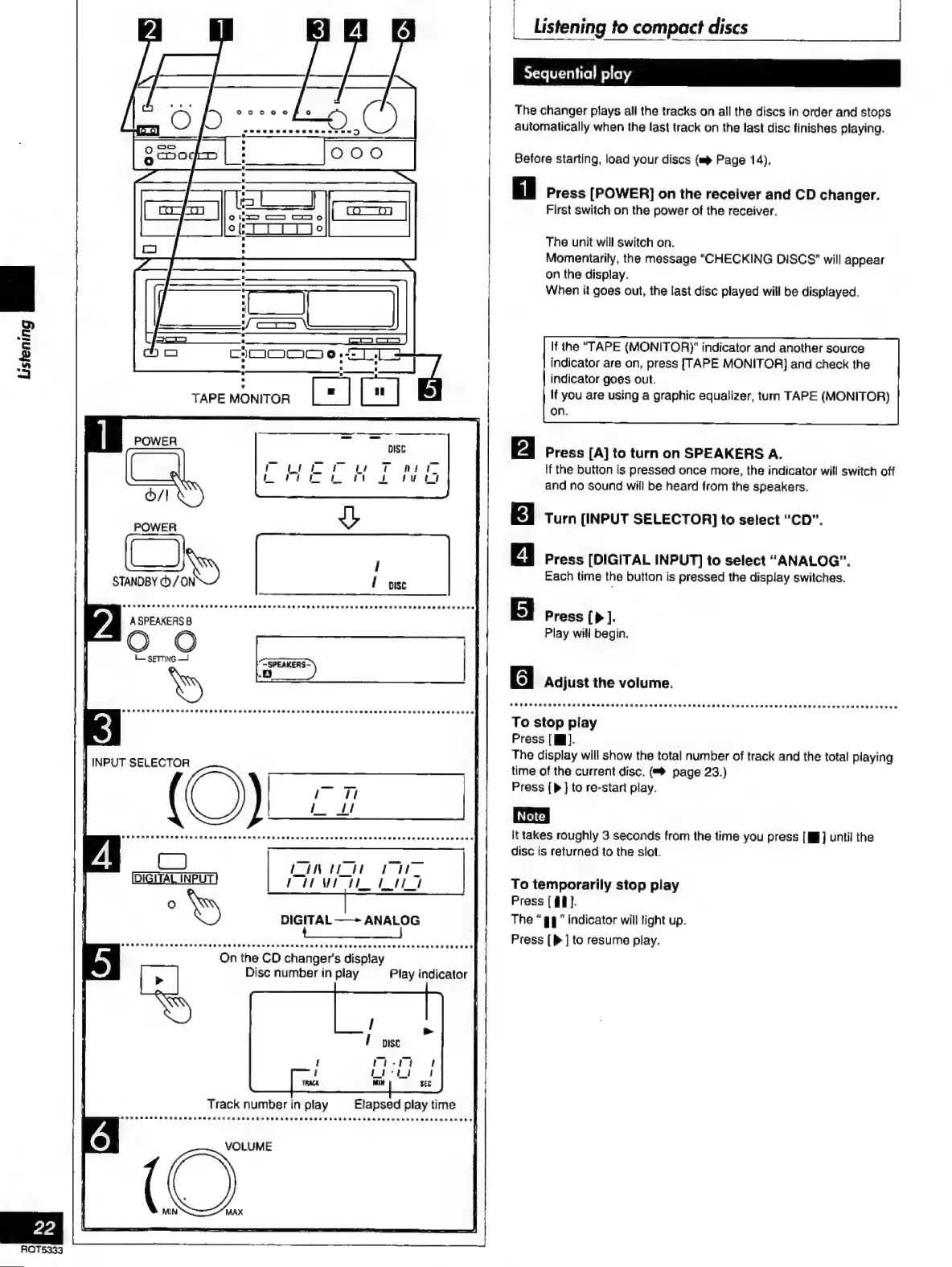
Technics SC-S2350 - Listening to Compact Discs

Technics SC-S2350
60 pages
Print Icon
To Next Page IconTo Next Page
To Previous Page IconTo Previous Page
Loading...
E
aaa
J
M
|
i
CIC
8
Cee
a
E
wom
EJE
E
TAPE
MONITOR
POWER
O)
|
STANDBY
©
/
IN
Í
use
l
ouppnoapnaaaa
FORCES
CERES
R
ETON
SH
RAEH
FEE
HHO
TTS
ETE
SRE
ESESEREREHEAE
OOH
EEEES
A
SPEAKERS
B
—SPEAKERS-
MA]
INPUT
SELECTOR
(O
On
the
CD
changer's
display
Disc
number
in
play
Play
indicator
VOLUME
Listening
to
compact
discs
|
-
Sequential
play
The
changer
plays
all
the
tracks
on
all
the
discs
in
order
and
stops
automatically
when
the
last
track
on
the
last
disc
finishes
playing.
Before
starting,
load
your
discs
(mp
Page
14).
Press
[POWER]
on
the
receiver
and
CD
changer.
First
switch
on
the
power
of
the
receiver.
The
unit
will
switch
on.
Momentarily,
the
message
“CHECKING
DISCS’
will
appear
on
the
display.
When
it
goes
out,
the
last
disc
played
will
be
displayed.
If
the
“TAPE
(MONITORY
indicator
and
another
source
indicator
are
on,
press
[TAPE
MONITOR]
and
check
the
indicator
goes
out.
If
you
are
using
a
graphic
equalizer,
turn
TAPE
(MONITOR)
on.
Press
[A]
to
turn
on
SPEAKERS
A.
If
the
button
is
pressed
once
more,
the
indicator
will
switch
off
and
no
sound
will
be
heard
from
the
speakers.
Turn
(INPUT
SELECTOR]
to
select
“CD”.
Press
[DIGITAL
INPUT]
to
select
“ANALOG”.
Each
time
the
button
is
pressed
the
display
switches.
Press
].
Play
will
begin.
g
Adjust
the
volume.
Atottvvaspvasaasacasttovýdvosvaraspnaspaototvvovaaspaasena
ARO
aro
raros
To
stop
play
Press
[W].
The
display
will
show
the
total
number
of
track
and
the
total
playing
time
of
the
current
disc.
(=è
page
23.)
Press
(>
]
to
re-start
play.
It
takes
roughly
3
seconds
from
the
time
you
press
[MW]
until
the
disc
is
returned
to
the
slot.
To
temporarily
stop
play
Press
[11].
The
“gg”
indicator
will
light
up.
Press
[>
]
to
resume
play.

Related product manuals