EasyManua.ls Logo

Technics SC-S2350 - Page 23

Technics SC-S2350
60 pages
Print Icon
To Next Page IconTo Next Page
To Previous Page IconTo Previous Page
Loading...
DISC
SKIP
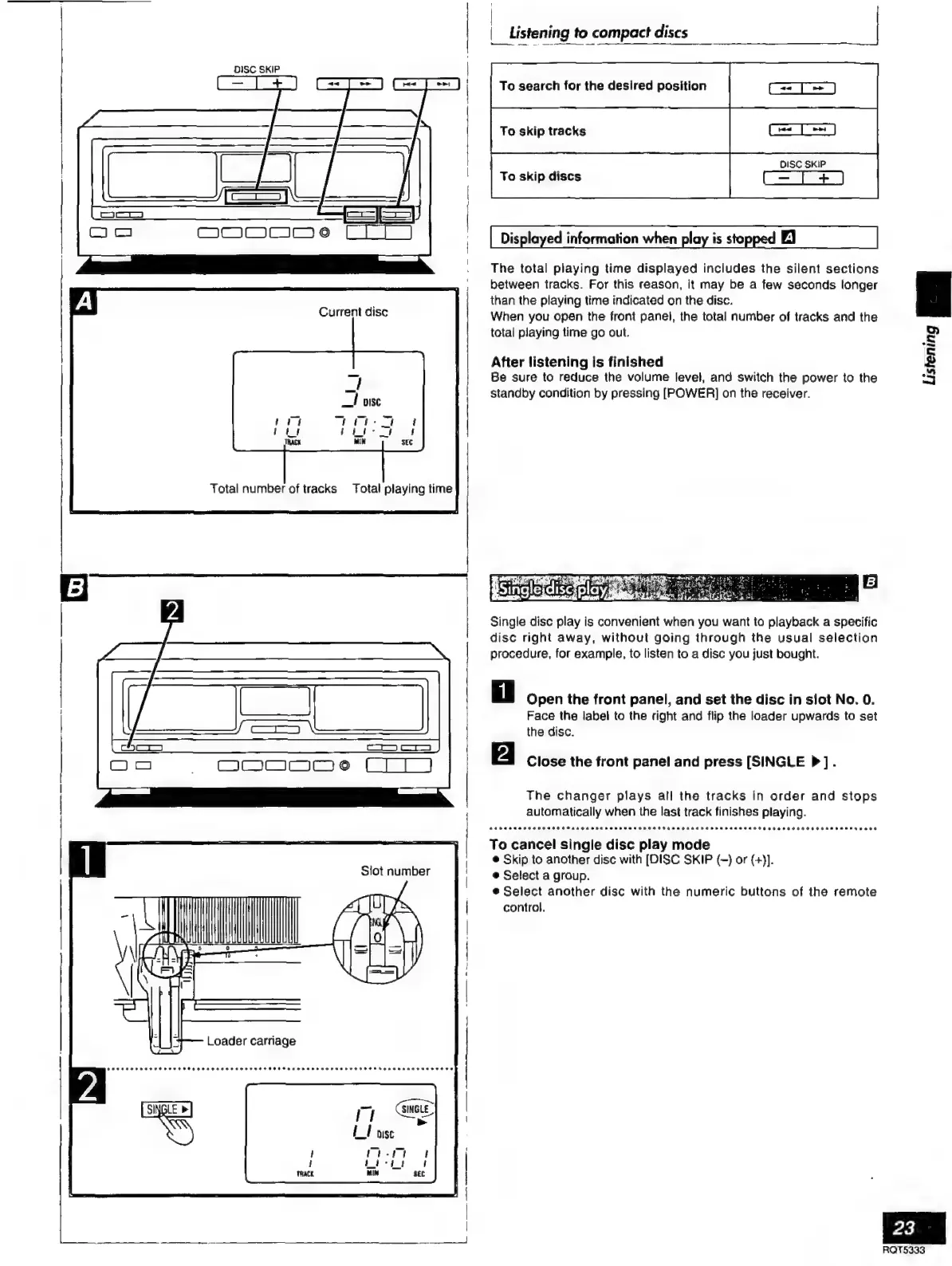
Current
disc
Total
number
of
tracks
Total
playing
time
i
III
Y
A
!
AN
|
|
Listening
to
compact
discs
To
search
for
the
desired
position
DISC
SKIP
To
skip
discs
C=
T
+)
The
total
playing
time
displayed
includes
the
silent
sections
between
tracks.
For
this
reason,
it
may
be
a
few
seconds
longer
than
the
playing
time
indicated
on
the
disc.
When
you
open
the
front
panel,
the
total
number
of
tracks
and
the
total
playing
time
go
out.
After
listening
is
finished
Be
sure
to
reduce
the
volume
level,
and
switch
the
power
to
the
standby
condition
by
pressing
[POWER]
on
the
receiver.
Single
disc
play
is
convenient
when
you
want
to
playback
a
specific
disc
right
away,
without
going
through
the
usual
selection
procedure,
for
example,
to
listen
to
a
dise
you
just
bought.
Open
the
front
panel,
and
set
the
disc
in
slot
No.
0.
Face
the
label
to
the
right
and
flip
the
loader
upwards
to
set
the
disc.
Close
the
front
panel
and
press
[SINGLE
P].
The
changer
plays
all
the
tracks
in
order
and
stops
automatically
when
the
last
track
finishes
playing.
To
cancel
single
disc
play
mode
e
Skip
to
another
disc with
[DISC
SKIP
(—)
or
(+)].
e
Select
a
group.
e
Select
another
disc
with
the
numeric
buttons
of
the
remote
control.
P
$
A
=]
23
RQTS333

Related product manuals