EasyManua.ls Logo

Technics SC-S2350 - Page 24

Technics SC-S2350
60 pages
Print Icon
To Next Page IconTo Next Page
To Previous Page IconTo Previous Page
Loading...
Listening
E
DIRECT
TUNING/
DISC
ENTER
.rrsrormvasn
rararraraaraa»o
PORRA
sr
rra
arras
rar
rra
raras
LETTET]
DISC/DECK
Track
number
AAA
a
E
TA
da.
A
e
IS
[pi
tfraccess:
e
dni
R
3
ee
aS
aa
Ne
i}
;
Udo
odas
babe
Khia
ME
ETAT
I
E
rec
ERAN
DALTA
E
(Only
available
from
the
remote
control.)
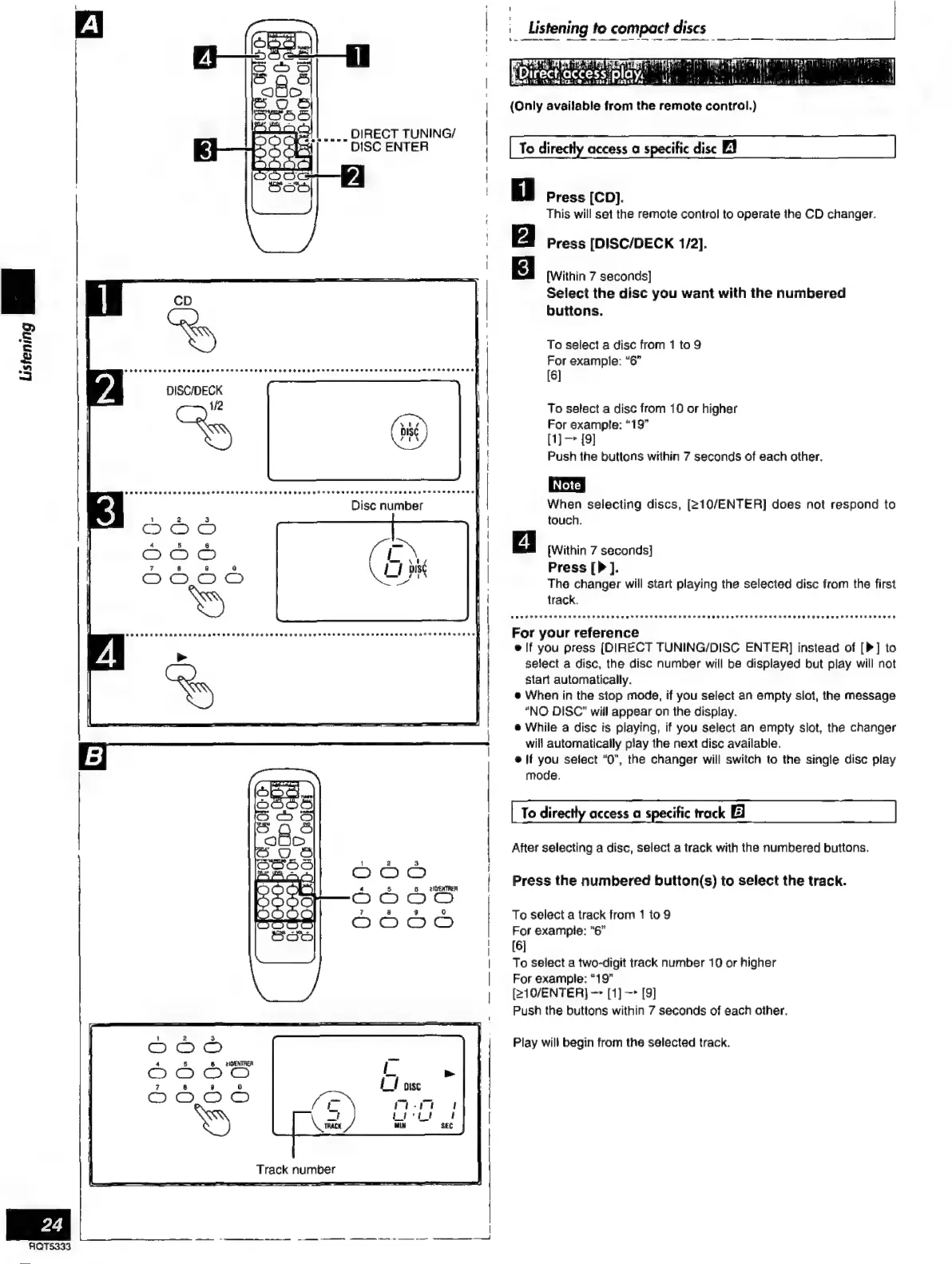
To
directly
access
a
specific
disc
El
Press
[CD].
This
will
set
the
remote
control
to
operate
the
CD
changer.
Press
[DISC/DECK
1/2].
[Within
7
seconds]
Select
the
disc
you
want
with
the
numbered
buttons.
To
select
a
disc
from
1
to
9
For
example:
“6”
[6]
To
select
a
disc
from
10
or
higher
For
example:
“19”
[1]
[9]
Push
the
buttons
within
7
seconds
of
each
other.
When
selecting
discs,
[210/ENTER]
does
not
respond
to
touch.
[Within
7
seconds]
Press
[P].
The
changer
will
start
playing
the
selected
disc
from
the
first
track.
For
your
reference
elf
you
press
[DIRECT
TUNING/DISC
ENTER]
instead
of
[P]
to
select
a
disc,
the
disc
number
will
be
displayed
but
play
will
not
start
automatically.
e
When
in
the
stop
mode,
if
you
select
an
empty
slot,
the
message
“NO
DISC”
will
appear
on
the
display.
e
While
a
disc
is
playing,
if
you
select
an
empty
slot,
the
changer
will
automatically
play
the
next
disc
available.
e
you
select
“0”,
the
changer
will
switch
to
the
single
disc
play
mode.
To
directly
access
a
specific
track
El
After
selecting
a
disc,
select
a
track
with
the
numbered
buttons.
Press
the
numbered
button(s)
to
select
the
track.
To
select
a
track
from
1
to
9
For
example:
“6”
[6]
To
select
a
two-digit
track
number
10
or
higher
For
example:
“19”
[210/ENTER]
[1]
[9]
Push
the
buttons
within
7
seconds
of
each
other,
Play
will
begin
from
the
selected
track.

Related product manuals