EasyManua.ls Logo

Technics SC-S2350 - Reference for Speakers

Technics SC-S2350
60 pages
Print Icon
To Next Page IconTo Next Page
To Previous Page IconTo Previous Page
Loading...
Center
speaker
speaker
(left)
Front
speaker
(left)
Front
speaker
(right)
|
1
Surround
ttvvetevrovvvovvovvaspuopvaonaasnaspuaopaopappasnaan
Apeere
totovovtovovver
A
SPEAKERS
6
“SIZE”
O)
A
SPEAKERS
B
ER
(2)
SFC
MODE
O)
LO
LIGNIT
CUYA
1
A
CIE
JU
PP
aT
ee
|
Reference
for
speakers
|
n
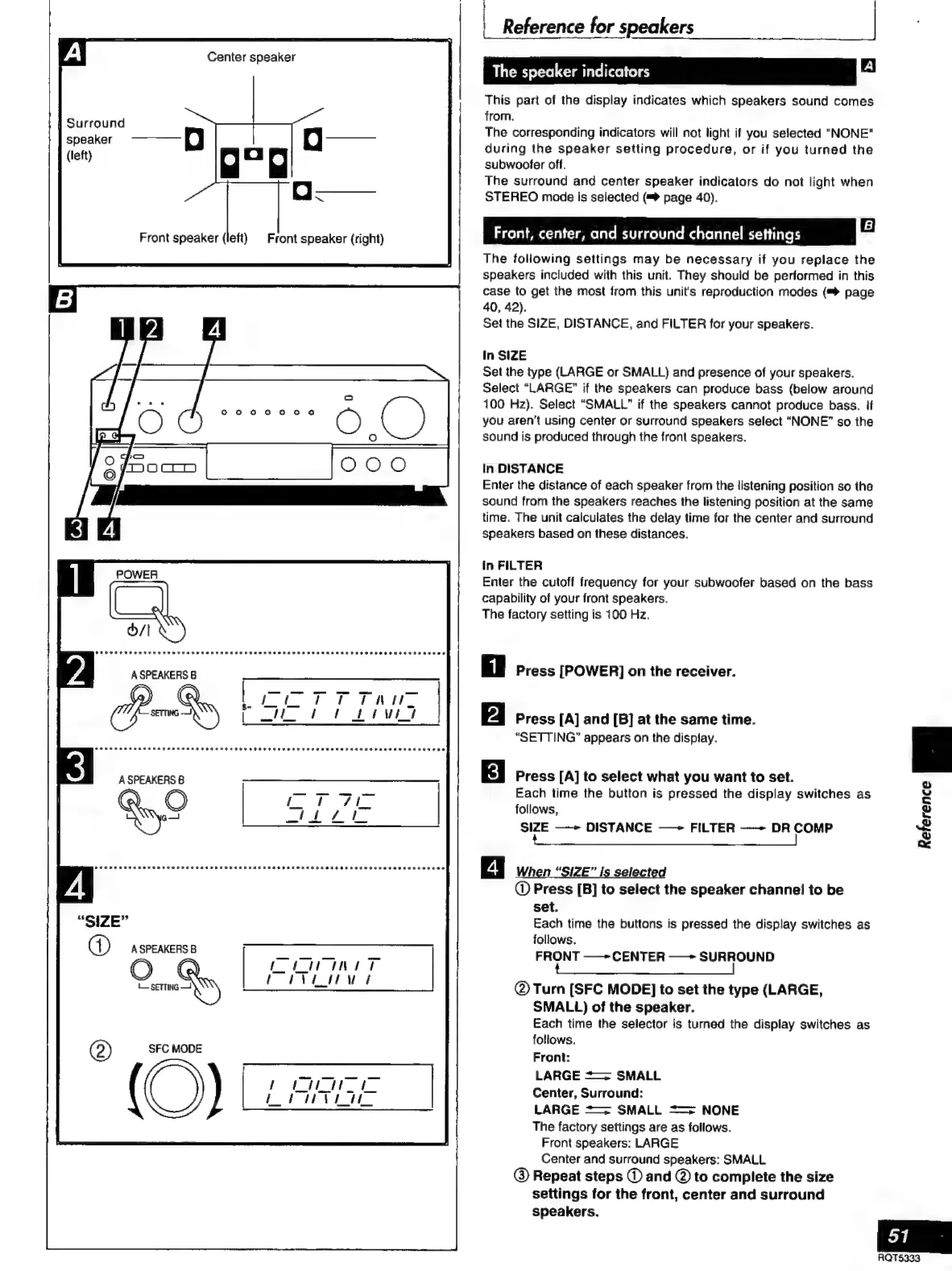
This
part
of
the
display
indicates
which
speakers
sound
comes
from.
The
corresponding
indicators
will
not
light
if
you
selected
"NONE"
during
the
speaker
setting
procedure,
or
if
you
turned
the
subwoofer
off.
The
surround
and
center
speaker
indicators
do
not
light
when
STEREO
mode
is
selected
(=
page
40).
Front,
center,
and
surround
channel
settings
El
The
following
settings
may
be
necessary
if
you
replace
the
speakers
included
with
this
unit.
They
should
be
performed
in
this
case
to
get
the
most
from
this
unit's
reproduction
modes
(™
page
40,
42).
Set
the
SIZE,
DISTANCE,
and
FILTER
for
your
speakers.
In
SIZE
Set
the
type
(LARGE
or
SMALL)
and
presence
of
your
speakers.
Select
“LARGE”
if
the
speakers
can
produce
bass
(below
around
100
Hz).
Select
“SMALL”
if
the
speakers
cannot
produce
bass.
if
you
aren't
using
center
or
surround
speakers
select
“NONE”
so
the
sound
is
produced
through
the
front
speakers.
In
DISTANCE
Enter
the
distance
of
each
speaker
from
the
listening
position
so
the
sound
from
the
speakers
reaches
the
listening
position
at
the
same
time.
The
unit
calculates
the
delay
time
for
the
center
and
surround
speakers
based
on
these
distances.
In
FILTER
Enter
the
cutoff
frequency
for
your
subwoofer
based
on
the
bass
capability
of
your
front
speakers.
The
factory
setting
is
100
Hz.
Press
[POWER]
on
the
receiver.
Press
[A]
and
[B]
at
the
same
time.
“SETTING”
appears
on
the
display.
Press
[A]
to
select
what
you
want
to
set.
Each
time
the
button
is
pressed
the
display
switches
as
follows,
SIZE
——
DISTANCE
——
FILTER
——-
DR
COMP
tec
A
a
a
eee
When
“SIZE”
is
selected
@
Press
[B]
to
select
the
speaker
channel
to
be
set.
Each
time
the
buttons
is
pressed
the
display
switches
as
follows.
FRONT
——
CENTER
——
SURROUND
AA
ES
|
©
Turn
[SFC
MODE]
to
set
the
type
(LARGE,
SMALL)
of
the
speaker.
Each
time
the
selector
is
turned
the
display
switches
as
follows.
Front:
LARGE
==
SMALL
Center,
Surround:
LARGE
==
SMALL
===
NONE
The
factory
settings
are
as
follows.
Front
speakers:
LARGE
Center
and
surround
speakers:
SMALL
@
Repeat
steps
©
and
@
to
complete
the
size
settings
for
the
front,
center
and
surround
speakers.
D
GU
È
2
D
o

Related product manuals