EasyManua.ls Logo

Technics SC-S2350 - Page 50

Technics SC-S2350
60 pages
Print Icon
To Next Page IconTo Next Page
To Previous Page IconTo Previous Page
Loading...
|_
Using
the
remote
control__
AAA
o
Po
aise
ete
figs
y
|:
|
Changing:
the
remote
control
code
_
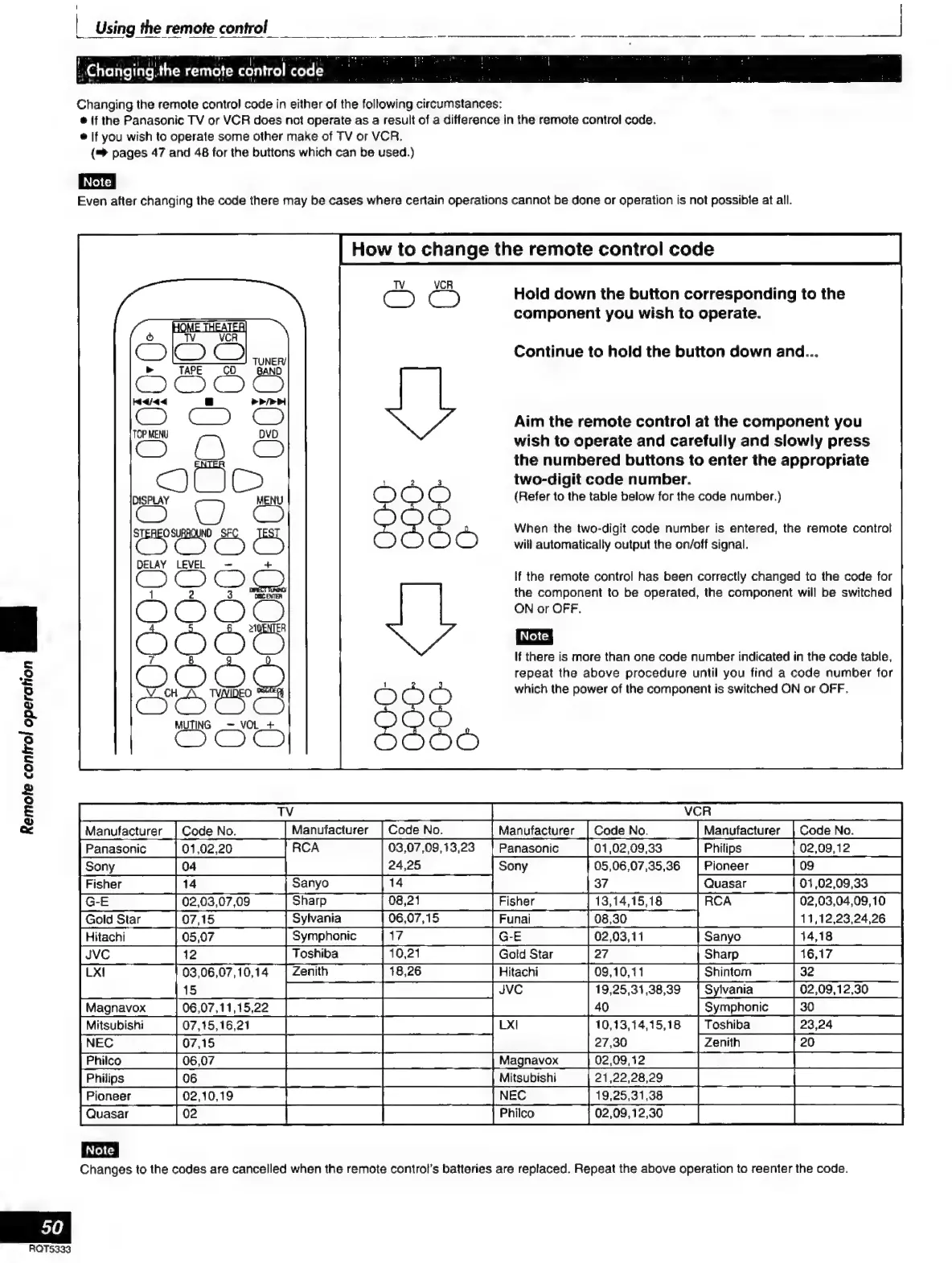
Changing
the
remote
control
code
in
either
of
the
foltowing
circumstances:
e
if
the
Panasonic
TV
or
VCR
does
not
operate
as
a
result
of
a
difference
in
the
remote
control
code.
e
If
you
wish
to
operate
some
other
make
of
TV
or
VCR.
(=>
pages
47
and
48
for
the
buttons
which
can
be
used.)
Even
after
changing
the
code
there
may
be
cases
where
certain
operations
cannot
be
done
or
operation
is
not
possible
at
all.
DISPLAY
ES
MENU
CIO
DELAY
LEVEL
~
+
27
PS
ODO
30
e
7
O22.
E
MUTING
_—
VOL
_+
Remote
control
operation
SU
How
to
change
the
remote
control
code
Hold
down
the
button
corresponding
to
the
component
you
wish
to
operate.
Continue
to
hold
the
button
down
and...
Aim
the
remote
control
at
the
component
you
wish
to
operate
and
carefully
and
slowly
press
the
numbered
buttons
to
enter
the
appropriate
two-digit
code
number.
(Refer
to
the
table
below
for
the
code
number.)
When
the
two-digit
code
number
is
entered,
the
remote
control
will
automatically
output
the
on/off
signal.
If
the
remote
control
has
been
correctly
changed
to
the
code
for
the
component
to
be
operated,
the
component
will
be
switched
ON
or
OFF.
If
there
is
more
than
one
code
number
indicated
in
the
code
table,
repeat
the
above
procedure
until
you
find
a
code
number
for
which
the
power
of
the
component
is
switched
ON
or
OFF.
TV
VCR
Panasonic
01,02,09,33
Philips
24,25
Sony
05,06,07,35,36
|
Pioneer
Fisher
Ja
[Sanyo]
37
Quasar
RC
02,03,04,09,10
Sanyo
Sharp
E
03,06,07,10,14
Shintom
Pe
ee
cra
ee
JVC
19,25,31,38,39
|
Sylvania
02,09,12,30
COTTON
reee
ema
UM
|
AN
Symphonic
[Mitsubishi
[07.18.1621]
>]
10,13,14,15.18
|
Toshiba
NEC
CAE
na
ean!
[Philco
|0607
|
CT
Magnavox
02,0912
|
[Phiips
Jos
|
Mitsubishi
Pioneer
[o0
O
OOo
[ra
sras
|
fauasar
COI
A
O
E
EIN
Note
|
Changes
to
the
codes
are
cancelled
when
the
remote
control’s
batteries
are
replaced.
Repeat
the
above
operation
to
reenter
the
code.
50
ROTS333

Related product manuals