EasyManua.ls Logo

Technics SC-S2350 - Page 49

Technics SC-S2350
60 pages
Print Icon
To Next Page IconTo Next Page
To Previous Page IconTo Previous Page
Loading...
To
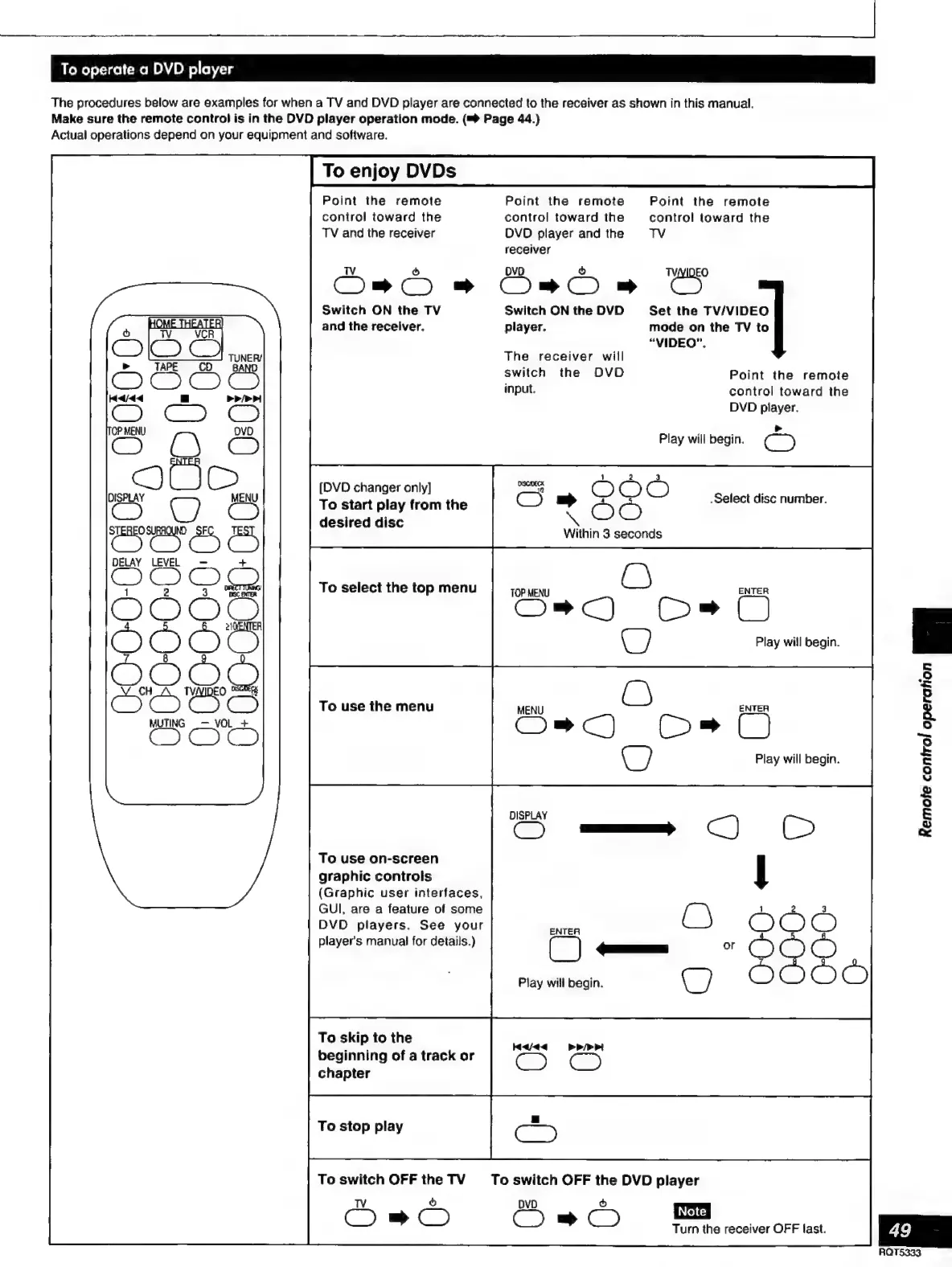
operate
a
DVD
player
The
procedures
below
are
examples
for
when
a
TV
and
DVD
player
are
connected
to
the
receiver
as
shown
in
this
manual.
Make
sure
the
remote
control
is in
the
DVD
player
operation
mode.
(™
Page
44.)
Actual
operations
depend
on
your
equipment
and
software.
To
enjoy
DVDs
Point
the
remote
Point
the
remote
Point
the
remote
control
toward
the
control
toward
the
control
toward
the
TV
and
the
receiver
DVD
player
and
the
TV
receiver
Oma
»
Oaa
CY
Switch
ON
the
TV
Switch
ON
the
DVD
Set
the
TV/VIDEO
and
the
receiver.
player.
mode
on
the
TV
to
“VIDEO”.
The
receiver
will
>
:
a
switch
the
DVD
Point
the
remote
input.
control
toward
the
DVD
player.
Play
will
begin.
C5
[DVD
changer
only]
S
=
2
©
Ò
To
start
play
from
the
«Select
disc
number.
desired
disc
Within
3
seconds
DELAY
LEVEL
C)
EJ
co
O
To
select
the
top
menu
1
TOP
MENU
ENTER
O
OBO
2
Q
22
O
a)
3
Play
will
begin.
n
To
use
the
menu
eS
O
ENTER
w
Se
a
A
Play
will
begin.
DISPLAY
S
=
A
o
£
S
Y
2
9
S
e
To
use
on-screen
graphic
controls
(Graphic
user
interfaces,
GUI,
are
a
feature
of
some
DVD
players.
See
your
player's
manual
for
details.)
Play
will
begin.
To
skip
to
the
beginning
of
a
track
or
chapter
Haaa
>>>»
To
stop
play
To
switch
OFF
the
TV
To
switch
OFF
the
DVD
player
Ds
Ss
æ
Turn
the
receiver
OFF
last.

Related product manuals