EasyManua.ls Logo

Technics SC-S2350 - Setting;Removing Discs -Narenn IA

Technics SC-S2350
60 pages
Print Icon
To Next Page IconTo Next Page
To Previous Page IconTo Previous Page
Loading...
Before
use
NN]
RQT5333
|_
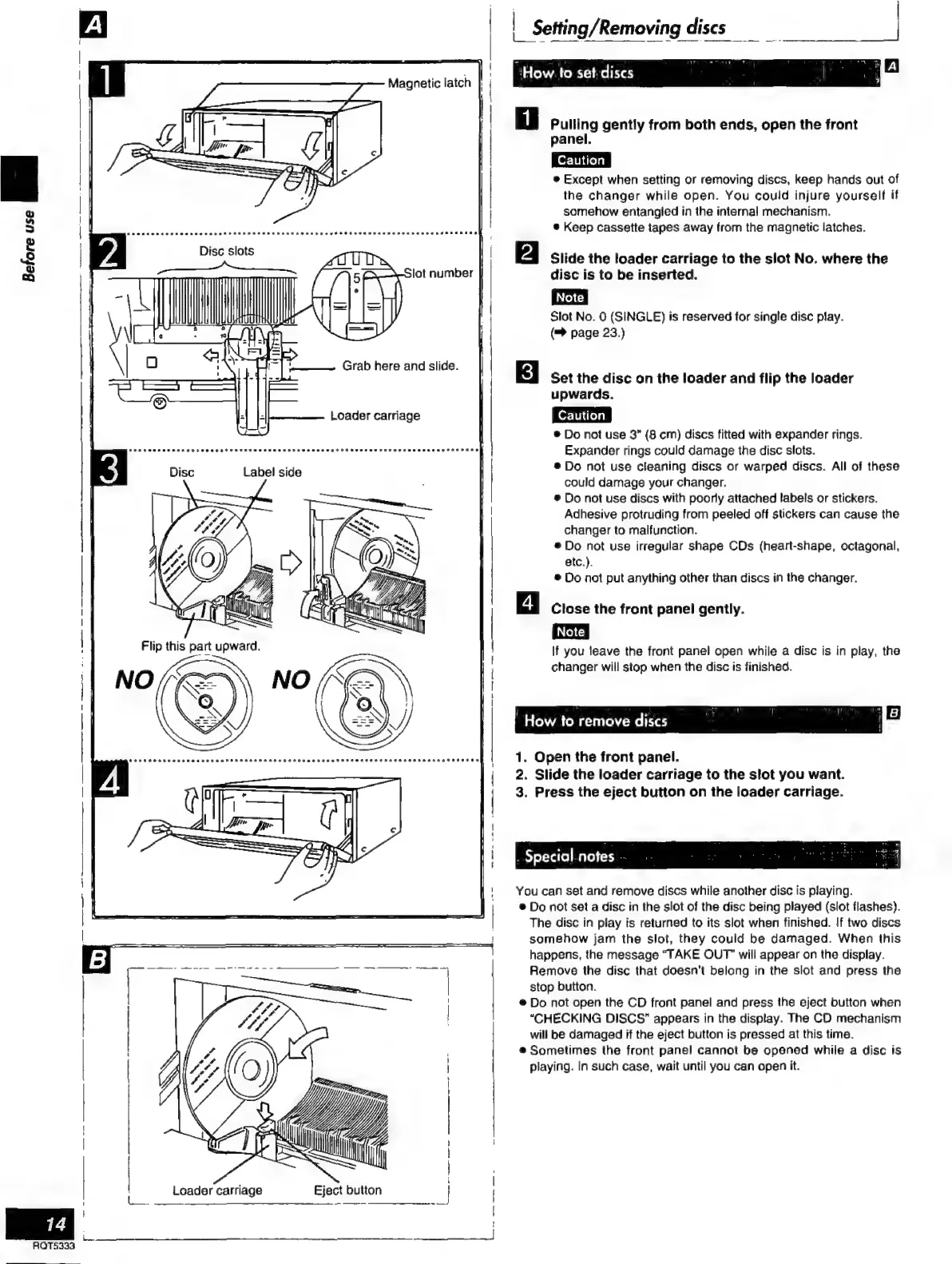
Setting/Removing
discs
_
a
"Howie
sede
Ol
ia
Pulling
gently
from
both
ends,
open
the
front
panel.
Except
when
setting
or
removing
discs,
keep
hands
out
of
the
changer
while
open.
You
could
injure
yourself
if
somehow
entangled
in
the
internal
mechanism.
e
Keep
cassette
tapes
away
from
the
magnetic
latches.
Slide
the
loader
carriage
to
the
slot
No.
where
the
disc
is
to
be
inserted.
Slot
No.
0
(SINGLE)
is
reserved
for
single
disc
play.
(™
page
23.)
Set
the
disc
on
the
loader
and
flip
the
loader
upwards.
®
Do
not
use
3”
(8
cm)
discs
fitted
with
expander
rings.
Expander
rings
could
damage
the
disc
slots.
e
Do
not
use
cleaning
discs
or
warped
discs.
All
of
these
could
damage
your
changer.
ə
Do
not
use
discs
with
poorly
attached
labels
or
stickers.
Adhesive
protruding
from
peeled
off
stickers
can
cause
the
changer
to
malfunction.
e
Do
not
use
irregular
shape
CDs
(heart-shape,
octagonal,
etc.).
®
Do
not
put
anything
other
than
discs
in
the
changer.
Close
the
front
panel
gently.
If
you
leave
the
front
panel
open
while
a
disc
is
in
play,
the
changer
will
stop
when
the
disc
is
finished.
“How
to
remove
discs
(
a
|
El
1.
Open
the
front
panel.
2.
Slide
the
loader
carriage
to
the
slot
you
want.
3.
Press
the
eject
button
on
the
loader
carriage.
.
Special.notes
You
can
set
and
remove
discs while
another
disc
is
playing.
e
Do
not
set
a
disc
in
the
slot
of
the
disc
being
played
(slot
flashes).
The
disc
in
play
is
returned
to
its
slot
when
finished.
If
two
discs
somehow
jam
the
slot,
they
could
be
damaged.
When
this
happens,
the
message
“TAKE
OUT”
will
appear
on
the
display.
Remove
the
disc
that
doesn't
belong
in
the
slot
and
press
the
stop
button.
e
Do
not
open
the
CD
front
panel
and
press
the
eject
button
when
“CHECKING
DISCS”
appears
in
the
display.
The
CD
mechanism
will
be
damaged
if
the
eject
button
is
pressed
at
this
time.
e
Sometimes
the
front
panel
cannot
be
opened
while
a
disc
is
playing.
In
such
case,
wait
until
you
can
open
it.

Related product manuals