EasyManua.ls Logo

Technics SC-S2350 - Page 52

Technics SC-S2350
60 pages
Print Icon
To Next Page IconTo Next Page
To Previous Page IconTo Previous Page
Loading...
S
E
è
$
e
RQT5333
“DISTANCE”
O
A
SPEAKERS
8
=
|
CGN
|
E
Ht
ANA
T
a
Te
“eu?
SFC
MODE
“FILTER”
SFC
MODE
(O)
ia
1
Sere
een
corra
rara
rs
nod
Arana
rara
a
AA
AAA
Ars
Asa
A
SPEAKERS
B
A
ly
TINALI
te
TI
op
So
METE
O
DN
A
SPEAKERS
B
O
L.
SETTING
ras
cc
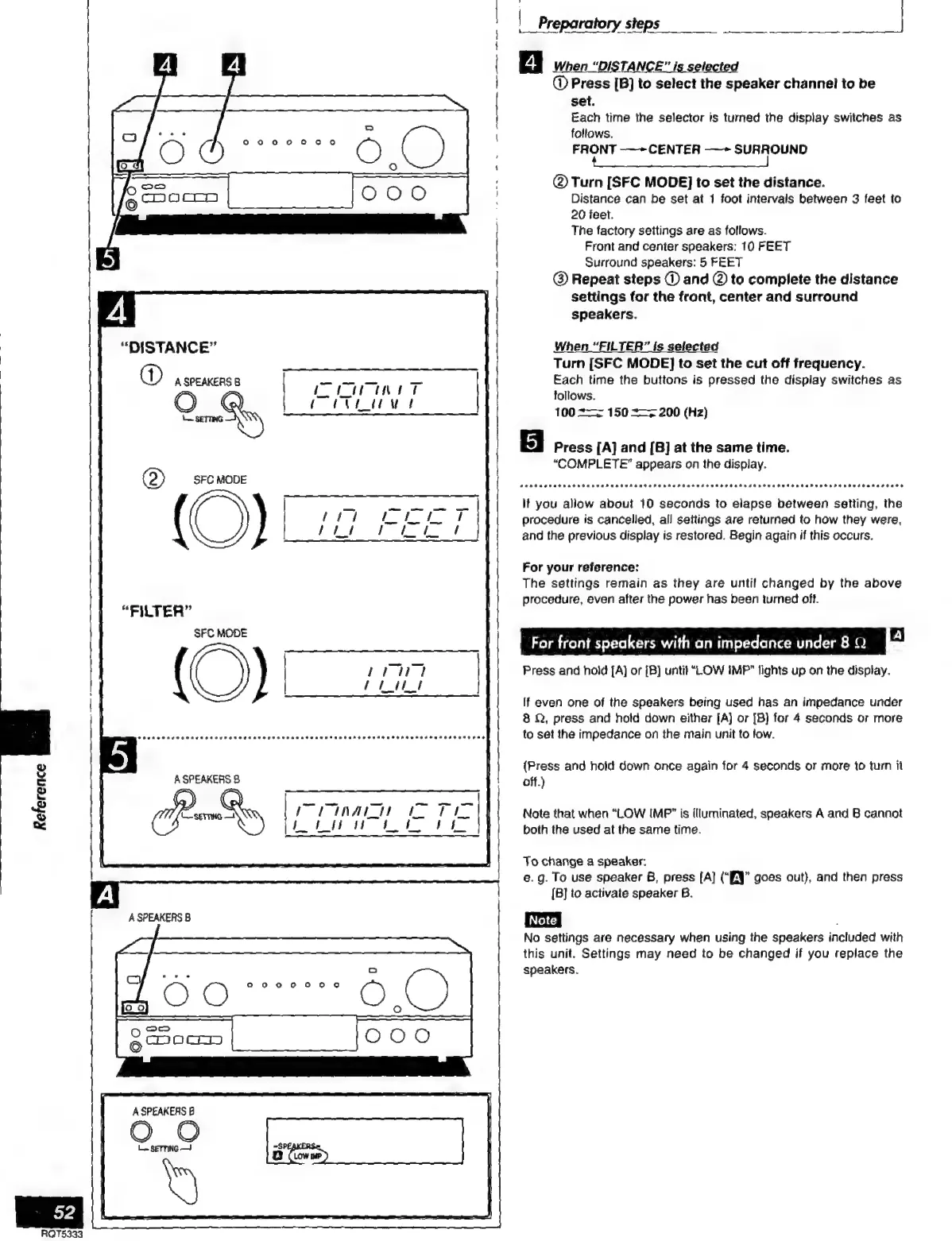
When
“DISTANCE”
is
selected
@
Press
[B]
to
select
the
speaker
channel!
to
be
set.
Each
time
the
selector
is
turned
the
display
switches
as
follows.
FRONT
——CENTER
——
SURROUND
REE
ES
|
|
Preparatory
steps
@
Turn
[SFC
MODE]
to
set
the
distance.
Distance
can
be
set
at
1
foot
intervals
between
3
feet
to
20
feet.
The
factory
settings
are
as
follows.
Front
and
center
speakers:
10
FEET
Surround
speakers:
5
FEET
@)
Repeat
steps
UD)
and
©
to
complete
the
distance
settings
for
the
front,
center
and
surround
speakers.
When
“FILTER”
is
selected
Turn
[SFC
MODE]
to
set
the
cut
off
frequency.
Each
time
the
buttons
is
pressed
the
display
switches
as
follows,
100
+z
150
+>
200
(Hz)
rontaprarrarnón»oa
Press
[A]
and
[B]
at
the
same
time.
“COMPLETE”
appears
on
the
display.
Purtraonterorarrtorndrnarrtarodrrnornarrtrrrarornor
+
iriv
dro
dara
rs
lt
you
allow
about
10
seconds
to
elapse
between
setting,
the
procedure
is
cancelled,
all
settings
are
returned
to
how
they
were,
and
the
previous
display
is
restored.
Begin
again
if
this
occurs.
For
your
reference:
The
settings
remain
as
they
are
until
changed
by
the
above
procedure,
even
after
the
power
has
been
turned
off.
For
front
speakers
with
an
impedance
under
8
Q
A
Press
and
hold
[A]
or
[B)]
until
“LOW
IMP"
lights
up
on
the
display.
If
even
one
of
the
speakers
being
used
has
an
impedance
under
8
Q,
press
and
hotd
down
either
[A]
or
[B}
for
4
seconds
or
more
to
set
the
impedance
on
the
main
unit
to
low.
(Press
and
hold
down
once
again
for
4
seconds
or
more
to
turn
it
off.)
Note
that
when
“LOW
IMP”
is
illuminated,
speakers
A
and
B
cannot
both
the
used
at
the
same
time.
To
change
a
speaker:
e.
g.
To
use
speaker
B,
press
[A]
(“EN
goes
out),
and
then
press
[B]
to
activate
speaker
B.
No
settings
are
necessary
when
using
the
speakers
included
with
this
unit.
Settings
may
need
to
be
changed
if
you
replace
the
speakers,

Related product manuals