EasyManua.ls Logo

Technics SC-S2350 - Page 37

Technics SC-S2350
60 pages
Print Icon
To Next Page IconTo Next Page
To Previous Page IconTo Previous Page
Loading...
On
the
cassette
deck's
display.
k
28)"
OG
=
<5
=10
=
=3
FORE
RAOHH
HERE
ORE
EH
EH
EH
HEE
FREE
SEH
RARA
ARA
IAEA
da
erro
REVERSE
MODE
K
pon(=)
"7
-5
eI
ot
e
REC
PAUSE
po
=
26
15
-0
INPUT
SELECTOR
O)
ga
Nor
B
uuu.
GON
(
-5
=10
=$
=}
o
LALALALA
LTITIATERITITIETITIEI]
t
Ca.
a
(PLAY.
|
Making
a
recording
Note
|
You
cannot
record
a
source
connected
through
the
receiver's
digital
terminals.
Recording
from
the
radio
or
external
source
(Deck
2
only)
Types
of
tapes
which
can
be
used
for
recording:
Wind
the
tape
past
the
leader
tape
section
so
that
recording
can
begin
straight
away.
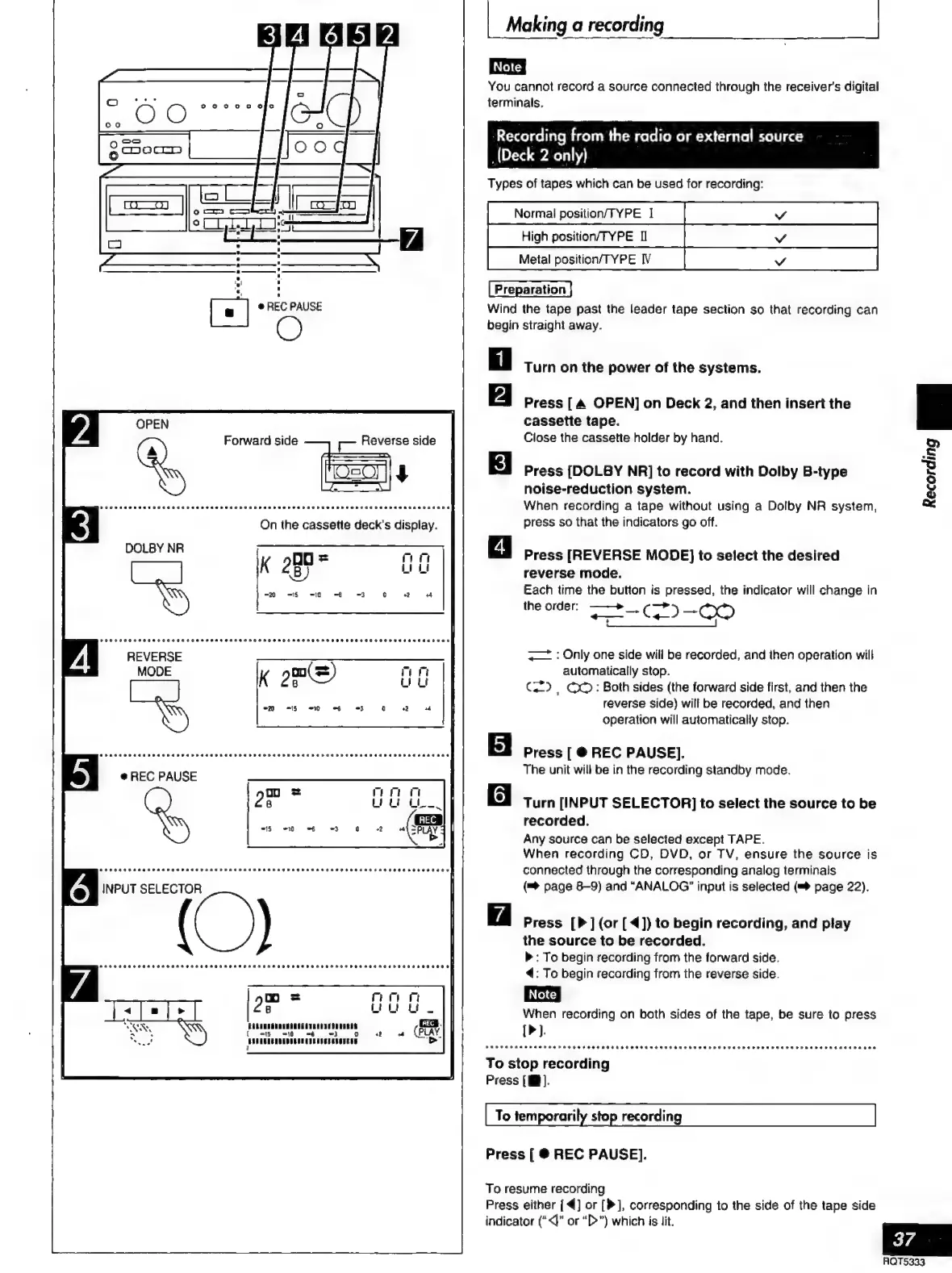
Turn
on
the
power
of
the
systems.
Press
[A
OPEN]
on
Deck
2,
and
then
insert
the
cassette
tape.
Close
the
cassette
holder
by
hand.
Press
[DOLBY
NR]
to
record
with
Dolby
B-type
noise-reduction
system.
When
recording
a
tape
without
using
a
Dolby
NR
system,
press
so
that
the
indicators
go
off.
Press
[REVERSE
MODE}
to
select
the
desired
reverse
mode.
Each
time
the
button
is
pressed,
the
indicator
will
change
in
the
order;
——+»
—>
=-(D-00
<=
:
Only
one
side
will
be
recorded,
and
then
operation
will
automatically
stop.
GD,
OO:
Both
sides
(the
forward
side
first,
and
then
the
reverse
side)
will
be
recorded,
and
then
operation
will
automatically
stop.
EJ
Press
[
@
REC
PAUSE].
The
unit
will
be
in
the
recording
standby
mode,
Turn
[INPUT
SELECTOR]
to
select
the
source
to
be
recorded.
Any
source
can
be
selected
except
TAPE.
When
recording
CD,
DVD,
or
TV,
ensure
the
source
is
connected
through
the
corresponding
analog
terminals
(=>
page
8-9)
and
“ANALOG”
input
is
selected
(™
page
22).
~
Press
[P]
(or
[
4])
to
begin
recording,
and
play
the
source
to
be
recorded.
>
:
To
begin
recording
from
the
forward
side.
4:
To
begin
recording
from
the
reverse
side.
When
recording
on
both
sides
of
the
tape,
be
sure
to
press
[>].
PERT
E
RAE
REE
O
REHEAT
EHESEEHETAHE
HOSE ESET
ESE
TEESE
DEEDES
REDE
DERE
DEER
RE
RED
RE
REE
DEERE
To
stop
recording
Press
[I].
To
temporarily
stop
recording
Press
[
@
REC
PAUSE].
To
resume
recording
Press
either
[4]
or
[>],
corresponding
to
the
side
of
the
tape
side
indicator
(“<)”
or
“D>”)
which
is
lit.

Related product manuals