EasyManua.ls Logo

Technics SC-S2350 - Page 39

Technics SC-S2350
60 pages
Print Icon
To Next Page IconTo Next Page
To Previous Page IconTo Previous Page
Loading...
|
Making
a
recording
|
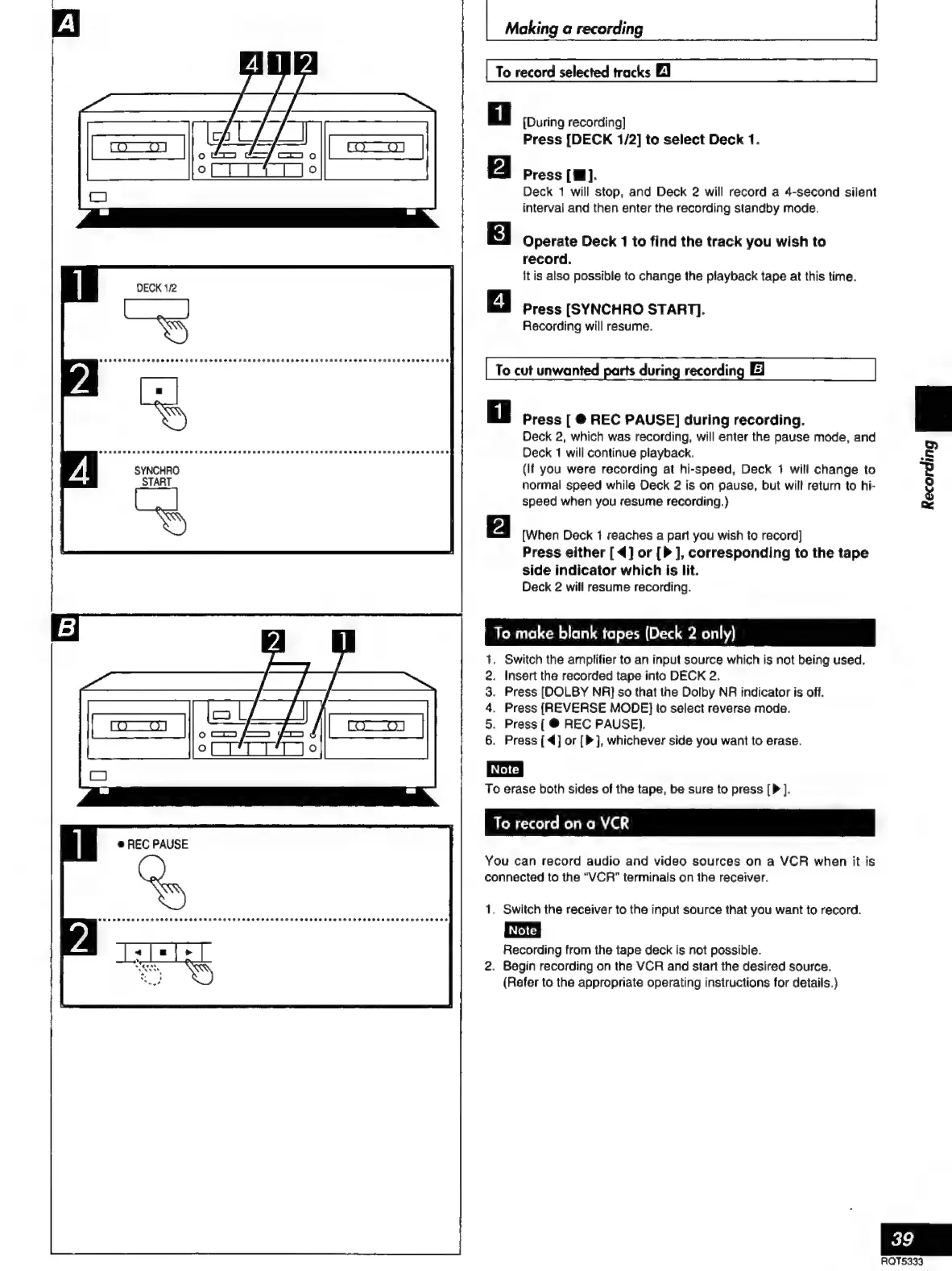
To
record
selected
tracks
El
[During
recording]
Press
[DECK
1/2]
to
select
Deck
1.
Press
[W].
Deck
1
will
stop,
and
Deck
2
will
record
a
4-second
silent
interval
and
then
enter
the
recording
standby
mode.
Operate
Deck
1
to
find
the
track
you
wish
to
record.
lt
is
also
possible
to
change
the
playback
tape
at
this
time.
Press
[SYNCHRO
START].
Recording
will
resume.
To
cut
unwanted
parts
during
recording
El
Press
[
@
REC
PAUSE]
during
recording.
Deck
2,
which
was
recording,
will
enter
the
pause
mode,
and
Deck
1
will
continue
playback.
(If
you
were
recording
at
hi-speed,
Deck
1
will
change
to
normal
speed
while
Deck
2
is
on
pause,
but
will
return
to
hi-
speed
when
you
resume
recording.)
[When
Deck
1
reaches
a
part
you
wish
to
record]
Press
either
[4]
or
[P
],
corresponding
to
the
tape
side
indicator
which
is
lit.
Deck
2
will
resume
recording.
To
make
blank
tapes
(Deck
2
only)
Switch
the
amplifier
to
an
input
source
which
is
not
being
used.
Insert
the
recorded
tape
into
DECK
2.
Press
[DOLBY
NA]
so
that
the
Dolby
NR
indicator
is
off.
Press
(REVERSE
MODE}
to
select
reverse
mode.
Press
[
®©
REC
PAUSE}.
Press
[4]
or
[P],
whichever
side
you
want
to
erase.
ors
NS
To
erase
both
sides
of
the
tape,
be
sure
to
press
[P
].
To
record
on
a
VCR
e
REC
PAUSE
You
can
record
audio
and
video
sources
on
a
VCR
when
it
is
connected
to
the
“VCR”
terminals
on
the
receiver.
1.
Switch
the
receiver
to
the
input
source
that
you
want
to
record.
Recording
from
the
tape
deck
is
not
possible.
2.
Begin
recording
on
the
VCR
and
start
the
desired
source.
(Refer
to
the
appropriate
operating
instructions
for
details.)
tornar
PEO
HE
SOHNE
SHOT
EE
HEHEHE
RESH
HOSED
EEE
EEF
EROOE
rss
osos
39
ROT5333

Related product manuals