EasyManua.ls Logo

Technics SC-S2350 - Page 45

Technics SC-S2350
60 pages
Print Icon
To Next Page IconTo Next Page
To Previous Page IconTo Previous Page
Loading...
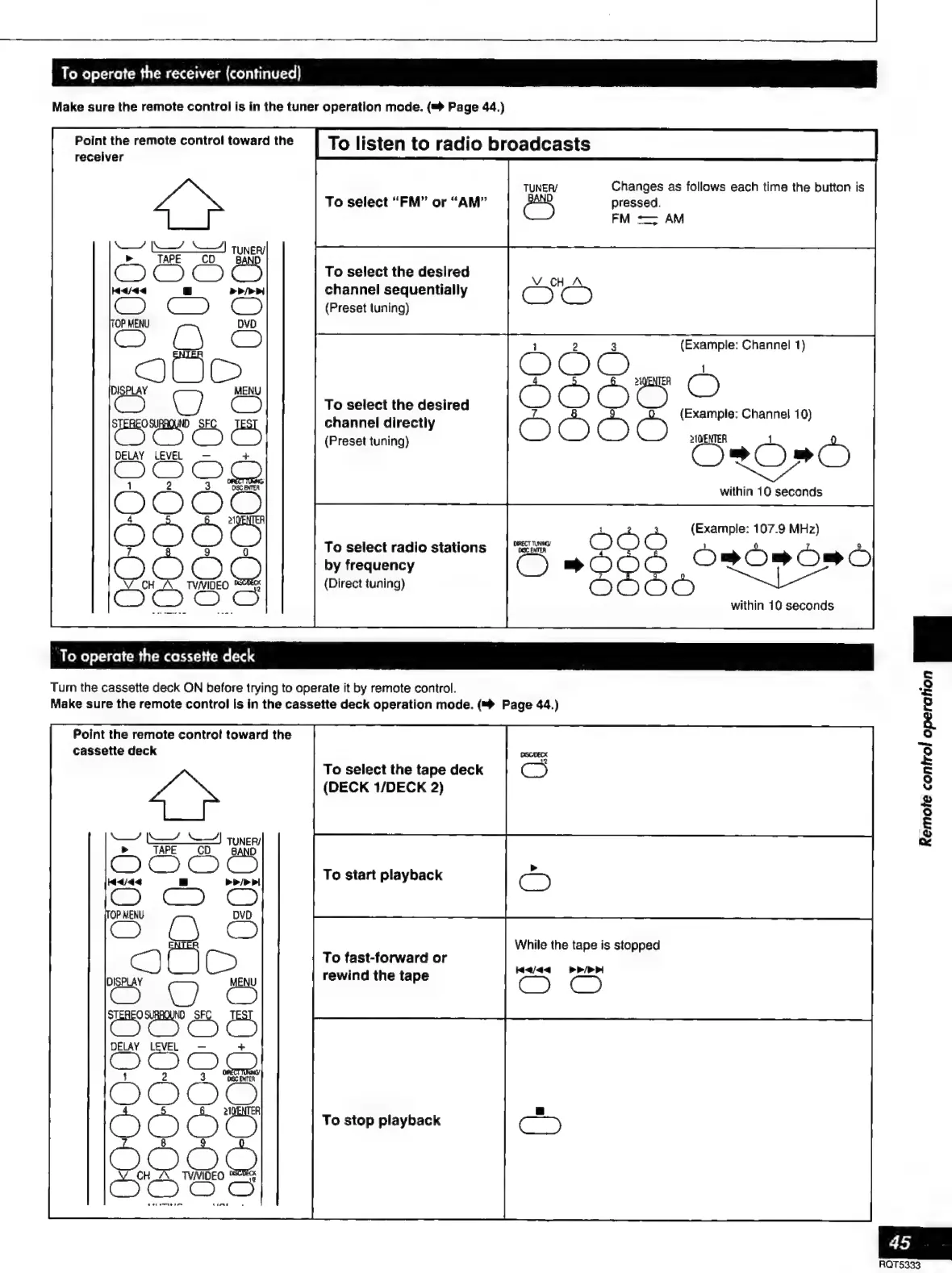
To
operate
the
receiver
(continued)
Make
sure
the
remote
control
is in
the
tuner
operation
mode.
(=
Page
44.)
To
listen
to
radio
broadcasts
Changes
as
follows
each
time
the
button
is
pressed.
FM
=;
AM
Point
the
remote
control
toward
the
receiver
MN
SY)
Tuner
»
TAPE
CO
To
select
“FM”
or
“AM”
To
select
the
desired
channel
sequentially
(Preset
tuning)
DISPLAY
DELAY
LEVEL
MENU
To
select
the
desired
channel
directly
(Preset
tuning)
ES
abs
Channel
10)
ÓrROPO
aoe
10
seconds
(Example:
107.9
MHz)
s
Osos
OSÒ
topo
within
10
seconds
To
select
radio
stations
by
frequency
(Direct
tuning)
To
operate
the
cassette
deck
Turn
the
cassette
deck
ON
before
trying
to
operate
it
by
remote
control.
Make
sure
the
remote
control
is
in
the
cassette
deck
operation
mode.
(™
Page
44.)
Point
the
remote
control
toward
the
cassette
deck
To
select
the
tape
deck
OS
(DECK
1/DECK
2)
Y
mY’
Tuner,
OOO
To
start
playback
While
the
tape
is
stopped
To
fast-forward
or
rewind
the
tape
Haaa
PPI
To
stop
playback
S
E
A
O
©
=
S
E
&
45
RQT5333

Related product manuals